
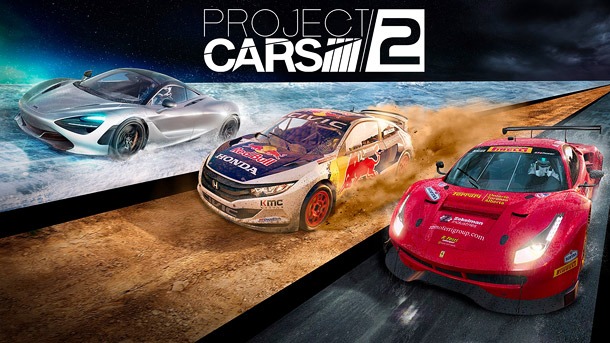
📅 Game released: 2017
Project CARS 2 is a track-focused motorsport simulation featuring dynamic weather, multi-class racing, a flexible career and detailed car setup. This PC guide explains its official Steam download status, existing-owner installation, Deluxe Edition and DLC access, VR and steering-wheel setup, system requirements, Steam Deck limitations and online-service caveats.
 By Editor Zero — independently researched, edited, and maintained.
Last updated: 9 November 2026
Last reviewed: 9 November 2026
Table of Contents
- Quick Facts
- Official PC Stores, Download & Installation
- Project CARS 2 Review
- Pros & Cons
- PC System Requirements
- Frequently Asked Questions
- Similar Games
Project CARS 2 Quick Facts
- Game: Project CARS 2 / Project CARS 2 Deluxe Edition
- Developer: Slightly Mad Studios
- Publisher: BANDAI NAMCO Entertainment
- Genre: Racing, Driving Simulation
- Release: September 21, 2017 (Windows PC, first official release); PS4 and Xbox One released in the same launch period
- Platforms: Windows PC, PS4, Xbox One
- DLC / Expansions: Four major Season Pass packs: Fun Pack, Porsche Legends Pack, Spirit of Le Mans Pack, Ferrari Essentials Pack; separate launch and promotional bonus-car packs also existed
- Online: Competitive PC multiplayer uses Steam-based sessions, but independent player reports indicate that certain centralized rating, Time Trial and leaderboard functions no longer work as originally designed
- Steam Deck: Unsupported; Valve reports that the game’s anti-cheat is not configured for Steam Deck or SteamOS
- VR: Official seated PC VR support, including SteamVR/OpenVR and original Oculus Rift support; modern headset compatibility depends on current software and hardware
- Engine: Madness Engine
- Community: Steam Discussions, Project CARS 2 Reddit, Bandai Namco FAQ
- PC modding: Unofficial mods and custom liveries exist; no official Steam Workshop or current official mod toolkit. See Nexus Mods
- Metacritic score: 84/100 (Windows PC)
- IGN score: 9.2/10 (review of the original multiplatform release)
- OpenCritic average: 82/100 (original release)
- Steam user reception: Very Positive overall; the Steam game is no longer sold to new buyers
Official PC Store Status, Download & Installation
👇 Check official Project CARS 2 PC ownership and download options below. The original Steam release can be reinstalled by existing owners, but new purchases are no longer offered through the normal Steam store.
- Steam availability: Project CARS 2 was removed from new digital sales after the expiry of car and track licensing arrangements. The official Steam listing remains accessible for product information but does not offer a normal new purchase.
- Existing owners: A copy already registered to a Steam account remains available in that account’s Library for normal download, installation and reinstallation on a compatible Windows PC. To reinstall, open Steam, select the game in Library and choose Install.
- Deluxe Edition: This release bundled the base game, Season Pass and bonus content. Check the game’s Steam Library > Properties > DLC area to see entitlements associated with your account before troubleshooting missing vehicles or events.
- Season Pass: Its four principal expansions are the Fun Pack, Porsche Legends Pack, Spirit of Le Mans Pack and Ferrari Essentials Pack. They add licensed vehicles, tracks, liveries and events; the original release also offered separate bonus-car packs.
- Unowned DLC: Digital delisting also makes normal official new purchases of missing packs unavailable. An existing game license does not automatically confer ownership of unpurchased expansions; avoid unauthorized game-file downloads or uncertain third-party offers.
- Steam services: Steam still advertises achievements, Steam Cloud, Online PvP, VR support and leaderboards. These storefront feature labels do not guarantee that every original centralized competitive service still works.
- Online racing: Player reports indicate that some Steam-based sessions and privately organized races remain possible, while the Competitive Racing License, dedicated Time Trial functions, safety-rating progression and some leaderboard-dependent achievements may be unavailable. Treat service-specific status as community-reported and subject to change.
- VR and controls: Seated PC VR, modern gamepads, steering wheels and multi-monitor setups are supported in the original Windows release. Check up-to-date wheel/headset drivers and SteamVR or headset software when configuring older hardware integrations.
- Steam Deck: Valve labels the game Unsupported because its anti-cheat setup is not configured for Steam Deck or SteamOS; community experiments should not be treated as official support.
- Windows and offline use: The published requirements mention Windows 10 and certain older Windows 7 versions, but the current Steam client requires Windows 10 or later. The single-player game can operate offline following a valid installation and normal Steam offline-mode setup.
- Mods and backups: Custom liveries have official PC import support, while other community mods are unofficial. Back up saves or configuration files before modifying an installation and use Steam’s file-verification function if problems arise afterward.
 View Project CARS 2 on Steam (no new sales)
 Read Bandai Namco’s Official Project CARS 2 FAQ

Project CARS 2 Review
A deep motorsport sandbox where changing grip and disciplined preparation matter more than collecting cars.
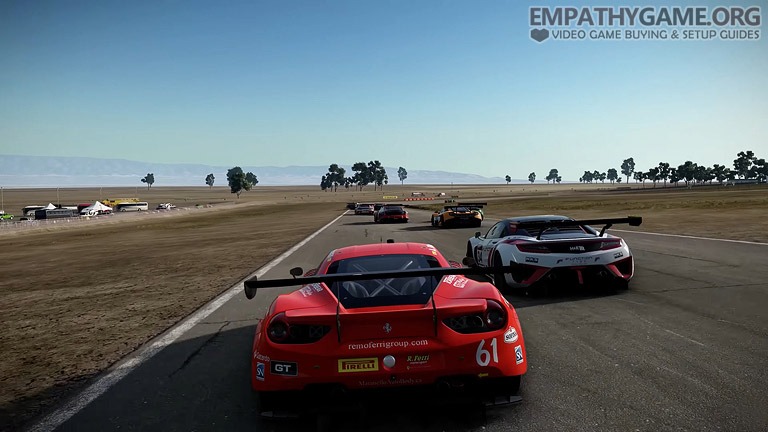
Project CARS 2 is at its most convincing when a race refuses to stay the same for long. A dry circuit can develop patches of standing water, cold tires can make an otherwise familiar opening lap nervous, traffic from another class can destroy the ideal line, and a car that felt planted in qualifying may demand far more restraint once conditions deteriorate. That constant need to read the machine and the track is the sequel’s defining strength.
Its scale helps. More than simply placing a large garage in front of the player, the game spreads its cars across GT racing, prototypes, open-wheel categories, touring cars, rallycross, ovals, historic machinery and other disciplines that ask for genuinely different habits. The career gives those categories structure, while Quickplay removes the usual money grind and lets the simulation itself become the reward. The trade-off is that the experience is not equally welcoming through every input method. A good wheel can communicate the car’s limit with satisfying detail, while a controller leaves more of that information to visual cues and educated guesswork. AI behavior can also break the illusion when close racing turns clumsy. For drivers who enjoy practice, setup work, tire management and learning why a lap went wrong, however, few racing games are this committed to the process of motorsport.
Different Cars Demand Different Driving Habits
The strongest argument for the huge vehicle roster is how quickly technique has to change from one category to another. A GT3 car tolerates a very different rhythm from a Formula Rookie, while a prototype rewards faith in aerodynamic grip that would be reckless in slower machinery. Move into rallycross and the neat circuit-racing instinct to keep every input smooth gives way to deliberate rotation, throttle correction and a willingness to let the car move underneath you.
That difference is more important than raw performance numbers. Learning an IndyCar on an oval is partly about resisting unnecessary steering and understanding draft, while a tight road course asks for braking stability and precision over curbs. Historic cars can feel much more alive under acceleration because there is less electronic assistance and less downforce to disguise poor weight transfer. Even familiar tracks gain a different personality when the machinery changes: a corner that is a short lift in a high-downforce car may become a braking event in something heavier and less planted.
This is where the game feels less like a collection checklist and more like a driving syllabus. There is little satisfaction in merely selecting a faster car if its behavior has not been understood. The useful progress happens when braking markers move later, steering corrections become smaller and a lap that once felt chaotic starts to look deliberate. That learning curve can be severe, but it creates a stronger sense of improvement than an XP bar or a more expensive garage ever could.
LiveTrack 3.0 Makes Weather Part of the Racing Line
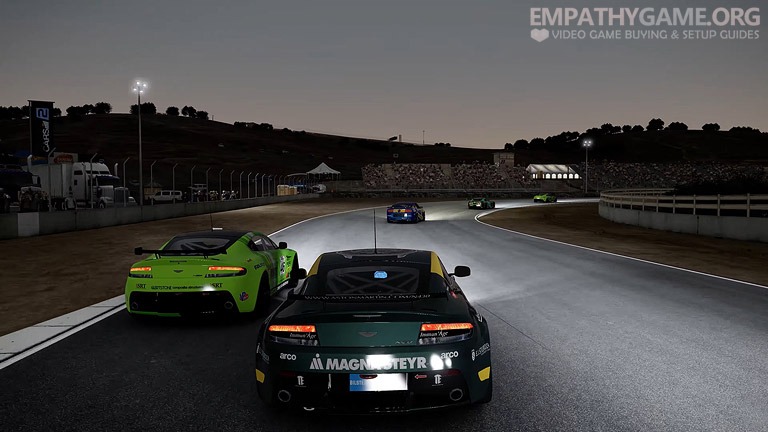
Dynamic weather is not unusual in racing games; what distinguishes Project CARS 2 is how aggressively it turns weather into a track-management problem. LiveTrack 3.0 changes grip across individual sections of a circuit according to water, temperature, sunlight, shade and surface contamination. Rain can collect in lower areas, one section may dry while another remains soaked, and the fastest line can shift as conditions evolve.
In practice, that means a wet race is not solved by simply selecting rain tires and continuing to use dry-weather braking points. Standing water can make the usual line dangerous, especially under acceleration or heavy braking, and a shallow puddle that is harmless in one car can unsettle another. When the surface begins to dry, the problem reverses: the driver has to decide whether the improving line is worth staying on increasingly unsuitable wet tires or whether a pit stop will recover enough pace to justify the time loss.
Longer events make this system much more interesting than short sprints. A two-hour race can move from daylight to darkness and from stable grip to rain, turning preparation into adaptation. A useful micro-level habit is to treat cold tires after the start or a pit stop as a separate phase of the race rather than assuming the car will immediately behave as it did a few laps earlier. Pushing the same braking point on under-temperature rubber can cost more time than a cautious opening sector.
Practice, Setup and Pit Strategy Reward Preparation
The race-weekend structure gives all of that simulation detail somewhere to matter. Practice is not filler when the car’s balance, fuel load and tire behavior can change the way a circuit should be approached. Qualifying matters because starting near the front reduces the amount of risky traffic that must be negotiated, and pit strategy becomes meaningful as soon as tire wear, fuel use, damage or weather enter the equation.
Car setup is deep enough to reward expertise without completely abandoning less technical drivers. Gear ratios, brake bias, suspension values, aerodynamics and other parameters can alter behavior in ways that become noticeable once lap times are consistent. The Pit Engineer gives setup suggestions, which is useful because the hardest part of tuning is often not finding a menu option but identifying which mechanical change addresses a specific problem. Softening an anti-roll bar to calm oversteer at a circuit such as Knockhill is a much more understandable lesson than changing numbers without knowing why.
The In-Car Management menu also keeps strategy from being locked to the garage. Depending on the car, brake bias, fuel mapping, traction control, ABS and anti-roll bars can be adjusted on track, while pit requests can specify fuel, tires and repairs. That matters most when conditions change suddenly. If rain is approaching, deciding to pit one lap early for the right tire can be more valuable than squeezing out another aggressive lap on a deteriorating setup.
Mechanical damage reinforces the same discipline. Contact is not only a cosmetic punishment when suspension, brakes, aerodynamics, gearbox or engine damage can affect the remainder of a race. That gives restraint a purpose: avoiding a low-percentage first-lap move can be strategically smarter than gaining a place and carrying a damaged car for the next twenty minutes.
The Career Gives Structure Without Turning Cars Into Currency
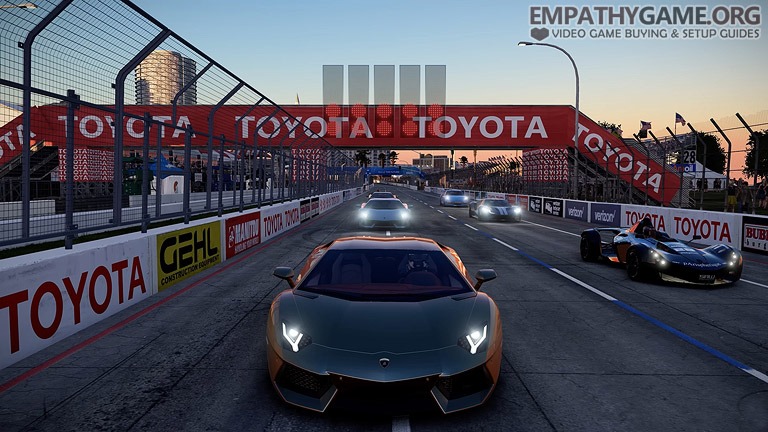
The career is one of the sequel’s most effective design choices because it creates progression without pretending that ownership is the objective. Outside career restrictions, the car and track roster is open from the start. The campaign instead asks the driver to choose a motorsport path, sign contracts, climb through tiers and earn opportunities through results. It is possible to begin above karting, so the early game does not force every driver through the same apprenticeship.
That flexibility makes specialization feel legitimate. Someone interested primarily in GT racing can build a career around that style, while another player can move through open-wheel or touring categories. Manufacturer affinity adds a parallel goal by unlocking factory-driver opportunities, and Invitational Events break up the championship rhythm with challenges tied to career accomplishments. The result feels closer to choosing a racing identity than filling a garage.
The drawback is that the career remains formal rather than playful. It expects consistency and can make experimentation feel expensive when a poor championship result has consequences for progression. That suits the motorsport fantasy, but it is less forgiving than the open structure initially suggests. The best approach is to treat practice and qualifying as part of the career rather than something to skip on the way to the race. A strong grid position is often worth more than trying to recover through a crowded opening lap.
AI and Controller Feel Can Break the Illusion
The simulation is at its weakest when the opponents fail to match the standards of the car and track model. AI strength and aggression can be adjusted separately, which makes it easier to build an appropriate challenge, and computer-controlled drivers can react to changing weather and tire conditions. Even so, their spatial judgment is not consistently convincing. Close packs can produce contact that feels less like an opponent making a pressured mistake and more like the underlying behavior failing to understand the available space.
That inconsistency matters because the rest of the game asks for so much precision. A careful twenty-minute stint can lose its tension instantly if an opponent barges into the car at a corner entry the player has approached responsibly. Multi-class racing magnifies the issue because faster cars must work through slower traffic without every overtake becoming predictable.
Input choice creates a different kind of limitation. Controller support is adjustable and far more usable than the game’s reputation for hardcore simulation might suggest, but a pad cannot reproduce the same stream of force-feedback information as a wheel. Catching the rear as it begins to rotate is harder when the warning arrives mostly through screen motion rather than steering weight. Wheel feedback itself can also feel very different depending on the chosen force-feedback profile and hardware, so the gap between a convincing setup and a numb one can be substantial. The underlying physics are often more readable once the steering communicates load clearly.
Presentation Is Built Around the Driver’s Seat
Project CARS 2 rarely tries to turn motorsport into spectacle outside the race. Its atmosphere comes from procedure: practice sessions, qualifying, engineer calls, animated pit crews and the changing light around a licensed circuit. A wet evening at Spa has a very different mood from a rallycross event or an Indianapolis oval race because the machinery, soundscape and sense of speed change with the discipline.
Audio is particularly important. Tire scrub, transmission noise, engine note and the sound of rain provide information as well as texture. The visuals are at their best when the simulation systems create the scene naturally: low sun reflecting from wet asphalt, spray obscuring a braking point, headlights becoming necessary as a long event moves into darkness. The result is more convincing than a heavily staged presentation because the dramatic moments usually emerge from the race itself.
Replayability Comes From Designing New Problems
Replay value is built less around unlocks than around combinations. Custom events can change car class, grid composition, track layout, time of day, season and weather progression, so the same circuit can support very different problems. A 300-kilometer GT3 race at Ruapuna Park with changing weather asks for patience, pit planning and consistency; a short rallycross event demands immediate aggression and car control. Historic versions of circuits add another layer because familiar names can come with layouts and rhythms that feel substantially different from their modern counterparts.
Multi-class racing is especially effective because it introduces decisions that do not exist in single-class events. A prototype catching GT traffic may have the pace advantage but not the right to an immediate line through every corner. The faster car has to decide where the pass is safe, while the slower class must remain predictable. That interaction can make an otherwise familiar lap feel new without changing the track at all.
Final Verdict
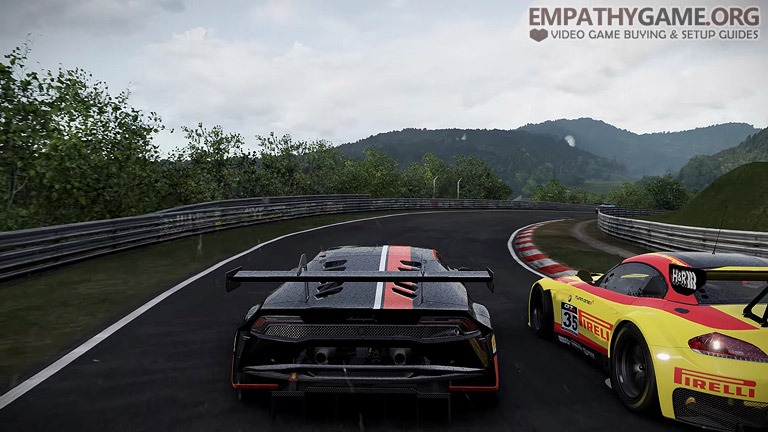
Project CARS 2 succeeds because it understands that serious racing is not only about driving quickly. It is about preparing the car, learning the circuit, managing cold tires, noticing when grip changes, judging whether traffic is worth attacking and adapting when weather destroys the plan made before the start. LiveTrack 3.0 gives those decisions a moving target, while the breadth of racing disciplines ensures that mastering one category never means mastering the entire game.
The experience is less convincing when AI racecraft becomes clumsy or when a controller cannot communicate the car’s limit with the same clarity as a good wheel. The career can also be stricter than its broad choice of starting disciplines suggests. Those weaknesses matter because they occasionally interrupt a simulation that otherwise rewards precision unusually well.
For drivers who want constant unlocks, forgiving handling or a simple sequence of short races, the structure can feel severe. For those who enjoy spending an extra practice session finding a cleaner line, adjusting a setup before qualifying, or gambling on a tire change just before rain reaches the circuit, it remains an unusually rich motorsport sandbox. Its best moments are not scripted victories; they are the laps where preparation, mechanical understanding and changing conditions finally come together.
Project CARS 2 Pros & Cons
- Pro: More than 180 licensed road and race cars across GT, prototypes, touring cars, IndyCar, rallycross, historic racing and other disciplines
- Pro: LiveTrack 3.0 makes water, temperature, drying lines and changing surfaces important to handling and strategy
- Pro: Meaningful tire, fuel, damage, pit-stop and tuning systems reward careful preparation
- Pro: Strong PC sim-racing options include racing wheels, detailed force feedback, seated VR and triple-screen configuration
- Pro: Flexible motorsport career and open Quickplay selection avoid a conventional money-and-car-unlock grind
- Con: AI spatial judgment and racecraft are inconsistent, particularly in crowded opening laps and multi-class traffic
- Con: A gamepad communicates less tire and steering feedback than a well-configured wheel
- Con: Delisting blocks normal new Steam purchases and limits legitimate access to previously unowned DLC
- Con: Some centralized Time Trial, safety-rating, leaderboard and related achievement functions are reported unavailable
- Con: Valve rates Steam Deck Unsupported because of the anti-cheat configuration
Project CARS 2 PC System Requirements
These are the official Windows requirements published on Steam. The original specification references certain Windows 7 configurations, but the current Steam client requires Windows 10 or later.
MINIMUM:
OS: Windows 10 (original specification also referenced specific versions of Windows 7)
CPU: 3.5 GHz Intel Core i5-3450 or 4.0 GHz AMD FX-8350
RAM: 8 GB
GPU: NVIDIA GeForce GTX 680 or equivalent
DirectX: Version 11
Storage: 50 GB available space
Internet: Broadband internet connection (listed in official requirements)
Sound Card: DirectX-compatible sound card
RECOMMENDED:
OS: Windows 10
CPU: Intel Core i7-6700K
RAM: 16 GB
GPU: NVIDIA GeForce GTX 1080 or AMD Radeon RX 480
DirectX: Version 11
Storage: 50 GB available space
Internet: Broadband internet connection (listed in official requirements)
Sound Card: DirectX-compatible sound card
Additional PC Performance and Setup Notes
- Triple screens: The game provides adjustments for screen dimensions, bezel width, placement and viewing angle. The advertised 12K presentation refers to three 4K monitors rather than a typical single-panel resolution.
- VR performance: Seated VR requires substantially more rendering work than ordinary single-screen racing. Start with a stable frame rate and compatible SteamVR/Oculus runtime before raising visual settings, especially on modern headsets not named in the original documentation.
- Wheel and pedals: Check the wheel manufacturer’s current driver/software, connect the hardware before launch and calibrate in-game. Force-feedback profiles can substantially alter the detail and weight felt at the rim.
- Controller handling: A gamepad works, but steering sensitivity and assists may need adjustment for smooth inputs; the strongest vehicle feedback is generally available with a well-configured force-feedback wheel.
- Configuration backups: Back up your local save and settings data before altering custom force feedback, external mods or other unofficial changes. If unexpected behavior follows a mod installation, verify game files through Steam before a complete reinstall.
- Offline and legacy services: Career and custom racing do not require functioning centralized Time Trial services. Some original online competitions, rankings and related achievements depend on older infrastructure that is not reliably available.
Official Trailer
Frequently Asked Questions
Why is Project CARS 2 no longer sold on Steam?
The game was withdrawn from new digital sales after licences for its real-world cars and circuits expired. The official Steam listing remains visible, but it does not offer a normal new purchase.
Can existing owners still download and reinstall Project CARS 2?
Yes. If the game is already attached to your Steam account, select it in your Library to install or reinstall it on a compatible Windows PC. Steam ownership is different from being able to make a new purchase.
What is included in the Deluxe Edition and Season Pass?
The Deluxe Edition bundled the base game, Season Pass and associated bonus content. The four principal expansions are the Fun Pack, Porsche Legends Pack, Spirit of Le Mans Pack and Ferrari Essentials Pack; check your Steam account’s DLC entitlements before assuming a particular add-on is owned.
Do you have to buy or unlock every car?
No. Ordinary Quickplay and custom races let you choose from the available car and track content without earning a currency to purchase vehicles. Career progression instead follows contracts, championships, invitational events and manufacturer opportunities.
Does the career have to begin in karts?
No. Several motorsport entry tiers are available, allowing drivers to start in a more experienced discipline instead of completing a mandatory karting apprenticeship.
Can you adjust the AI without changing driving assists?
Yes. Opponent strength and aggression are separate settings. Lowering aggression can help reduce overly forceful racing while strength controls pace; neither setting removes every AI judgment problem.
What does LiveTrack 3.0 change during a race?
It models the changing grip of sections of a circuit as rain, water accumulation, sunlight, shade and track temperature evolve. A drying racing line can become faster while nearby patches remain slippery, influencing tire selection and pit strategy.
Does Project CARS 2 support multi-class racing?
Yes. Eligible classes can share an event, with separate class scoring. Faster cars must manage slower traffic, making timing and positioning important beyond simply setting a quick lap.
Is online multiplayer still usable, and which features are unavailable?
Steam-based online sessions have been reported usable, but availability depends on hosted lobbies and other drivers. Player reports also describe discontinued centralized services affecting Time Trial, Competitive Racing License progression, safety/performance ratings, some leaderboards and related achievements. This is community-reported status rather than a new official service guarantee.
Why is Time Trial unavailable or greyed out?
The dedicated service supporting the original centralized Time Trial and leaderboard features is reported to be unavailable. A working single-player race or hosted online lobby does not mean that service has returned.
Is there split-screen, local co-op, LAN, or crossplay?
There is no native same-screen split-screen or cooperative career and no cross-platform PC/PlayStation/Xbox matchmaking. The PC release has dedicated-server tooling for configured network racing, but that requires separate computers and is not a split-screen replacement.
Can Project CARS 2 be played offline?
Yes. After a valid Steam installation and with Steam’s normal offline arrangements in place, single-player career, practice and custom racing can be played without an active multiplayer session. Server-dependent features are separate.
Do you need a steering wheel, and what if force feedback is missing?
A wheel is not mandatory: gamepads are supported. If a connected wheel is not detected, first check Windows device recognition, the manufacturer’s software, in-game calibration and whether Steam Input is interfering with a wheel that expects native input support.
Can Project CARS 2 be used with a modern PC VR headset?
The Windows release has official seated VR support, originally including Oculus Rift and SteamVR-compatible headsets. Modern headsets may need compatible connection software and runtimes, so present-day operation cannot be guaranteed solely from the original headset list.
Does Project CARS 2 work on Steam Deck or Windows 11?
Valve classifies the game as Unsupported on Steam Deck because its anti-cheat is not configured for SteamOS. Windows 11 is newer than the published original requirements; modern Windows installations may run the game, but VR runtimes and older wheel drivers are potential compatibility variables.
Can you use custom liveries or other mods?
The PC version supports importing custom liveries, while broader vehicle, visual and force-feedback changes come from unofficial community mods. Make backups and check compatibility before replacing files; there is no official Steam Workshop integration.
Is Project CARS 2 an open-world game?
No. It is a structured motorsport simulation built around circuits, ovals, rallycross layouts and other race venues rather than a free-roam map.
Still have questions? Check the Project CARS 2 Reddit community, Steam Discussions, or the official Bandai Namco FAQ for game-specific help and discussion.
Sources & References
Key game, ownership, PC and legacy-service information was checked against the following official and community sources. Community reports about older online services should not be confused with a publisher service guarantee.
- Project CARS 2 on Steam — official Windows release, store status, edition information, game features, system requirements and user reception
- Bandai Namco Project CARS 2 FAQ — publisher explanations of LiveTrack 3.0, VR, career, multiclass racing, pit systems and custom liveries
- SteamDB — Project CARS 2 — Steam app metadata, retirement status, supported features and Valve’s Steam Deck compatibility findings
- SteamDB — Project CARS 2 DLC — the original Season Pass and named expansion packs
- Metacritic — PC Critic Reviews — Windows PC critic aggregate and original IGN review score
- Steam Community — competitive-service discussion — player-reported limitations of the safety-rating and related online systems, distinguished from official guarantees
Similar Games Like Project CARS 2

Found something worth playing through DecideGame?
DecideGame.com is an independent gaming project run by Editor Zero. If this guide helped you discover a game, solve a problem, or find useful information, you can support DecideGame.com and help keep new and updated game guides coming.
DecideGame — PC Game Guides, Reviews & Setup Help