
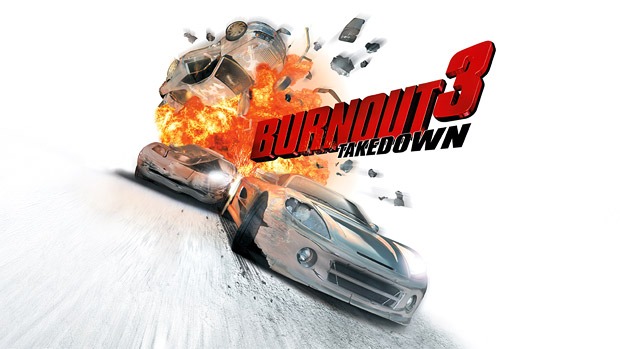
📅 Game released: 2004
Use this updated 2026 Burnout 3: Takedown PC guide to verify its official Windows status, set up the recommended PlayStation 2 version through PCSX2 using your own game disc and PS2 BIOS, compare the Xbox/xemu alternative, and check emulator requirements, controller setup, graphics options, and compatibility.
 By Editor Zero — independently researched, edited, and maintained.
Last updated: 22 September 2026
Last reviewed: 22 September 2026
Table of Contents
- Quick Summary
- Quick Facts
- Official PC Stores, Download & Installation
- Burnout 3: Takedown Review
- Pros & Cons
- PC System Requirements
- Frequently Asked Questions
- Similar Games
Burnout 3: Takedown Quick Summary
✔ High-speed arcade racer from Criterion Games built around aggressive driving, boost management, spectacular crashes, and forcing rivals into cinematic takedowns
✔ World Tour combines traditional races with Road Rage, Crash, Burning Lap, Face-Off and other events, rewarding medals, takedowns, destruction, fast times, and vehicle unlocks
✔ Similar to Burnout Paradise through its boost-driven speed, spectacular wrecks, aggressive driving and encouragement to treat collisions as part of the racing strategy
✔ Burnout 3: Takedown never received a native Windows release, Steam version or EA app PC edition
✔ For an owned copy, the PlayStation 2 release through PCSX2 is the recommended PC route because emulator compatibility and setup are stronger and simpler than the original Xbox/xemu alternative
✔ The original official online service is no longer available, but the single-player campaign and local multiplayer remain usable through the original game
Burnout 3: Takedown Quick Facts
Official PC Store Status, PS2 Emulation & Installation
👇 Burnout 3: Takedown has no official Windows PC release, so use the notes below to understand its current availability and set up the recommended PlayStation 2 version through PCSX2 using a game disc and console data you own.
- Official PC status: Electronic Arts has never released Burnout 3: Takedown as a native Windows game. There is no legitimate Steam, EA app, Epic Games Store, GOG or Microsoft Store PC edition to purchase and install.
- Best console version: The PlayStation 2 release is the recommended version to emulate on PC. PCSX2 currently classifies major North American and European Burnout 3 releases as Playable and provides a mature Windows setup, game library, controller system and graphics options.
- Recommended emulator: Download PCSX2 from its official website. PCSX2 is an open-source PlayStation 2 emulator for Windows, Linux and macOS and should be obtained directly from the project’s own site rather than a third-party emulator bundle.
- Owned PS2 disc: PCSX2 does not include Burnout 3. Its official disc-dumping guide explains how to create a personal backup from your own PlayStation 2 disc. A PS2 DVD can be read with an appropriate PC optical drive and saved as an ISO for use in PCSX2.
- PS2 BIOS: PCSX2 also requires proprietary PlayStation 2 BIOS files. Follow the emulator project’s official BIOS-dumping documentation to obtain them from your own PS2 console; PCSX2 cannot legally distribute Sony’s BIOS.
- Game-file safety: DecideGame.com does not host, recommend or link to third-party Burnout 3 ISO, ROM, BIOS or game-image sources. Prepare the game image from media you own and keep your original disc as the source copy.
- Basic setup: Install PCSX2, add the BIOS dumped from your PS2, choose a folder containing your Burnout 3 disc backup, allow PCSX2 to scan it into the game list, and launch the game from there. Test the emulator’s default game settings before changing advanced options.
- Controller setup: Burnout 3 was designed for a gamepad, so an Xbox, PlayStation or other modern PC controller is recommended. PCSX2’s SDL input system supports automatic mapping for many controllers; configure a second controller port when using the game’s local multiplayer modes.
- Graphics setup: Start with PCSX2’s current default hardware renderer and increase rendering resolution gradually if your GPU has enough performance. Higher internal resolution can make road markings, vehicles and track scenery considerably sharper than the original PS2 output without changing the underlying assets.
- Widescreen: Burnout 3 already offered widescreen support on original hardware. Use the game’s intended display option before experimenting with unofficial patches that alter aspect ratio or rendering behavior.
- Online multiplayer: EA has retired the original Burnout 3 online service, so the original official online experience should not be treated as a functioning modern PC service. Offline World Tour, Single Event and local multiplayer remain the reliable parts of the package.
- Xbox alternative: Owners of the original Xbox release can instead use xemu. Its compatibility database classifies Burnout 3 as Playable with minor issues, but xemu requires original-Xbox MCPX/BIOS data, a hard-drive image and an Xbox-compatible XISO game backup, making it a more involved setup than PCSX2.
 Get PCSX2 from the Official Website
 View Burnout 3: Takedown on Criterion / EA

Burnout 3: Takedown Review
Aggressive driving, instant boost rewards and spectacular crashes form an unusually coherent arcade racer, even when its toughest medals expose some rigid routes and camera quirks.
Burnout 3: Takedown treats racing etiquette as a problem to be solved with a side impact. Criterion’s third Burnout is still recognisably about threading fast cars through ordinary traffic, but the addition of Takedowns changes the purpose of every overtake. A rival is no longer just something to pass; it is a moving source of boost, a potential weapon and a hazard that can return the favour seconds later. That one idea ties together racing, Road Rage, Aftertouch and the game’s wider progression more cleanly than many arcade racers manage with far larger feature sets.
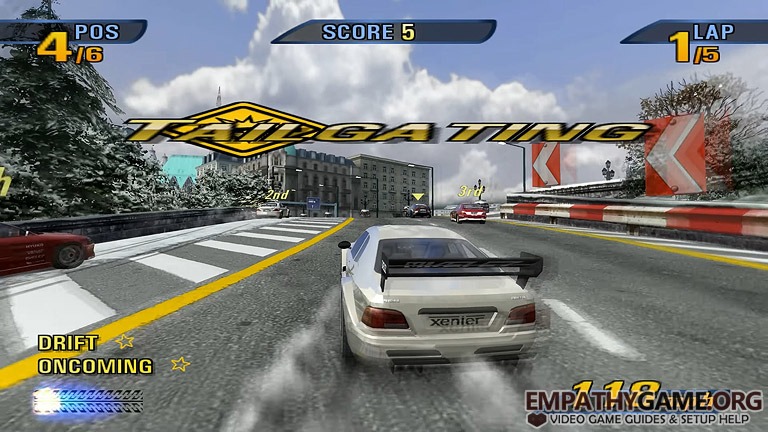
The handling is deliberately generous rather than realistic. Cars turn quickly, drifts begin with little ceremony and boost arrives whenever the player accepts more risk—driving into oncoming lanes, slipping past traffic, catching air or forcing another racer into a barrier. The result is immediate and readable, but not mindless. Higher-speed classes shrink the time available to process traffic, and the most demanding gold medals punish a single mistake severely. Crash mode and some completion challenges can also become more prescribed than the game’s anarchic image suggests. Burnout 3 is therefore at its best for players who want racing built around aggression, reflexes and route knowledge rather than tuning depth or simulation.
Takedowns Make Every Rival Part of the Racing Line
The brilliance of the Takedown system is that contact does not sit beside racing as a separate combat mechanic. It changes where the fastest line is. If a rival is approaching a divider, the useful move may be to sacrifice the perfect corner entry, lean into its flank and use the resulting Takedown to refill boost for the next straight. A car in oncoming traffic can become an obstacle for the player or the final piece of a successful attack, depending on positioning. Because rivals can retaliate, a clean lead never completely removes the sense of threat.
Boost reinforces the same behaviour. Safe driving preserves the car, but the systems consistently pay more for danger. Drifting through a bend while staying close to traffic, running against the flow of vehicles and chaining Takedowns all create momentum. This is why the handling needs to be so responsive: the game asks for decisions at a speed where a slower steering model would make aggression feel arbitrary. Early Compact cars give enough time to read the road, while Sports and Super events compress those decisions until a gentle correction can separate a near miss from a wreck.
Crashing does not always end the interaction. Impact Time slows the aftermath, and Aftertouch lets the wrecked car be nudged toward another racer for a possible revenge Takedown. At its best, this turns failure into one last tactical decision. A crash near a pack of opponents can still produce an Aftertouch Takedown rather than a completely dead moment. The limitation is visibility. The camera does not always show the most useful angle, so the player may have steering influence without enough information to aim the wreck precisely. It is a clever mechanic occasionally constrained by the presentation around it.
Crash Mode Is Brilliant Until the Multiplier Becomes the Route
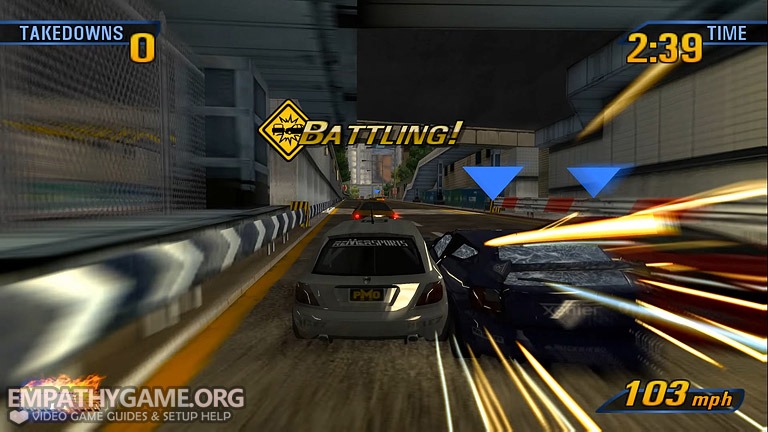
Crash mode takes the same fascination with destruction and turns it into a score puzzle. Each junction is less about surviving than about choosing where the first collision should happen, how many lanes can be blocked, when a Crashbreaker is worth triggering and whether the wreck can be steered toward a valuable pickup. A good attempt has a clear chain of cause and effect: clip the right vehicle, spill traffic into another lane, detonate at the right moment, then watch a pileup continue growing after the player’s car has stopped moving.
The scoring pickups create the mode’s most interesting tension and one of its clearest weaknesses. A x2 or x4 multiplier can be worth so much that the theoretical freedom of a junction narrows into finding a route that collects the multiplier without starving the pileup of traffic. Some layouts still allow several convincing solutions, but others increasingly feel like route-finding exercises with one obviously superior target. The destruction remains satisfying, yet a spectacular improvised crash can feel strategically wrong if it misses the multiplier that makes a gold-medal score realistic.
That tension keeps Crash mode from being pure spectacle. It rewards experimentation, but it also encourages repetition until the opening line, pickup sequence and first impact are understood. The best junctions let players discover a reliable plan and then refine it. The weaker ones make the multiplier feel less like a tactical bonus and more like the answer the event was waiting for.
World Tour Variety Gives Way to Ruthless Gold-Medal Tests
World Tour prevents the central mechanics from becoming monotonous by rotating standard races with Grand Prix events, Eliminators, Face-Offs, Road Rage, Crash junctions and time trials such as Burning Laps and Preview events. Each mode asks for a different expression of the same handling model. Eliminator punishes a badly timed crash because last place disappears at the end of a lap, while Face-Off reduces the field to a direct duel and makes the opponent’s car part of the reward.
The time trials are where Burnout 3 becomes less forgiving than its loud presentation suggests. A gold run in a forced vehicle can leave almost no room to recover from a crash, which means the challenge is not merely learning the road but learning that specific car-track pairing. Long routes also demand changes in rhythm. A section that rewards full boost and confidence can feed into denser traffic or tighter corners where carrying the same aggression becomes self-destructive. Gold medals therefore ask for a surprising amount of memorisation beneath the game’s apparent chaos.
This difficulty is mostly satisfying because mistakes are easy to understand, but completion challenges can sometimes work against the game’s natural instincts. Certain Takedown requirements depend on meeting a rival near a specific hazard or piece of traffic. Instead of attacking whenever an opportunity appears, the efficient strategy may be to slow down, wait for the required alignment and then accelerate into the setup. That turns aggression into staging. It is a small part of World Tour, but one that becomes more noticeable for players chasing complete medal and challenge sets rather than simply progressing.
Road Rage Turns Damage Into a Second Resource
Road Rage is the purest version of Burnout 3’s combat racing. Finishing position disappears; the objective is to keep destroying rivals before time and vehicle damage end the run. The mode initially encourages reckless ramming, but stronger attempts require a more selective kind of aggression. A wall rub, repeated impacts or badly chosen side contact can matter even without a full crash once the car is heavily damaged.
The battered vehicle itself becomes a rough status display. Cracked glass, missing panels and increasingly mangled bodywork make the accumulated punishment visible without stopping the action for a detailed durability readout. That changes the final stretch of a good run. When the car is already close to failure, forcing one more rival into traffic may be worth more than protecting the bodywork—or it may end the event before the next target appears. Road Rage works because it gradually shifts from carefree destruction toward risk management without changing its basic controls.
Speed Is as Much a Presentation Trick as a Handling Trait
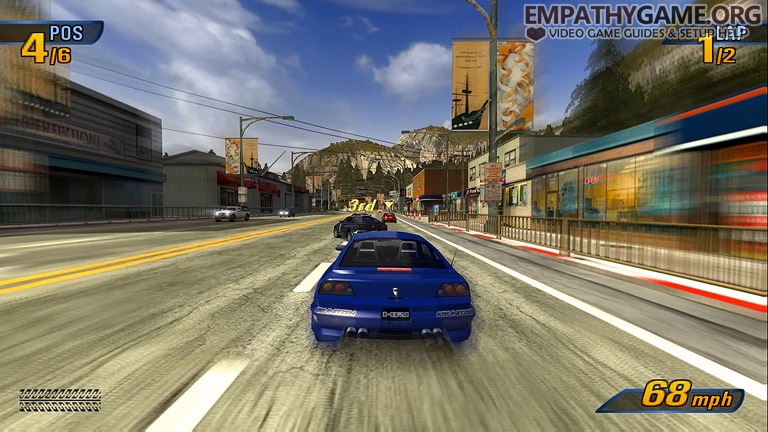
There is no conventional story to carry World Tour, so personality comes from velocity, music and broadcast-style presentation. DJ Stryker’s commentary, EA Trax, fast menu transitions and dramatic wreck cameras make the campaign feel like an early-2000s extreme-sports event rather than a motorsport championship. That tone is specific enough to be memorable and excessive enough to become tiring. The commentary rarely allows the game to feel quiet, and the soundtrack’s pop-punk, rock and alternative focus strongly reflects its era.
The courses are built for readability more than realism. Downtown streets, coastal roads, mountain routes and industrial areas are shaped around blind crests, medians, merging traffic and bottlenecks that create Takedown opportunities. Traffic is effectively part of the level design. A bus or sedan entering the wrong lane at the wrong moment can transform a routine overtake into a chain reaction, while glass, sparks and detached bodywork exaggerate the consequences enough that crashes remain entertaining after repeated events.
The cinematic Takedown camera is one of the game’s smartest indulgences because it gives a successful hit a brief punctuation mark. It is not always mechanically neutral, though. The interruption can occasionally break the flow of an imminent danger strongly enough to feel like a reprieve, while Aftertouch can suffer from the opposite problem by presenting too little useful information when precision matters. Burnout 3 often turns cameras into part of the sensation of play rather than simple observation, and that produces both some of its strongest spectacle and a few of its roughest edges.
Progression Rewards Mastery, Not Garage Management
Progression is built around medals, Burnout Points, Takedown milestones, Crash scores, Signature Takedowns and special challenges rather than currency, tuning or a dealership economy. That keeps attention on driving. Winning a Face-Off can unlock the rival vehicle, while gold medals and cumulative achievements gradually expand the garage and event map. The structure suits a game whose cars are primarily different speed-and-handling tools rather than projects to customise.
The downside is that late progression can become checklist-driven. A player interested only in seeing more events can move forward with less than perfect results, but completion pushes toward repeated gold attempts, specific Takedown conditions and carefully optimised Crash routes. Because the core handling is strong, repetition often feels like practice rather than grind. Still, the hardest time trials and situational challenges reveal that the campaign is more rigid at its edges than its aggressive, freeform style initially implies.
Local Multiplayer Keeps the Rivalry but Loses Some Spectacle
Local multiplayer suits Burnout 3 because the basic language of the game is immediately competitive: take a better line, force the other driver into danger, then use the gained boost before they can respond. Split-screen preserves that rivalry, but the reduced viewing area makes traffic harder to read at the speeds the game demands. A road that feels generous in solo play can become visually cramped when each driver receives only half the display.
The presentation is also less lavish than the single-player game’s full-screen spectacle. That does not undermine the value of head-to-head racing or Crash variants, but it changes their character. Local play is more about reacting to the person beside you and less about enjoying every cinematic flourish. For a game so dependent on speed and visual information, that trade-off is more noticeable than it would be in a slower racer.
Final Verdict
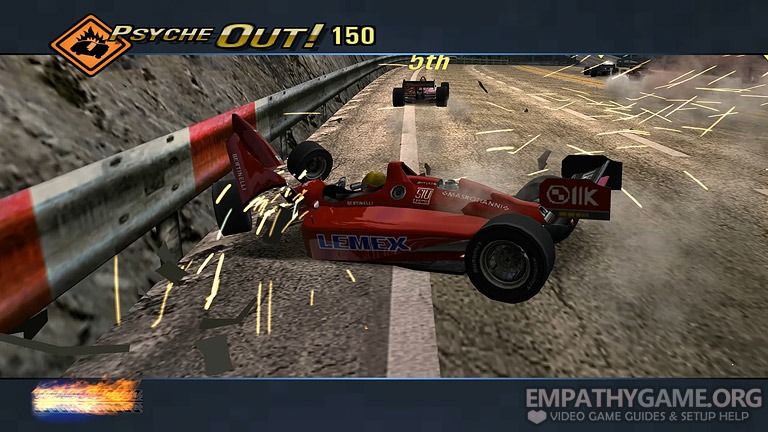
Burnout 3: Takedown remains unusually focused because nearly every important system answers the same question: how can danger make the race faster? Boost rewards risky driving, Takedowns turn opponents into opportunities, Road Rage converts contact into a survival problem, and Aftertouch gives a crash one final chance to matter. Crash mode then takes destruction out of the race entirely and proves that the same physics can support a scoring puzzle.
The design is not as freeform as its chaos first suggests. High-level Crash play can funnel attempts toward x4-multiplier routes, some completion challenges reward waiting for a specific setup, and gold time trials can demand near-clean runs in vehicles the player did not choose. Aftertouch is sometimes limited by its camera, while split-screen reduces the visual clarity that makes solo racing so readable. Those weaknesses matter most when chasing perfection rather than simply moving through World Tour.
For players who want realistic handling, detailed tuning or open-ended exploration, Burnout 3 is deliberately narrow. For players who want immediate steering, aggressive opponents, escalating speed and crashes that serve the mechanics instead of merely interrupting them, that narrowness is a strength. It understands exactly what kind of arcade racer it wants to be and keeps finding new ways to make the next dangerous decision feel worthwhile.
Burnout 3: Takedown Pros & Cons
Burnout 3: Takedown PC System Requirements
Burnout 3: Takedown has no official native Windows system requirements because Electronic Arts never released a PC version.
The specifications below are the current general requirements published by PCSX2 and should not be confused with an official Burnout 3 PC hardware specification.
PCSX2 GENERAL MINIMUM:
OS: Latest supported Windows 10 release
CPU: x86-64 processor with SSE4.1
CPU Performance: PassMark single-thread rating of at least 1500
CPU Cores: Two physical cores with SMT
RAM: 8 GB
GPU API: Vulkan 1.1, Direct3D 11 or OpenGL 3.3 compatible hardware
GPU Performance: PassMark G3D Mark rating of at least 600
PCSX2 MODERATE TARGET:
OS: Windows 11
CPU: x86-64 processor with AVX2
CPU Performance: PassMark single-thread rating of at least 2000
CPU Cores: Four physical cores with or without SMT
RAM: 16 GB
GPU API: Vulkan 1.3, Direct3D 12 or OpenGL 4.6 compatible hardware
GPU Performance: PassMark G3D Mark rating of at least 6000
VRAM: 4 GB
Additional PC Performance and Setup Notes
- Game compatibility: PCSX2 currently classifies the commonly used North American and European PlayStation 2 versions of Burnout 3: Takedown as Playable on Windows.
- Start with defaults: Run the game with PCSX2’s automatic/default game settings first. Only introduce game-specific patches or advanced graphics changes after confirming that normal gameplay is stable.
- Renderer choice: The current PCSX2 hardware renderers provide several modern API options. Start with the emulator’s default choice; Vulkan is a useful alternative when a system encounters renderer-specific problems.
- Resolution scaling: Increase rendering resolution gradually rather than changing several graphics options simultaneously. Higher resolution needs more GPU performance even though the emulated PS2 workload itself remains the same.
- Controller: PCSX2 recommends SDL as its preferred controller input source. Automatic mapping supports many modern gamepads, including vibration where the device exposes it correctly.
- Local multiplayer: Map a second controller to PCSX2 Controller Port 2 when using Burnout 3’s two-player local modes.
- Save data: Continue using normal emulated PS2 memory-card saves as your primary progress record. Save states are convenient, but ordinary game saves are easier to preserve across emulator changes.
xemu — Original Xbox Alternative
Native Burnout 3 PC requirements: None; xemu emulates the original Xbox release rather than running a Windows port
Supported PC Platforms: Windows, macOS and Linux
GPU: OpenGL 4.0-compatible graphics hardware required by xemu
Game Compatibility: Burnout 3: Takedown is currently classified as Playable with minor issues
Additional Files: Original-Xbox MCPX boot ROM, compatible BIOS/Flash ROM data and Xbox hard-drive image are required
Game Image: xemu uses Xbox XISO-format disc images prepared from legally owned original-Xbox media
Official Trailer
Note: This archival upload preserves a 2004 EA press-disc trailer showing Burnout 3: Takedown’s high-speed races, crashes and aggressive driving. The written guide above adds the game’s present PC-release status, PS2-versus-Xbox emulation comparison, PCSX2 setup guidance and hardware requirements.
Frequently Asked Questions
Is Burnout 3: Takedown worth playing in 2026?
Yes, especially if you enjoy fast arcade racing where aggressive driving is rewarded rather than punished. Its track-based structure and older presentation show their age, but Takedowns, Road Rage, Crash events, responsive handling, and a strong sense of speed still give it an identity that few modern racers reproduce.
Is Burnout 3: Takedown officially available on PC or Steam?
No. Burnout 3: Takedown was released for PlayStation 2 and the original Xbox and has never received an official native Windows or Steam edition.
What is the best way to play Burnout 3: Takedown on PC?
For an owned console copy, the PlayStation 2 version through PCSX2 is the most straightforward route. PCSX2 currently classifies the main North American and European releases as Playable and provides modern controller mapping, resolution scaling, widescreen options, and other emulator-side conveniences.
Should I emulate the PlayStation 2 or Xbox version of Burnout 3?
The PlayStation 2 version through PCSX2 is the easier default for most PC users. The original Xbox version can also be played through xemu, but that setup requires additional Xbox system files and is generally more involved than PCSX2.
Does Burnout 3: Takedown work on Windows 10 and Windows 11?
There is no native Windows version, but the PS2 release can be run through PCSX2 on supported modern Windows systems. Actual emulation performance still depends on your CPU, GPU, drivers, PCSX2 version, and graphics settings.
Can Burnout 3: Takedown be played on Steam Deck?
Yes through PlayStation 2 emulation rather than an official Steam release. PCSX2 supports Linux, which makes the PS2 version usable on Steam Deck, but Burnout 3 itself has no Valve Steam Deck compatibility rating.
Does Burnout 3 support widescreen in PCSX2?
Yes. Burnout 3 can respond to the PlayStation 2 system’s 16:9 setting, and PCSX2 also provides game-specific widescreen patch support that can correct the field of view, interface, and other presentation elements for modern displays.
Can PCSX2 make Burnout 3 look better than the original PS2 version?
Yes. Increasing the emulator’s internal rendering resolution can produce a much sharper image on modern monitors while retaining the original game assets, and PCSX2 can also use widescreen and progressive-scan related options.
Does Burnout 3: Takedown run at 60 FPS?
Normal racing is designed around a high frame rate, but some parts of the game—including crashes, menus, and split-screen situations—can operate differently. PCSX2 community patches exist for areas such as 60 FPS crashes and menus, but these are emulator-side modifications rather than features added by EA.
Why can split-screen feel less smooth than single-player in Burnout 3?
Two-player split-screen can use a lower effective frame rate than normal single-player racing, which may make motion look less fluid even when emulation itself is running correctly. This behavior is associated with the original game’s split-screen design rather than necessarily indicating a PCSX2 performance problem.
Can I play Burnout 3 with an Xbox or PlayStation controller on PC?
Yes. PCSX2 supports modern Windows-compatible controllers through its input system, and its recommended SDL input source can automatically map many Xbox, DualShock, and DualSense controllers.
Can Burnout 3 be played with a keyboard on PC?
Yes, because PCSX2 can map PlayStation 2 buttons and analog controls to keyboard inputs. A gamepad is usually the more natural choice, however, because steering, drifting, boosting, and Aftertouch were designed around analog console controls.
Does Burnout 3: Takedown support steering wheels?
The original PlayStation 2 release supported selected Logitech wheels including the GT Force, Driving Force, and Driving Force Pro. PCSX2 can work with modern input devices as well, but wheel behavior depends on the controller configuration and should not be assumed to match native support for every modern wheel.
Does Burnout 3 have split-screen multiplayer?
Yes. The game includes two-player local multiplayer, so two controllers can be configured in PCSX2 for head-to-head play on one PC.
Does Burnout 3 have local co-op?
There is no cooperative World Tour campaign. Crash multiplayer includes Team Crush, however, where two players work together to build a combined destruction score, while other multiplayer modes are competitive.
Can more than two people play Burnout 3 locally?
Party Crash can accommodate up to eight participants by having players compete through Crash Junction rounds rather than displaying eight cars simultaneously on one split screen. Conventional simultaneous local racing is built around two players.
Are Burnout 3: Takedown’s official online servers still available?
No. Electronic Arts permanently retired the original PlayStation 2 and Xbox online services, so the game’s built-in online features no longer connect to an official EA multiplayer service.
Can Burnout 3 still be played online through PCSX2?
Unofficial community-run projects have restored portions of the original PS2 online functionality and players continue experimenting with them through PCSX2 and original hardware. These services are independent of EA, require additional configuration, and can change or disappear, so they should be treated as community projects rather than restored official support.
Is Burnout 3: Takedown an open-world racing game?
No. Burnout 3 uses individual closed racing routes and Crash Junctions selected through World Tour or Single Event menus rather than an open city that you drive through between events.
Does Burnout 3 have a story campaign?
Not in the traditional narrative sense. World Tour is the main progression mode, taking you through racing and Crash events across different regions while you earn medals, unlock vehicles, open new events, and improve your Driver Details record.
How do Takedowns work in Burnout 3?
A Takedown occurs when your actions force a rival vehicle to crash, such as pushing it into a wall, traffic, or another obstacle. Successful Takedowns reward aggressive driving and help maintain or expand the boost available during races.
What is Road Rage mode in Burnout 3?
Road Rage removes the emphasis on finishing first and instead challenges you to destroy rival cars through repeated Takedowns. Your own vehicle becomes increasingly damaged, so surviving long enough to reach the medal target is part of the challenge.
How does Crash Mode work in Burnout 3?
Crash events place you at specially designed junctions where the goal is to cause the highest-value traffic pileup possible. Aftertouch, score multipliers, pickups, traffic positioning, and Crashbreaker opportunities make the mode more tactical than simply driving into the first vehicle you see.
What is Aftertouch in Burnout 3?
Aftertouch lets you influence the movement of your wreck during Impact Time after a crash. In racing events it can sometimes turn your own mistake into an Aftertouch Takedown by sending the wreck into a rival, while Crash events use it to spread destruction through additional traffic.
What are Signature Takedowns?
Signature Takedowns are special World Tour Takedowns triggered by wrecking a rival at particular landmarks, objects, or locations. There are 20 to discover, and completing the set also contributes to a special vehicle unlock.
How do you unlock more cars in Burnout 3?
Vehicles are unlocked through several progression systems rather than a traditional currency-based dealership. Gold medals, accumulated Takedowns, Burnout Points, Signature Takedowns, Crash achievements, and other World Tour accomplishments all contribute to opening additional cars.
What should beginners focus on first in Burnout 3?
Learn to balance aggression with survival rather than trying to ram every opponent immediately. Using boost on safer straights, tapping the brake to initiate controlled drifts, watching traffic ahead, and pushing rivals toward walls or traffic instead of colliding head-on will make early events much easier.
Can you choose which songs play in Burnout 3?
Yes. The EA Trax settings let you control how individual soundtrack songs are used, including limiting tracks to menus or races and disabling songs you do not want in the rotation. During offline play, the game also provides a control for skipping to the next track.
Still have questions? Check the Burnout Reddit community or the PCSX2 community forums for additional help with Burnout 3, emulator settings, controller configuration, compatibility, and community multiplayer projects.
Sources & References
Key factual and technical information in this guide was checked against relevant official and established sources, including:
- Electronic Arts / Criterion Games — Games — official Criterion retrospective information covering Burnout 3: Takedown, its developer history, takedown mechanics and place in the Burnout series
- Electronic Arts — Online Services Shutdown — official confirmation that Burnout 3: Takedown’s original PlayStation 2 and Xbox online services have been retired
- PCSX2 Wiki — Burnout 3: Takedown — PlayStation 2 release data, game identifiers and current emulator compatibility status
- PCSX2 — System Requirements — current minimum, moderate and heavy emulator hardware guidance for Windows and other supported PC platforms
- PCSX2 — Dumping Discs — official ownership-based instructions for creating a personal PlayStation 2 game backup from physical media
- xemu — Burnout 3: Takedown Compatibility — current original-Xbox emulation rating and documented game-specific compatibility considerations
Similar Games Like Burnout 3: Takedown
- Burnout Paradise
- Need for Speed Most Wanted (2012)
- Need for Speed: The Run
- Need for Speed: Hot Pursuit 2
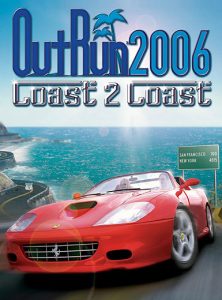
- OutRun 2006: Coast 2 Coast
- Blur

Found something worth playing through DecideGame?
DecideGame.com is an independent gaming project run by Editor Zero. If this guide helped you discover a game, solve a problem, or find useful information, you can support DecideGame.com and help keep new and updated game guides coming.
DecideGame — PC Game Guides, Reviews & Setup Help