
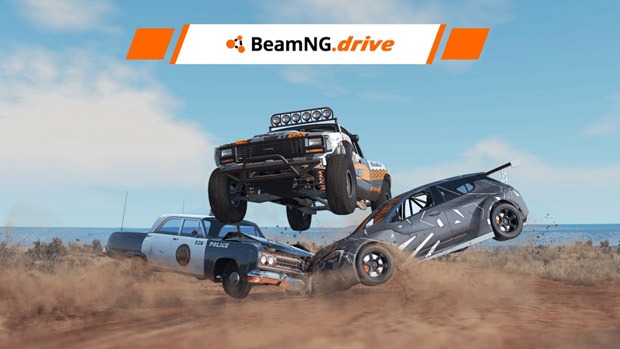
📅 Game released: 2015
BeamNG.drive is an Early Access vehicle-physics sandbox where driving, crashes, repairs and tuning are shaped by detailed mechanical simulation. This PC guide compares official Steam, Epic Games Store and Humble download and installation options, explains split-screen and BeamMP multiplayer, Career Mode, mods, VR, steering-wheel and Steam Deck support, and covers system requirements and practical performance guidance.
 By Editor Zero — independently researched, edited, and maintained.
Last updated: 14 November 2026
Last reviewed: 14 November 2026
Table of Contents
- Quick Facts
- Official PC Stores, Download & Installation
- BeamNG.drive Review
- Pros & Cons
- PC System Requirements
- Frequently Asked Questions
- Similar Games
BeamNG.drive Quick Facts
- Game: BeamNG.drive
- Developer: BeamNG GmbH
- Publisher: BeamNG GmbH
- Genre: Driving Simulation, Racing, Sandbox, Open World
- Release: Early Access — May 29, 2015 (Windows PC); PS5 Early Access — October 19, 2026; full 1.0 release: not announced
- Development Status: Early Access; Career Mode is experimental, and official online multiplayer is still in development
- Platforms: Windows PC, Linux (experimental), PS5
- PS5 edition: Released in Early Access; sold separately, with no official mods, World Editor or VR support, and no PC-to-PS5 save transfer
- Multiplayer: Built-in local split-screen on PC (up to 64 players, hardware permitting) and PS5 (up to 4); BeamMP provides unofficial online multiplayer; official online multiplayer is in development
- Steam Deck: Playable, not Verified; native Linux/Vulkan build is the default, with small-text and controller/launcher caveats
- Engine: Heavily modified Torque3D-based engine with BeamNG’s custom soft-body physics technology
- VR: Experimental OpenXR support on compatible PC hardware; Vulkan and Direct3D 12 renderers supported on compatible Windows PCs
- Community: Official BeamNG Forums, Steam Discussions, BeamNG subreddit
- PC modding: Official BeamNG Repository, Official Forums, Nexus Mods, and BeamMP
- Metacritic score: N/A / Not scored (no PC critic Metascore)
- IGN score: N/A / Not scored (no verified scored PC review)
- Steam user reception: Overwhelmingly Positive overall
Official PC Stores, Download & Installation
👇 Compare official BeamNG.drive PC purchase, download, ownership and installation options before choosing a storefront or configuring the game.
- Steam: Buy BeamNG.drive in Early Access, then download and install it from your Steam library. Steam provides achievements, cloud support, Remote Play Together, and the Steam Deck compatibility listing.
- Epic Games Store: The Windows edition is also sold through Epic and installs through the Epic Games Launcher; this is a separate library purchase from Steam.
- Humble Bundle: BeamNG’s official purchase documentation lists an authorized Humble option that includes a Steam activation key as well as DRM-free installer and ZIP downloads. Check the actual product offer before checkout; standalone DRM-free installations may require manual updating.
- Early Access: Purchase includes the evolving playable simulator, not a finished 1.0 product. Career Mode remains experimental even though local split-screen is already available.
- Updates and files: Steam and Epic generally handle installation and updates inside their launchers. Use the official BeamNG support portal for verification, cache, Safe Mode and clean-install procedures before deleting user data.
- Mod repository: Official BeamNG Repository content is available through the game and BeamNG’s website; BeamNG does not depend on Steam Workshop for its main mod catalogue.
- Local split-screen: Built-in local multiplayer supports separate player views and seven modes including Race, Drag Race, Pursuit, Derby, Drift, Rock Crawling and Soccer. Select Split-Screen from the main menu or pause menu; configure a controller, wheel or other input device for each PC player. The published PC limit is 64 participants, but practical numbers depend heavily on hardware.
- BeamMP online play: This is a separately installed, unofficial online-multiplayer project, distinct from BeamNG’s built-in local split-screen. Follow BeamMP’s official setup instructions and use a legitimate, compatible PC installation.
- Steam Deck and Linux: The native Linux version runs by default on Steam Deck, with experimental support and some user-folder and controller caveats. Steam lists BeamNG.drive as Playable, not Verified.
- Experimental VR: OpenXR VR works with Vulkan or Direct3D 12 on compatible Windows x64 hardware; Linux VR uses Vulkan. VR is not available on PS5, in the Direct3D 11 fallback or in the native Windows-on-Arm build. Allow extra GPU and VRAM headroom.
- Separate PS5 purchase: BeamNG.drive is also available on PS5 in Early Access, but PC ownership, mods, World Editor features, VR and saved progress do not transfer to the console edition. Check its official PlayStation Store listing for local availability.

 Buy BeamNG.drive on Epic Games Store
 View BeamNG.drive on the Official Website

BeamNG.drive Review
A driving sandbox where the consequences matter as much as the journey.
BeamNG.drive is easiest to misunderstand when viewed as a collection of spectacular crashes. The twisted metal draws attention, but the reason those crashes matter is what happens before and after them. Every corner asks something of the suspension and tires; every impact can change whether a vehicle remains controllable. A simple drive across town can become a lesson in braking, or a challenge to bring home a car that no longer steers straight.
There is no need for a dramatic racing story or a finish line to make that interesting. This is primarily a soft-body vehicle simulation with an unusually open sandbox, supported by scenarios, deliveries, time trials, traffic, and an experimental Career Mode. It offers plenty to do, but rarely insists on a particular goal. Whether that freedom feels liberating or directionless depends on how much satisfaction you find in making your own experiments.
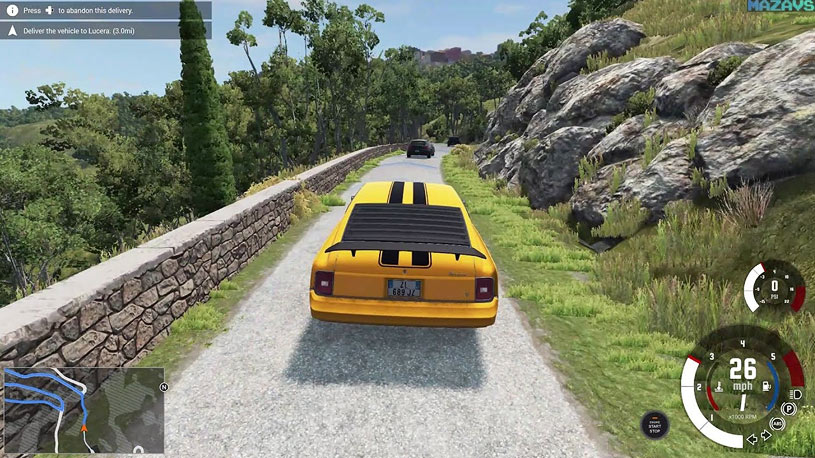
The Gameplay: Freedom Through Physics
The difference from conventional racers becomes clear when something goes wrong. A car does not simply enter a crash animation and return to normal once the impact ends. Its body can fold, a wheel can lose alignment, suspension components can fail, or the engine can overheat and stop. Two collisions at similar speeds can produce very different results because the impact angle, weight, structure, and surface all matter. The satisfying part is not only watching metal deform, but discovering whether the damaged vehicle can still be driven.
That realism carries into ordinary driving. A heavy pickup needs more distance to stop; a rally-oriented setup feels happier sliding across loose gravel; a low sports car can be precise on smooth pavement but unsettled by a rough road. Weight transfer matters when braking into a bend, and the wrong choice of tires can transform an otherwise manageable route. It is possible to drive carefully for several minutes, make one small steering correction too late, and find that the rest of the journey is now about surviving the damage.
Consider a sedan descending a mountain road. Late braking loads the front suspension, the rear grows lighter, and a wheel drops off the shoulder. The resulting tumble is memorable, but the more revealing outcome might be a less dramatic collision that bends the front suspension just enough to make every following corner difficult. BeamNG.drive encourages a kind of mechanical sympathy. Speed becomes only one part of the decision; keeping the machine intact is another.
Specialized vehicles make that lesson more complicated. The Hirochi WL-40 wheel loader, for example, uses articulated steering, so controlling its direction is a different exercise from turning an ordinary car’s front wheels. Its unusual response can make driving straight surprisingly demanding until the relationship between the machine’s two sections becomes familiar. This is a good example of the simulator’s depth and its learning curve appearing in the same feature.
The sensation of realism also depends on what the player can perceive. Changing the camera’s field of view alters how fast an unchanged speed appears, especially from a hood view. With a steering wheel, strong force feedback may communicate weight convincingly while making finer clues about understeer harder to notice. Those details reveal an interesting limitation of any desktop driving simulator: accurate physics still have to be translated into visual and steering signals that a person can understand without the physical forces of a real car.
For a different balance of driving freedom and structured progression, Forza Horizon 4 is a useful comparison. Its seasons, events, and car collecting give almost every drive a familiar purpose. BeamNG.drive asks the player to care more about how a car behaves during the journey than about what reward waits at the end.

The Sandbox Experience: Endless Ways to Break, Test, and Learn
Free roam is where the game feels most comfortable. Choose a map, spawn a vehicle, add traffic, adjust the setup, and follow an idea until it becomes a different one. A sports car run along a coastal road might lead to an off-road comparison, a heavy-truck climb, or a series of controlled impacts against the same barrier. Resetting is easy, but it does not make the outcome predictable. A small change in angle, approach speed, or surface can shift the result enough to justify another attempt.
Scenarios, police pursuits, obstacle routes, and time trials provide clearer objectives without turning the game into a conventional racing campaign. They are especially effective when the rules interact naturally with damage. A checkpoint run becomes more interesting if a damaged wheel makes the final corner difficult, or when overheating punishes a vehicle pushed beyond what its setup can handle.
Local split-screen adds a more social kind of experimentation without changing the underlying physics. Friends can explore a map in separate vehicles or turn their mistakes into competition through drag races, pursuits, demolition derbies, drift scoring, rock crawling and even vehicle soccer. Unlike the old shared-view multiseat setup, each participant has an independent view. The benefit is that unpredictable collisions become shared moments rather than solitary tests; the trade-off is that simulating several active vehicles and viewpoints can make performance and setup more demanding.
Not all structured activities are about speed or destruction. Bus routes offer a slower rhythm built around stops, vehicle size, careful braking, and the challenge of moving a large machine through ordinary roads. Yet the experience exposes the difference between convincing vehicle behaviour and a convincing world. When passengers are represented without visible people boarding, the bus can feel mechanically authentic while the transport service around it feels strangely empty. The physics simulates the job more completely than the surrounding human activity.
Vehicle Damage, Tuning, and Mechanical Detail
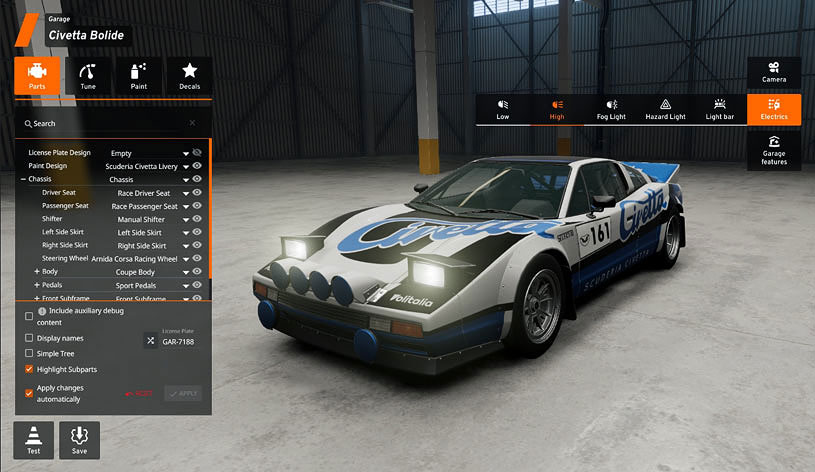
The damage model remains the headline feature, but tuning is what gives those consequences practical meaning. Changing suspension parts, wheels, drivetrain components, or other vehicle configurations affects more than a specification sheet. More ground clearance can prevent repeated impacts on a rocky trail, while a stiff setup that feels controlled on asphalt may struggle on uneven ground. A vehicle that looks powerful can be the wrong tool for a route if its weight, gearing, or grip works against it.
There is a pleasing workshop logic to the process: identify a problem, change a part, drive the same stretch, and see whether the adjustment actually helped. A damaged axle, flat tire, or misaligned wheel also makes it easier to understand which component normally contributes to stable handling. Some experiments end in failure; that failure often explains more than a clean run would.
This depth does have an accessibility cost. Players expecting quick arcade-style upgrades can find the vehicle configurator and mechanical terminology intimidating. The interface makes many choices available before it explains why a particular change matters. BeamNG.drive rewards curiosity, but it does not always teach at the same pace as it introduces possibilities.
Career Mode: When Driving Becomes an Economy
Experimental Career Mode gives the sandbox a different kind of purpose. Instead of selecting any vehicle and resetting every mistake, players can work through jobs, earn money, and think about what a vehicle is worth beyond its performance on a test road. Delivery work is particularly interesting because cargo space, vehicle equipment, and route planning can matter as much as horsepower. A modest car with useful cargo capacity may make more sense for a group of nearby jobs than a faster vehicle with little room to carry anything.
That connection between workshop decisions and earning money is promising, but the economic incentives have not always matched the driving challenge. Community accounts of the preview describe situations where parking bonuses were more lucrative than the delivery itself, or where time-consuming heavy-haul work compared poorly with faster-paying races. The specific payouts can change as development continues, yet the design tension is worth noting: a driving career loses some of its purpose when its rewards steer players away from the activities they most want to master.
Even vehicle ownership can take on an unexpected character. Buying used cars, removing valuable components, and selling parts separately creates a workshop-and-trading loop that is distinct from completing routes. That is a clever use of the game’s mechanical detail, but it also raises a question about balance if dismantling bargain vehicles becomes more rewarding than driving them. Career Mode is at its best when these systems complement each other rather than turning the simulation into a search for the most profitable shortcut.
The World: Varied Maps Built for Experimentation
The environments are less interested in cinematic spectacle than in giving different vehicles somewhere meaningful to operate. Mountain roads test braking and weight transfer. Industrial areas suit tight manoeuvres and controlled impacts. Forest tracks expose weak suspension setups, while highways reveal high-speed stability and the consequences of an unexpected obstacle. The variety helps the game escape the feeling of a single laboratory disguised as an open world.
The locations are also good at encouraging self-directed challenges. A steep trail invites comparison between a lifted off-roader and an unsuitable road car. A narrow stretch of town becomes an exercise in threading a truck through traffic without damaging it. The environment is not merely scenery; its geometry is part of the test.
AI traffic and custom scenarios do not always show the same flexibility as the physics beneath them. In one reported police-escort scenario, an ambulance following a defined route would not manoeuvre around stationary vehicles despite another lane being available. That should not be treated as a permanent rule for every game build, but it illustrates a meaningful weakness: assigning an AI vehicle a route does not guarantee that it will make plausible decisions when the road becomes obstructed. Convincing crashes are easier to appreciate when the surrounding traffic also behaves convincingly.
If the main attraction is urban street racing, styling, night-time atmosphere, and the tension of police pursuits, Need for Speed Heat pursues those pleasures much more directly. BeamNG.drive is slower to provide excitement on demand, but far more interested in the physical consequences of every decision behind the wheel.
Mods, Community Content, and Long-Term Replayability
Community creations considerably widen what the sandbox can be. Vehicles, maps, parts, props, and scenarios can move the focus from road racing to rock crawling, stunt construction, mechanical testing, or something harder to categorize. The underlying appeal remains consistent: there is always another combination of vehicle, terrain, and objective worth investigating.
Replayability, though, is unusually dependent on the player’s imagination. Repeating the same collision with different weights and speeds can be fascinating if the differences are the point of the exercise. Without that curiosity, repeated resets and self-imposed goals may begin to feel like a game asking the player to supply all the entertainment. Career Mode and scenarios help, but they do not completely replace a polished campaign with clear long-term direction.
From a more traditional open-world racing angle, Forza Horizon 6 offers a useful contrast. Festival-style progression and authored events are designed to keep momentum moving forward, whereas BeamNG.drive can make returning to the same corner worthwhile simply because a different suspension setup changes how it feels.
Final Thoughts
BeamNG.drive is compelling not because it simulates destruction for spectacle, but because it makes ordinary driving and mechanical mistakes worth examining. The soft-body damage, varied handling, workshop experimentation, and map design turn a single journey into several different possibilities. Its less obvious strengths, from specialized machinery to practical cargo decisions, show how much more there is here than crashing cars for entertainment.
There are clear limitations. Experimental progression can have uneven incentives, some AI activities feel rigid beside the vehicle physics, and the open-ended structure demands patience and initiative. Players looking for a cinematic racing career or effortless rewards may prefer something more directed. For anyone interested in why a vehicle behaves as it does, and willing to experiment instead of always competing, BeamNG.drive offers a remarkably thoughtful kind of driving freedom.
BeamNG.drive Pros & Cons
- Pro: Exceptional soft-body vehicle physics with deformation, suspension damage, drivetrain behavior, tire failures, overheating, and mechanical consequences
- Pro: Deep sandbox freedom through free roam, scenarios, traffic, towing, rally, drifting, off-roading, police chases, and vehicle testing
- Pro: Built-in local split-screen with separate views, cooperative free roam, and seven driving competition modes
- Pro: Strong vehicle configuration, tuning, steering-wheel, force-feedback, VR, and controller support for simulation-focused setups
- Pro: Extensive replay value through the official BeamNG Repository, community maps and vehicles, custom scenarios, and BeamMP
- Pro: Active Early Access development and experimental Career Mode offer additional driving challenges
- Con: Career Mode remains experimental, and official built-in online multiplayer is not yet available; BeamMP is a separate community project
- Con: Traffic, multiple split-screen participants, large maps, VR, and mod collections can demand substantial CPU, RAM, VRAM, and storage
- Con: Steam Deck is Playable rather than Verified, with small text and input or launcher caveats
- Con: Major game updates can temporarily affect compatibility of older mods, configurations, or community multiplayer setups
BeamNG.drive PC System Requirements
OFFICIAL WINDOWS PC REQUIREMENTS:
MINIMUM:
OS: Windows 10 64-bit
CPU: AMD Ryzen 5 1600 / Intel Core i5-8400
RAM: 16 GB
GPU: Minimum 6 GB VRAM — AMD Radeon RX 570 / NVIDIA GeForce GTX 1060
DirectX: Version 11
Storage: 60 GB available space
Additional: Installing mods increases required storage space; gamepad recommended; steering wheel supported
RECOMMENDED:
OS: Windows 10 64-bit
CPU: AMD Ryzen 7 3700X / Intel Core i7-9700
RAM: 32 GB
GPU: Minimum 8 GB VRAM — AMD Radeon RX 6700 / NVIDIA GeForce RTX 3060
DirectX: Version 11
Storage: 60 GB available space
Additional: Recommended specification is based on 1080p; installing mods increases required storage space; gamepad recommended; steering wheel supported
Additional VR, Linux, Performance and Setup Notes
- VR: Experimental OpenXR VR supports Direct3D 12 or Vulkan on compatible Windows x64 PCs and Vulkan on native Linux. It is unavailable through Direct3D 11 or the native Windows-on-Arm build. BeamNG lists 8 GB VRAM as a minimum and recommends 10 GB.
- Windows renderer: Direct3D 12 is the default Windows renderer; Vulkan and Direct3D 11 remain alternatives. Direct3D 11 is a more limited compatibility fallback that does not support VR or newer temporal upscaling features.
- PC graphics features: Where supported by the GPU and renderer, optional DLSS, AMD FSR, Intel XeSS, HDR and screen-space reflection options can help balance image quality and performance. BeamNG also offers a native Windows-on-Arm build on compatible devices; VR and Steam overlay support differ from the normal Windows x64 build.
- Steam Deck / Linux: The native Linux build and Vulkan renderer are the defaults on Steam Deck. Linux remains experimental; a different user-folder location from Proton can make existing settings and mods appear missing after switching builds.
- CPU and memory load: Every active vehicle adds physics work, so traffic, numerous split-screen players and many spawned vehicles can be more demanding than driving alone on the same map.
- Mod storage: Vehicle packs, maps, textures, and BeamMP server content can push storage use well beyond the base 60 GB requirement.
- Performance tuning: When performance drops, reduce traffic and active vehicles first, then review reflections, shadows, lighting, and texture settings according to available CPU, GPU, and VRAM headroom.
- Broken mods or crashes: Test the game without mods using Safe Mode, verify the installation, clear cache when appropriate, and re-enable mods gradually before resorting to a clean install.
- User data: Back up important vehicle configurations, settings, replays, and mods before major troubleshooting or deleting the BeamNG user folder.
Official Trailer
Note: BeamNG’s official showreel trailer highlights soft-body crashes, vehicle variety, open environments, community creations, and the sandbox experimentation that defines the Early Access simulator.
Frequently Asked Questions
Is BeamNG.drive still in Early Access?
Yes. The driving sandbox is playable, but the PC and PS5 editions are still Early Access products. Experimental systems such as Career Mode may change before a full release.
Does BeamNG.drive have a campaign or Career Mode?
There is no conventional story campaign. Experimental Career Mode adds car ownership, repairs, deliveries, events, money and progression, while free roam, rally stages, scenarios and time trials can be played separately.
How do I start Career Mode?
Open the Career option from the main menu. Career is explicitly experimental, so keep backups of important progress before major changes and consult BeamNG’s official documentation if the available preview changes.
Does BeamNG.drive have official online multiplayer?
Not yet. BeamNG has confirmed work on its own online multiplayer, but built-in split-screen is a local mode, not internet matchmaking. For online driving with other PC players, a separate community project called BeamMP exists.
Does BeamNG.drive support local split-screen multiplayer on PC?
Yes. Each participant has an independent view and vehicle in local split-screen. BeamNG lists support for up to 64 participants on PC, though real-world limits depend on the number of controllers, simulated vehicles and available hardware. PS5 supports up to four local players. On PC, start from the main menu’s Split-Screen option or choose it from the pause menu, then assign input devices to players.
Which split-screen activities can friends play?
Alongside free roam, the built-in modes include Race, Drag Race, Pursuit, Derby, Drift, Rock Crawling and Soccer. Settings such as layouts, penalties and score goals can be adjusted by mode. Split-screen is separate from conventional online play.
What is BeamMP, and is it official?
BeamMP is an independent multiplayer client and server project for BeamNG.drive on PC. It provides community online servers but is not BeamNG’s own official online multiplayer feature.
Can I play BeamNG.drive on PS5?
Yes. BeamNG.drive has a separate PS5 Early Access edition available through the PlayStation Store. It includes local split-screen but not the PC edition’s mod repository, World Editor or experimental VR. Buying the Windows version does not grant PS5 ownership.
Can I transfer saves or vehicles from PC to PS5?
No. BeamNG’s official PS5 feature guide says PC progress, saved vehicles and settings cannot be transferred to PS5.
Is BeamNG.drive available on Xbox consoles?
No official Xbox console edition is listed by BeamNG or on its verified platform pages. PC purchases through Steam, Epic or Humble do not provide an Xbox version.
Can BeamNG.drive run on Steam Deck?
Steam rates the game Playable rather than Verified. The native Linux/Vulkan version is the default on Steam Deck, although small text, launcher prompts, input setup and demanding scenes can require extra attention.
Does BeamNG.drive run natively on Linux?
Yes, but Linux support is experimental and uses Vulkan. Switching between the Windows version under Proton and the native Linux version can change where mods, settings and other user files are stored; see BeamNG’s Linux and Steam Deck instructions before moving data.
Does BeamNG.drive work in VR?
Experimental OpenXR VR is available on compatible Windows x64 and Linux setups. Windows supports Direct3D 12 or Vulkan for VR; Linux uses Vulkan. Direct3D 11, PS5 and native Windows-on-Arm builds do not support it. VR needs more graphics performance and VRAM than ordinary monitor play.
Is a controller or steering wheel better than a keyboard?
A controller is an easy starting point because its analog inputs allow gradual steering, acceleration and braking. Compatible force-feedback wheels and pedals provide a more simulation-focused driving experience, while keyboard controls remain usable for simple experiments and navigation.
Are the cars in BeamNG.drive real licensed vehicles?
The main lineup uses fictional brands such as Gavril, Hirochi, Ibishu and Civetta rather than a comprehensive catalogue of licensed manufacturers. Community mods can add other designs.
Where can I find BeamNG.drive mods?
Start with the official BeamNG Repository and official forums. They offer vehicles, maps, parts, scenarios and other community content. The game does not depend on Steam Workshop for its main mod catalogue.
Why are my mods missing or not working?
Older mods may need updates after significant changes to the game. Try launching in Safe Mode, disabling suspect mods and consulting the official documentation. If using Linux or Steam Deck, check whether a switch between Proton and the native build changed your user-data location.
What should I do if BeamNG.drive crashes on launch?
Try the game’s Safe Mode without mods, verify your installed files and check the official BeamNG support portal. If needed, test an alternative compatible rendering backend. Back up user data before removing folders or reinstalling.
Why does BeamNG.drive slow down with traffic or split-screen?
Every active vehicle adds physics calculations. Multiple local players may also require more viewpoints to be rendered. Reduce AI traffic and spawned vehicles first, then adjust graphics options if performance remains poor.
Should I use Direct3D 12, Direct3D 11 or Vulkan?
Direct3D 12 is the default for Windows x64. Vulkan is required for native Linux and is also available on compatible Windows PCs. Direct3D 11 provides a fallback for older or problematic configurations, but lacks certain visual features and VR support.
Can BeamNG.drive be played offline?
The single-player sandbox and local split-screen are designed for local play after legitimate installation and any necessary account or launcher setup. Community servers, mod downloads and cloud features require an internet connection.
Is BeamNG.drive suitable for beginners?
Yes, if you begin with an ordinary stock car, automatic transmission and a controller, then learn resetting, basic steering and brake control before attempting advanced tuning or traffic-heavy scenarios. It has no single mandatory difficulty path.
Still have questions? Check the BeamNG subreddit, official BeamNG Forums, and Steam Discussions.
Sources & References
Game features, official availability, ownership and hardware details were checked against BeamNG and platform documentation:
- Steam — BeamNG.drive — Early Access listing, release chronology, Windows requirements, store features and overall user reception
- BeamNG purchasing documentation — official Steam, Epic and Humble options, including DRM-free downloads
- BeamNG gameplay and feature release notes — built-in split-screen, local modes, renderer improvements and Windows-on-Arm support
- BeamNG PS5 feature comparison — console feature limitations and lack of PC-to-PS5 progress transfer
- BeamNG system requirements — official Windows, Linux and VR hardware guidance
- BeamNG Steam Deck and Linux support — native Linux default, Proton differences and data locations
- BeamNG experimental VR documentation — OpenXR compatibility, supported graphics backends and limitations
Similar Games Like BeamNG.drive





Found something worth playing through DecideGame?
DecideGame.com is an independent gaming project run by Editor Zero. If this guide helped you discover a game, solve a problem, or find useful information, you can support DecideGame.com and help keep new and updated game guides coming.
DecideGame — PC Game Guides, Reviews & Setup Help