
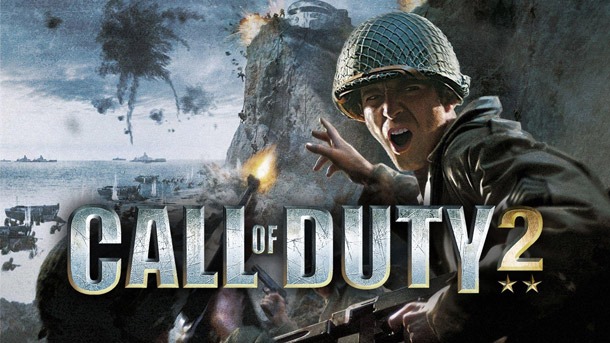
📅 Game released: 2005
Call of Duty 2 is a classic World War II first-person shooter following Soviet, British, and American soldiers through smoke-filled assaults, squad combat, and cinematic battles. This PC guide covers official Steam and Microsoft Store download and installation options, multiplayer compatibility, mods, Steam Deck support, system requirements, and practical Windows setup.
 By Editor Zero — independently researched, edited, and maintained.
Last updated: 14 November 2026
Last reviewed: 14 November 2026
Table of Contents
- Quick Facts
- Official PC Stores, Download & Installation
- Call of Duty 2 Review
- Pros & Cons
- PC System Requirements
- Frequently Asked Questions
- Similar Games
Call of Duty 2 Quick Facts
- Game: Call of Duty 2 / Call of Duty 2 (2005)
- Developer: Infinity Ward
- Publisher: Activision
- Genre: First Person Shooter (FPS), Multiplayer
- Release: October 25, 2005 (Windows PC; first release)
- Platforms: Windows PC, Xbox 360, macOS
- PC packages: Standalone game on Steam and Microsoft Store; Steam also offers Call of Duty Warchest, including Call of Duty (2003) and United Offensive
- Modes: Single-player campaign and competitive Internet/LAN multiplayer; no campaign co-op or PC split-screen
- Steam Deck: Playable; controller icons, text entry, small text and the native display-resolution setting may need attention
- Engine: IW 2.0 (COD2 / Infinity Ward engine)
- Community: Steam Discussions, Call of Duty Reddit, Official Call of Duty site
- PC modding: Legacy official Mod Tools support custom maps and missions; ModDB projects use manual setup; no Steam Workshop
- Metacritic score: 86/100 (Windows PC)
- IGN score: 8.5/10 (Windows PC review)
- Steam user reception: Very Positive overall
Official PC Stores, Download & Installation
👇 Compare the official Steam and Microsoft Store PC editions before buying, downloading, installing, or setting up Call of Duty 2 multiplayer and mods.
- Steam: The original Windows game is available as a standalone purchase and installs through Steam. The store lists single-player, multiplayer, Family Sharing, and a third-party EULA, but does not advertise Steam achievements or Steam Cloud.
- Microsoft Store PC: Call of Duty 2 (2005) is separately sold for Windows through Microsoft/Xbox. Its listing warns that Xbox Network features, including achievements and cross-platform multiplayer, may be unavailable. Do not assume a PC Game Pass entitlement unless the store or subscription catalogue explicitly shows one.
- Separate ownership and multiplayer: A Steam purchase does not provide the Microsoft Store edition, or vice versa. PCGamingWiki also documents that Steam and Microsoft Store players cannot join the same multiplayer games, so friends should buy the same PC version.
- Warchest bundle: The Call of Duty Warchest Steam package combines Call of Duty (2003), United Offensive, and Call of Duty 2. Check the included titles before buying to avoid unwanted overlap.
- Xbox console edition: The original Xbox 360 game is a separate console purchase, playable through backward compatibility on Xbox One and Xbox Series X|S. Activision warns that Call of Duty 2’s Xbox 360 DLC does not carry over to Xbox One; its Bonus, Skirmish, and Invasion map packs are not Windows PC add-ons.
- Launcher and offline campaign: The Steam release does not use Battle.net or Call of Duty HQ. After installation and any necessary store licensing, the single-player campaign does not depend on a continuously active Internet connection; online multiplayer does.
- Classic multiplayer: PC matches use traditional Internet or LAN servers rather than modern cross-platform matchmaking. Server rules, custom files, moderation and anti-cheat arrangements vary by host. Choose established servers and avoid downloading unknown third-party executable files.
- Older retail-disc caveat: Physical Windows copies may use obsolete SafeDisc protection that modern Windows versions no longer support. Legitimate digital editions avoid the original disc-based installation workflow; do not use unknown modified game executables as a workaround.
- Steam Deck: Valve rates the Steam edition Playable, not Verified. The default controller configuration and graphics are considered suitable, but users may need to adjust resolution, manually invoke the keyboard or switch controller priority.
- Mods and custom maps: Official legacy tools include Radiant and Maya plug-ins, but there is no Steam Workshop. Many guides predate the Microsoft Store release; check the chosen project’s game-version and installation-path instructions, and back up original files before adding content.

 Buy Call of Duty 2 (2005) for Windows PC

Call of Duty 2 Review
A fiercely paced World War II campaign whose smoke, sound and forward pressure still define cinematic shooters.
Call of Duty 2 is remembered for its spectacle, but the more interesting achievement is how rarely it lets a battle stand still. A defensive line buckles, artillery changes the route, and another objective appears before the noise settles. Infinity Ward’s 2005 sequel moves between Soviet, British and American soldiers, from frozen streets to North African towns and Normandy hedgerows. It presents World War II as urgent combat problems rather than one continuous personal story.
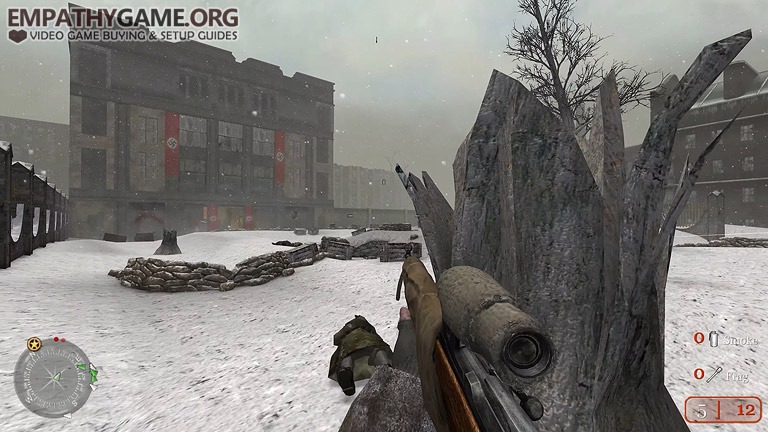
Much of that design became standard for military shooters, yet Call of Duty 2 remains unusually direct about what matters. Regenerating health keeps the assault moving, smoke grenades create temporary paths through exposed ground, and weapons have clear purposes without an upgrade system explaining them. The illusion is not seamless. Enemies can keep arriving until an unseen trigger is crossed, allies are more convincing as a fighting crowd than as tactical partners, and Veteran difficulty sometimes turns a battle into a grenade-filled checkpoint puzzle. Its strength is that every system encourages the same decision: move forward.
Forward Pressure Is the Real Combat System
Most encounters follow a recognizable pattern. Find the position holding up the squad, disrupt its view with cover or smoke, remove the immediate threats and move into the opening. Staying behind one wall to pick off distant Germans can seem sensible, but it often achieves less than a risky advance at the right moment. Reinforcements may continue feeding a defended area, while friendly troops tend to push only once the player has weakened the position or reached the required point. The challenge is recognizing when another kill matters less than ten yards of ground.
Regenerating health makes that rhythm possible. Incoming fire produces directional warnings, blurred vision, heavy breathing and a pounding heartbeat instead of a visible health meter. Find cover, break the enemy’s line of sight for a few seconds and the soldier recovers. This avoids arriving at a checkpoint nearly dead, with no way to recover. One mistake need not compromise the next encounter.
There is a trade-off. On Regular, a mistake often means losing a position for a few seconds rather than losing a lasting resource. Hardened and Veteran expose the other side of the system: a short glimpse around cover can be fatal, grenades make safe corners temporary, and retreat gives defenders time to settle again. Health regeneration does not make caution irrelevant. It makes exposure timing crucial, dividing firefights into commitment and recovery.
Smoke grenades are particularly important because they make an aggressive advance feel earned. Throwing smoke directly onto a machine-gun nest is not always the best choice; placing the cloud across the gunner’s view of the intended route can matter much more. The weapon remains dangerous, but the sightline disappears long enough to cross a street or approach a flank. On Veteran, an impossible-looking crossing becomes a difficult timing problem.
Even this useful system reveals the limits of the scripting. Friendly characters may delay a required shot or action when smoke obscures their target, despite the player knowing where the enemy is. It is a believable response to poor visibility and a frustrating reason for a mission to stall. Battles appear reactive, but progress depends on staged conditions.
Simple Weapons Produce Clear Tactical Choices
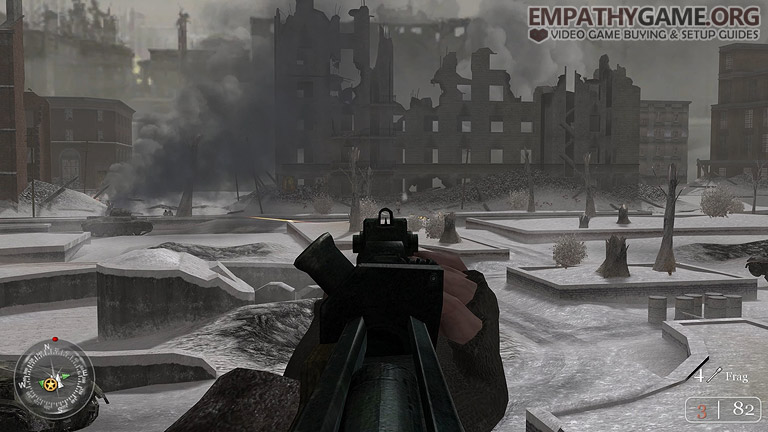
The arsenal has no attachment collection, rarity tiers or elaborate weapon statistics. Handling defines each weapon. A bolt-action rifle rewards a careful opening shot but makes a close-range miss costly. A semi-automatic rifle provides quicker follow-up fire, while a submachine gun suits rooms and narrow approaches better than long streets. Machine guns can dominate a lane, provided the position remains defensible. Swapping a weapon from the ground is a response to distance and ammunition, not a decision about protecting a customized build.
That simplicity works because the levels keep changing what is useful. A scoped rifle becomes awkward inside a ruined house. An SMG paired with a bolt-action weapon covers contrasting ranges, but ammunition can make that combination less comfortable than it sounds. A mounted MG42 offers tremendous firepower until artillery, a grenade or an exposed flank makes staying behind it a liability. The environment gives equipment choices meaning without a progression screen.
The PC controls also offer more precision than the campaign’s frantic reputation suggests. There is no dedicated sprint, but crouching, going prone, mantling low obstacles and leaning around corners give cover real value. Moving sacrifices accuracy, so stopping for a deliberate rifle shot competes with the need to advance. This is not a tactical simulation. Its best combat alternates controlled exposure with quick relocation.
Three Fronts Keep Reframing the Same Fundamentals
The campaign contains 27 mission stages spread across four soldiers: Red Army fighter Vasili Koslov, British infantryman John Davis, British tank commander David Welsh and American soldier Bill Taylor. Their abilities are largely alike. Instead of changing the rules for each character, Call of Duty 2 changes the terrain, visibility, weapon ranges and direction of the attack. The battlefield supplies the variety.
The Soviet missions establish a harsh urban rhythm. Snow and smoke obscure the approaches around Moscow, while Stalingrad’s damaged buildings, rail yards and streets create firing positions at several heights. Some areas allow nearby strongpoints to be tackled in a different order. These are not sandboxes, but choosing which threat to remove first helps them feel less rigid.
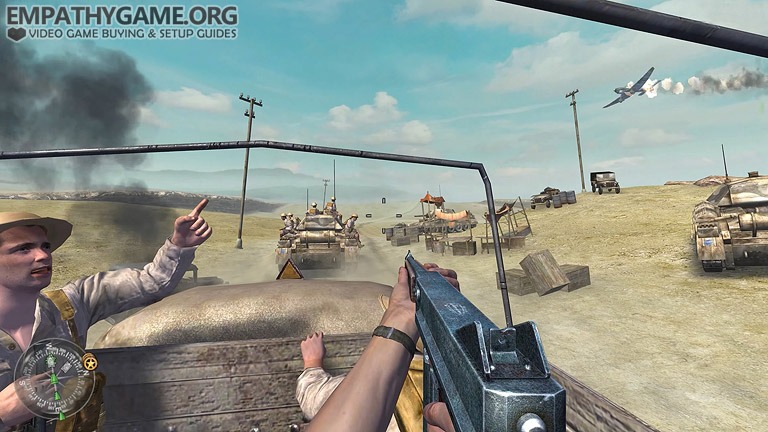
North Africa asks for a different kind of awareness. Longer views give rifles and mounted weapons more influence, pale buildings hide dangerous rooftop positions, and armor occasionally interrupts the infantry fighting. David Welsh’s Crusader tank sequence is deliberately uncomplicated as a vehicle experience. After so long being vulnerable to machine guns, controlling a tank shifts attention to enemy armor and the walls between targets.
The American campaign concentrates the largest set pieces. Pointe du Hoc opens under artillery fire, sends Rangers up ropes toward the bunkers, then turns the climb into trench fighting and a desperate defense against counterattacks. Explosions, MG42 fire and shouted warnings make the landing sound far larger than the playable route itself. Later operations through Normandy, Hill 400 and the Rhine keep switching between attack and defense. Those reversals maintain tension, even as the scripted waves become easier to recognize.
There is also modest freedom in how the war is explored. Unlocked operations can be selected, and some areas let several objectives be completed in a chosen sequence. The game still controls the broader performance, but occasionally allows a decision about which part of the battlefield deserves attention first. That modest agency is valuable.
Squadmates Create a Battle, Not a Tactical Squad
Friendly soldiers take cover, call out grenades, identify enemy movement and draw attention to positions blocking the advance. Their voices are more than background noise. Hearing a warning about an MG or a threat approaching from the flank can communicate useful information without forcing attention onto the interface. Repeated dialogue eventually exposes the trick, but in a crowded firefight it makes guidance feel as though it comes from people sharing the danger.
These are convincing participants, not reliable partners to command. There are no meaningful squad orders, named allies sometimes wait for a script, and ordinary troops create the scale of an assault more effectively than they complete its objectives. German soldiers change cover, throw grenades and punish exposed movement, but endlessly replenished positions can make careful marksmanship seem pointless. Veteran brings the contradiction into focus: smoke placement and target priority matter, yet winning sometimes means surviving the few yards needed to activate the next stage of the encounter.
Story Stays Behind the Battlefield
Call of Duty 2 has little interest in constructing an intimate character drama. Archival-style footage, maps, orders and journal entries establish the operation before handing control back to the player. Koslov, Davis, Welsh and Taylor provide different perspectives on the conflict rather than fully developed personal arcs. Even Captain Price is more valuable as a familiar voice and commanding presence than as a complex character.
This approach keeps missions moving, but it limits what remains emotionally connected between them. Just as one group of soldiers becomes familiar, the campaign can shift to another country and another front. Avoiding long cinematics preserves pace but leaves victories with little personal consequence. The storytelling is strongest when the battered streets of Stalingrad or the exposed cliffs at Pointe du Hoc communicate the cost and danger without a speech. The places remain more memorable than the protagonists.
Multiplayer Preserves a Different Kind of Simplicity
On PC, multiplayer strips competitive improvement down to fundamentals rather than persistent unlocks. Deathmatch and Team Deathmatch emphasize direct fights; Capture the Flag demands coordinated routes; Search & Destroy makes each life matter; and Headquarters forces the focus of a match to keep moving. Weapons are chosen for the match, not earned through career levels. The main progression is less visible: better aim, more deliberate movement and a growing understanding of how each map is contested.
That understanding can become very specific. Toujane rewards knowledge of windows, roofs and connecting lanes. Carentan’s buildings create short fights around dangerous crossings, while practiced jumps and mantles help players reach less obvious positions. A strong elevated angle stops being strong once the opposing team knows to check it. Map mastery includes knowing when a good position has become predictable.
Movement adds another layer. A sudden jump or quick move into a sightline can change an entry fight, though the slowdown after landing discourages constant evasive hopping. Responsive aiming and scope use reward confident sniper timing. In competitive rule sets that restrict specialist roles, teams may limit snipers and shotguns, with the shotgun slot also providing smoke. One player’s weapon choice can therefore determine how the whole team crosses an exposed lane, not merely who handles close-range fights.
Search & Destroy brings these details together. Smoke can conceal a crossing or bomb plant, one bolt-action pick can change the balance of a round, and a memorized angle can punish a repeated approach. Headquarters produces a different tension because the moving objective eventually forces both teams away from positions they have learned to defend. Different objectives give the same gunplay different priorities.
PC server rules can further reshape that experience. Rifle-focused rotations, custom maps and modified competitive configurations put different pressures on familiar movement and weapons. That flexibility is appealing, although it also means that two matches bearing the same Call of Duty 2 name may reward quite different habits. Its readable combat supports those variations without permanent unlocks.
Replayability Comes From Mastery, Not Unlocks
Campaign progression means completing missions, unlocking later operations and selecting one of four difficulty levels. There are no skill trees or challenge tracks feeding a long-term reward system. A return to Pointe du Hoc is appealing because the assault itself remains exciting, while revisiting a broader objective area can reveal a different order of attack. It asks players to enjoy the encounter rather than chase the next attachment.
Veteran can extend the experience, but not always in a satisfying way. At its best, it rewards careful leaning, well-placed smoke and timely movement between defensible positions. At its worst, grenade pressure and hidden reinforcement triggers replace battlefield judgment with trial and error. Regular or Hardened may be the better choice for anyone who wants to preserve the sensation of a large assault without repeatedly rehearsing each checkpoint.
Multiplayer offers a more durable form of improvement. Recoil control, sniper timing, grenade placement and a mental picture of likely enemy positions all grow through familiarity. That is why individual corners on Carentan or Toujane can matter long after the maps have stopped feeling new. Newcomers face opponents whose map knowledge can outweigh simple rules.
Final Verdict
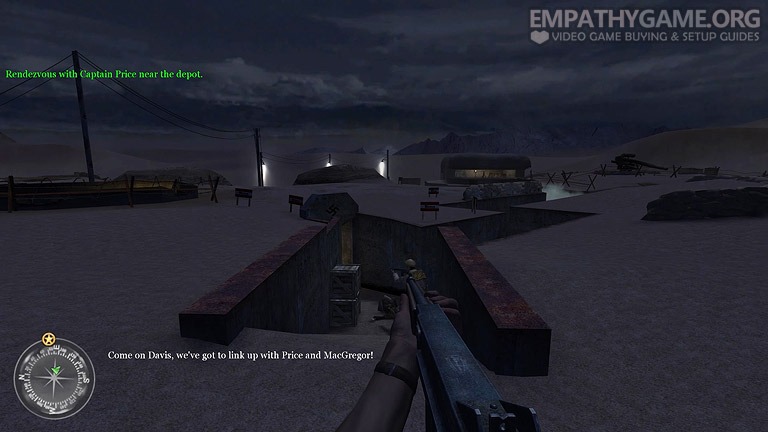
Call of Duty 2 has aged best where its design serves movement. Regenerating health keeps one mistake from ruining the next assault, smoke provides an answer to exposed ground, and weapons are distinct enough to make quick decisions meaningful. Stalingrad, North Africa and Normandy then give those fundamentals different pressures without burying them under extra systems.
The compromises are difficult to ignore. Reinforcement triggers can matter more than accurate shooting, allies imply teamwork without providing much control, and Veteran sometimes exposes the machinery behind the spectacle. Thin characterization and dated presentation make that scripting harder to ignore.
Yet the assault on Pointe du Hoc, the fighting through Stalingrad and the strongest objective-based multiplayer maps explain the game’s staying power better than nostalgia alone. Anyone seeking an open-ended military simulation or a constant stream of progression rewards will find it restrictive. For those who prefer a focused World War II shooter, the appeal is wonderfully direct: recognize the threat, use what the battlefield gives you and find the moment to move.
Call of Duty 2 Pros & Cons
- Pro: Three distinct Allied perspectives take the campaign from snowy Soviet streets to North Africa and Normandy
- Pro: Smoke grenades, regenerating health, strong sound design and responsive gunplay make assaults memorable
- Pro: Internet, LAN and classic objective modes support flexible community-hosted multiplayer
- Pro: Legacy Mod Tools enable custom single-player missions and multiplayer maps
- Pro: Modest original hardware demands and a Steam Deck Playable rating broaden access
- Con: Scripted enemy reinforcements, inconsistent squad behavior and grenade-heavy Veteran encounters can frustrate
- Con: Dated animation, checkpoint rules and narrow mission boundaries reveal the age of the design
- Con: Separate Steam/Microsoft PC multiplayer, limited modern features and uneven server availability complicate online play
- Con: No Steam Workshop or Steam Cloud listing; manual mods, save backups and some modern-PC workarounds require care
Call of Duty 2 PC System Requirements
Important: These are the original Windows specifications retained by Steam. They describe Windows 2000/XP-era hardware, not a modern Windows 10/11 compatibility guarantee. Steam’s client itself now requires a newer supported Windows version.
MINIMUM (official legacy specification):
OS: Microsoft Windows 2000 or Windows XP
CPU: Intel Pentium IV 1.4 GHz / AMD Athlon XP 1700+ or higher
RAM: 256 MB
GPU: DirectX 9.0c-compatible 64 MB hardware-accelerated graphics card with suitable drivers
DirectX: DirectX 9.0c-compatible graphics and 16-bit sound hardware
Storage: 4 GB of uncompressed free space, plus 600 MB for the Windows 2000/XP swap file
Input: Windows-compatible keyboard and mouse
Sound card: DirectX 9.0c-compatible 16-bit sound card
Network: Broadband for Internet play; network interface card for TCP/IP LAN play
RECOMMENDED (additional legacy recommendations):
RAM: 512 MB
GPU: NVIDIA GeForce 7 Series or higher
Steam specifies these additional memory and graphics recommendations rather than a separate complete recommended CPU/OS/storage tier. The other fields above remain the published minimum values.
Additional PC Performance and Setup Notes
- Modern Windows: An official Steam or Microsoft Store listing confirms purchase access, not trouble-free operation on every Windows 10/11 PC. Start with store installation and verify files before changing compatibility options or replacing anything.
- Legacy DirectX: If the game reports missing DirectX-era components, use an official Microsoft or storefront-supplied runtime instead of downloading individual DLLs from unverified sites.
- Widescreen: The original PC version supports native horizontal-plus 16:9 gameplay. A special fix is not required merely to use 16:9. Some old menus or cinematics may still scale differently; optional community UI fixes need version-specific checks.
- Steam Deck: Valve’s Playable rating covers performance under its tested settings, but native screen resolution may need selecting manually; small text and keyboard prompts also remain.
- Saves and configuration: Steam does not advertise Steam Cloud. Before reinstalling, preserve your campaign profile and settings; PCGamingWiki documents Windows save data inside the game’s
main\playersfolder. - Community servers: Online matches use the legacy server browser and custom maps rather than centralized modern matchmaking. Firewall, server-filter, custom-file and older anti-cheat behavior may differ between servers.
- Mod safety: Add custom content one project at a time, read the compatibility instructions, and keep a clean backup so that joining a standard or Pure multiplayer server remains straightforward.
Official Trailer
Note: IGN’s archived Call of Duty 2 launch trailer shows the Russian winter, North African armor, Normandy landings, squad assaults, smoke, and large battlefield set pieces, while the written guide adds current PC store, multiplayer, requirements, Steam Deck, mod, and setup details.
Frequently Asked Questions
Can you still play Call of Duty 2 multiplayer online?
Yes. Its PC multiplayer uses community-hosted servers rather than modern Call of Duty matchmaking. Availability varies by region, map and mode; use the game’s Internet server browser to check hosts, ping and custom-file requirements.
Can Steam and Microsoft Store Call of Duty 2 players play together?
No. The two Windows releases are documented as separate multiplayer environments. To play together, friends should use the same PC storefront edition; there is also no modern cross-play with Xbox consoles.
Does Call of Duty 2 support co-op, split-screen or LAN?
There is no cooperative campaign or split-screen mode in the Windows release. Competitive LAN matches are supported between separate PCs on the same network, as are Internet multiplayer matches.
Can you run your own Call of Duty 2 multiplayer server?
Yes. The original PC game supports hosting multiplayer games and dedicated-server configurations, with selectable maps, modes and rules. External hosting may require additional network and firewall configuration.
Does multiplayer have bots or modern unlockable perks?
The original multiplayer does not provide a standard built-in bot mode, Create-a-Class system, persistent perks or modern killstreak progression. Community mods can add special modes or bots, but those are not part of the stock game.
Why does the game download files or reject a server connection?
Some servers distribute custom maps and mods, while Pure servers may reject modified game files. Use trusted hosts, check which content they require, and keep a clean game backup rather than accepting unknown executable downloads.
Can you use a controller on the PC version?
The original Windows controls were built for mouse and keyboard, without the seamless native gamepad interface of newer Call of Duty games. Steam Input and other controller-mapping tools can emulate keyboard and mouse bindings, but on-screen prompts may remain keyboard-based.
Can you sprint or lean around corners?
The stock PC game has left and right leaning but no dedicated modern sprint control. You can also stand, crouch, go prone and climb certain low obstacles.
Can you pick up enemy weapons, and how many guns can you carry?
Yes. You can swap weapons found on the battlefield, but only carry two main firearms at once, alongside grenades and mission-specific equipment. Choosing complementary weapons is useful as ranges and ammunition needs change.
How does regenerating health work?
There are no traditional health packs. When wounded, the screen and audio warn of danger; retreating behind cover and avoiding further damage for several seconds restores health.
Can you choose campaign missions and difficulty?
The campaign switches among Soviet, British and American soldiers and allows some flexibility in mission order as campaigns unlock. Four difficulty settings range from Easy through Veteran, which sharply increases the danger of exposing yourself to enemy fire.
Where are campaign saves stored, and does Steam Cloud back them up?
Steam does not list Steam Cloud support. The Windows game stores player-profile and save information in the game’s main\players directory, so back up that folder before reinstalling or modifying the game.
Can you make custom maps and single-player missions?
Yes. The original Mod Tools include Radiant and Maya plug-ins, and community projects use those tools for multiplayer maps and custom campaign content. There is no Steam Workshop, so follow each project’s instructions and verify version compatibility.
Does Call of Duty 2 work on Windows 10 and Windows 11?
It can run on modern Windows PCs, but its published operating-system requirements are still from the Windows 2000/XP era. If you encounter startup or display issues, verify your official installation and consult established technical references before making reversible compatibility changes.
Still have questions? Check the Call of Duty 2 Reddit community, Steam Discussions, or GameTracker server directory for additional help and community discussion.
Sources & References
Official storefronts, publisher support, and established game references used to verify this PC guide:
- Steam — Call of Duty 2: Windows release, purchase options, original system requirements, Steam Deck status and reception.
- Microsoft/Xbox — Call of Duty 2 (2005) for PC: separate Windows purchase and Xbox Network feature limitations.
- Steam — Call of Duty Warchest: included titles and bundle distinctions.
- Activision — Xbox One Backward Compatibility FAQ: console version and Xbox 360 DLC compatibility.
- PCGamingWiki — Call of Duty 2: engine, legacy PC issues, multiplayer-version differences, widescreen and save locations.
- Metacritic — PC Critic Reviews: the PC-specific aggregate score, separate from Xbox 360.
Similar Games Like Call of Duty 2


Found something worth playing through DecideGame?
DecideGame.com is an independent gaming project run by Editor Zero. If this guide helped you discover a game, solve a problem, or find useful information, you can support DecideGame.com and help keep new and updated game guides coming.
DecideGame — PC Game Guides, Reviews & Setup Help