
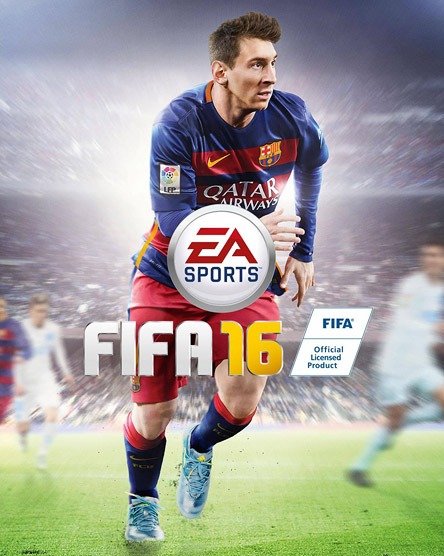
📅 Game released: 2015
FIFA 16 is EA Sports’ football simulation built around more deliberate defending, tighter midfield battles, Career Mode, and the series’ first women’s national teams. This PC guide explains its official download and ownership status, EA app installation for existing owners, retired online modes, FIFA Infinity mods, original system requirements, and practical setup considerations.
 By Editor Zero — independently researched, edited, and maintained.
Last updated: 16 November 2026
Last reviewed: 16 November 2026
Table of Contents
- Quick Facts
- Official PC Stores, Download & Installation
- FIFA 16 Review
- Pros & Cons
- PC System Requirements
- Frequently Asked Questions
- Similar Games
FIFA 16 Quick Facts
- Game: EA SPORTS FIFA 16 / FIFA 16; Standard, Deluxe and Super Deluxe launch editions
- Developer: EA Canada
- Publisher: Electronic Arts (EA Sports)
- Genre: Sports, Multiplayer, Football Simulation
- Release: September 22, 2015 (North America, including Windows PC); September 24, 2015 in Europe
- Platforms: Windows PC, PS4, PS3, Xbox One, Xbox 360
- Modes: Offline Kick Off, local multiplayer, Career Mode, offline tournaments; original online and FUT services retired
- Notable features: Twelve women’s national teams, FIFA Trainer, Player Training, Pre-season Tournaments, original FUT Draft
- Steam Deck: Not available on Steam; no official Steam Deck rating
- Engine: EA Sports Ignite (Windows PC, PS4 and Xbox One versions)
- Community: EA Forums, EA Sports FC Reddit, FIFA Infinity Mods
- PC modding: Unofficial kits, squads, competitions and databases via FIFA Infinity Patch 16 and compatible editing tools
- Metacritic score: 81/100 (Windows PC)
- IGN score: 7.8/10 (review listed for Windows PC and Xbox One)
Official PC Store Status, Download & Installation
👇 FIFA 16 has a native Windows PC release, but it is no longer sold through normal official digital storefronts. Use the ownership, download, setup and service-status notes below before trying to install an existing copy.
- Official PC status: FIFA 16 originally launched on EA’s Origin service for Windows PC. The original game is no longer offered as a normal new digital purchase through the EA app, Steam, Epic Games Store or GOG. A missing store listing does not mean the original lacked a PC release.
- Existing digital ownership: If FIFA 16 was previously purchased or redeemed on an EA Account, sign in to the official EA app with that same account. Open Library, look for FIFA 16 and, if EA offers the download for your entitlement, select it and follow the install prompts. Access to a previously owned legacy title can depend on the account, entitlement and functioning activation systems; it should not be assumed from the product’s age alone.
- Missing library entry: If the game is absent, check whether a different EA Account originally owned or redeemed it, then follow EA’s official library and installation instructions. Do not buy a replacement key until you have checked your existing ownership and contacted EA Help if necessary.
- Retail PC copies: A legitimate boxed Windows copy may exist on the secondhand market, but FIFA 16 used a single-use activation code tied to an EA Account. A used disc or code does not automatically convey a working, transferable PC license. Check the original entitlement and activation limitations before paying.
- EA Play: EA removed FIFA 16 from the EA Play catalogue. An EA Play or EA Play Pro subscription does not by itself provide a FIFA 16 license or restore the game’s discontinued online services.
- Online shutdown: EA retired FIFA 16 online services for Windows PC and consoles on February 14, 2023. Online matchmaking, original Ultimate Team connectivity, FUT Draft rewards and server-dependent features cannot be treated as usable. This is different from playing an offline match or an offline Career Mode save.
- Offline modes: Traditional local Kick Off, offline tournaments and Career Mode remain the intended reasons to revisit an installed, properly activated copy. The women’s national teams were included for Kick Off and offline tournament play; do not confuse their former Online Friendlies option with a still-operating service.
- Account and activation: The PC version was originally distributed with Origin activation and Denuvo content protection. EA’s original disclosures require internet access, an EA Account and a valid license for activation. The modern EA app replaces Origin, but successful setup on a particular machine cannot be guaranteed after the game’s service retirement. Do not use unauthorized executables, activation bypasses or third-party repacks.
- Local controls: A compatible gamepad is the most natural option for football controls and local multiplayer, although the PC version also provides configurable keyboard input. Connect and test all intended controllers before entering a match, and assign each player to the correct side in the local match setup.
- Mods and squad updates: FIFA 16 has a substantial unofficial editing scene, including FIFA Infinity Patch 16. These modifications do not supply the paid base game. Follow the mod author’s version-specific instructions, back up saves and original files, and remember that large database replacements can change teams, tournaments and even remove the original women’s national teams.
- Edition differences: The original Standard, Deluxe and Super Deluxe editions chiefly differed in Ultimate Team bonuses, loan players and related extras. With FIFA 16’s online services retired, those former FUT benefits are not a reason to seek an expensive premium edition. No separate modern remaster or official complete PC edition replaces this release.
 Download the Official EA App for Previously Owned PC Games

FIFA 16 Review
A more thoughtful football game, where the right decision can still meet the wrong response.
FIFA 16 asks players to notice what happens before the obvious pass. In FIFA 15, pace and a through-ball could often substitute for patient build-up. Here, midfielders have more influence, defenders close the gaps more intelligently, and receiving the ball under pressure becomes a decision in itself. It is still recognisably FIFA, with EA Canada’s licensed football and polished broadcast presentation. A quick forward pass is not necessarily a good one. That rewards players who enjoy breaking down a team, but creates a central frustration. When a passing move fails because of good defending, the game feels convincing; when it fails because a teammate hesitates or control changes too slowly, the emphasis on smarter football begins to work against it.
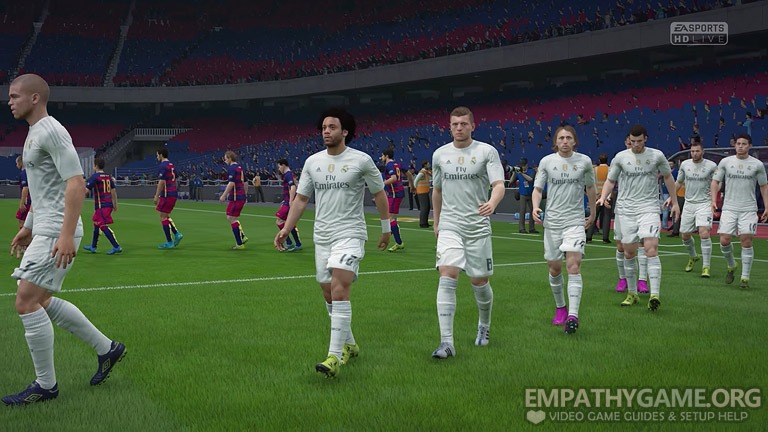
Midfield Is Where Matches Are Won or Stalled
The change is clearest in midfield. Interception Intelligence encourages computer-controlled midfielders to step into passing lanes, while Defend as a Unit helps the defence cover the space left by a teammate moving toward the ball. A striker may look open until a defender crosses the passing lane. The safer choice might be to play backward, involve a supporting midfielder and switch the attack to the opposite side. Playing backward can become part of the attack.
Still, keeping the ball and doing something with it are different skills. The computer can circulate the ball across its back line without creating danger. Even a high pass-completion percentage does not tell the whole story. Some completed passes force an awkward touch that immediately surrenders possession. What matters is whether the receiver can turn, move forward or find another player, not simply whether the statistics register a completed pass.
Passing with Purpose becomes important here. A driven ground pass can travel through a small opening before the defender closes it, but the extra speed also makes the ball harder to control. Give that pass to a striker with his back to goal and a marker already pressing him, and the attack can collapse immediately. Play it into the path of a capable midfielder facing forward, and the same mechanic can turn slow possession into a genuine chance. The satisfaction comes from judging the receiver, not just the gap.
Through-balls are less dependable than in FIFA 15, and patient play sometimes becomes endless circulation against a compact computer defence. The game deserves credit for making midfield play more important, but there are moments when it seems to confuse an attack being difficult with an attack being interesting.
FIFA Trainer offers contextual prompts for passing, tackling and shooting, helping newcomers learn without leaving the match. Its advice follows the situation rather than pausing the action for a lesson. Once the controls become familiar, though, it is better switched off so players can read movement instead of instructions.
Defending Requires Better Positioning, but Not Every Reaction Is Reliable
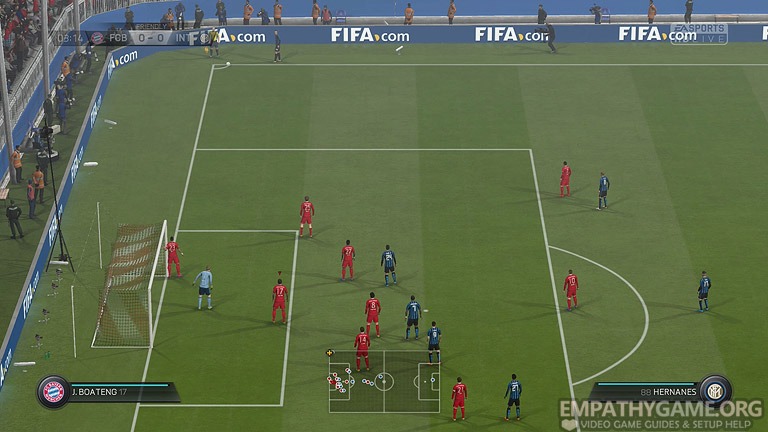
Defensive Agility and revised tackling discourage charging at the ball. Jockeying beside a winger, staying between him and the box, and waiting for support can achieve more than an early tackle attempt. A full-back who delays a run buys time for midfield cover; step too aggressively and a channel opens behind him. Defending becomes about positioning rather than sprint speed alone.
Teammates often cover one another well, rewarding positioning established before the pass. Yet the individual moments are less dependable. A tackle may trigger an awkward collision or a surprisingly soft foul, while an apparently reachable loose ball can leave nearby players looking strangely uninterested.
Goalkeeper rebounds capture that contradiction. A spill can give an alert attacker a genuine second chance. But a parry can also fall beside an unselected attacker who never reacts quickly enough, while attempts to switch control fail to select him in time. The player sees the chance but cannot always act through the right footballer. This is more frustrating than a missed finish because it interrupts the link between reading play and acting on it.
Custom acceleration sliders reveal another weakness: with even a slight user advantage, defenders can step aside as the ball carrier bursts past. This is a slider-dependent effect, not a description of default defending. It does show how much the impression of intelligent football depends on animation and movement speed remaining in balance.
Dribbling and Shooting Ask for a Different Approach
No Touch Dribbling has more practical value than its showy feints suggest. An attacker can shift his body around the ball, inviting a defender to commit before moving in another direction. It is most useful with just enough space to make one defender hesitate.
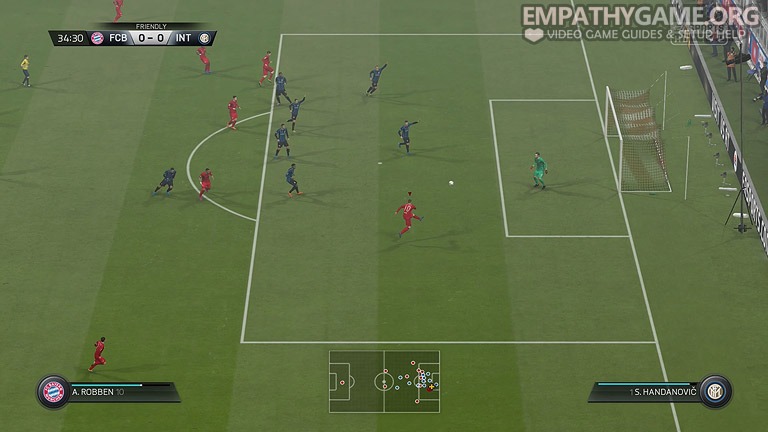
With an agile winger such as Arjen Robben, a brief movement followed by acceleration can create separation without a long combination of skill moves. A passing sequence moves the defensive line; the dribble attacks the gap. A good dribble in FIFA 16 often begins with the decisions made by players who never touch the ball.
Finishing also requires adjustment from FIFA 15. Different shooting techniques are not equally dependable. A near-post finesse shot can be more effective than a forceful effort across the goalkeeper, while long-range shooting occasionally rewards a player who has been given room outside the box. These are tendencies, not formulas; attributes, angles and pressure still matter.
Heading feels less dependable. Even an excellent cross can produce a weaker chance than a low delivery or cutback. This matters because beating a full-back should open a worthwhile aerial option, not merely another uncertain finish. The variety is welcome, but some routes to goal feel much more trustworthy.
Match-Day Atmosphere Does More Than Decorate the Pitch
With no scripted campaign, FIFA 16 finds drama in the season. A relegation match carries weight because of what happened in the previous fixtures; a late substitute goal matters because an otherwise ordinary match was slipping away. Licensed clubs and broadcast presentation turn results into small stories. Stadium introductions, crowd chants, commentary and weather make fixtures feel like occasions rather than isolated exhibitions. The Bundesliga even has its own broadcast presentation.
The illusion works better from the broadcast camera than close up. Crowd behaviour and facial animations can look stiff, and commentary does not always respond to the story a match has developed. Even so, crowd sound and stadium imagery give Career Mode life beyond the menus.
Twelve women’s national teams are more than an extra selection of kits. Countries including the United States, Germany, England and Canada feature dedicated player models and animation work, with recognisable names such as Alex Morgan and Christine Sinclair. Their different attributes broaden the matchups available. The limitation is clear: women’s teams are restricted to selected matches and tournaments rather than the full club and Career Mode structure. FIFA 16 makes room for a part of football the series had previously left out, but does not yet give it an equivalent place in the overall game.
Career Mode Is Strongest When Progress Takes Time
Manager Career suits FIFA 16’s patience. Running a modest club is not just about buying a faster striker. Improving the midfield, choosing which youngster deserves minutes and deciding when to spend transfer funds can have consequences across several seasons. Promotion is particularly interesting because a team that controlled matches in one division may struggle just to keep possession in the next. Progress brings new problems.
Player Training adds more control over that development through five weekly training slots. Managers can play or simulate drills for young prospects or established starters. Repeating drills can become a chore, and the system is not a substitute for deeper squad management. The five-slot limit forces a choice about whose skills matter most to the team being built.
Pre-season Tournaments offer room to test formations, try squad players and potentially earn some extra money before league football begins. Together with training, they give the weeks between matches more purpose.
Resisting the urge to build an unbeatable team can make the save more satisfying. Limit transfers, develop only a few prospects at once and a career can contain difficult promotions, relegation setbacks and several seasons of rebuilding before continental competition becomes realistic. Such outcomes are not inevitable, but uneven progress can make the career more absorbing. The history of a club is often more interesting than a perfect run of results.
Player Career and Local Football Offer a Different Pace
Player Career narrows responsibility to one footballer. A striker has to decide when to hold position, move between defenders or make a run without knowing whether the pass will arrive. You can request passes and direct teammates, but declining those commands lets them make independent decisions.
That approach can also be humbling. On demanding settings, good positioning can produce few goals when teammates choose different passes. That is a choice, not a universal restriction. This tension becomes clearer with slower match speed and less assisted controls. Playing one footballer is not necessarily the same as controlling what happens around him. Even a modest contribution can feel meaningful, though the AI can be frustrating.
Kick Off, tournaments and local multiplayer offer shorter sessions. Against a friend, FIFA 16’s improved defending becomes a different contest, because a human opponent can be tempted out of position in ways the computer often resists. The original FUT Draft instead built temporary squads from five-player choices at each position for runs of up to four matches. It was an inventive contrast to the slow work of growing a Career Mode squad, even if its design belonged to the game’s online Ultimate Team ecosystem.
Final Verdict
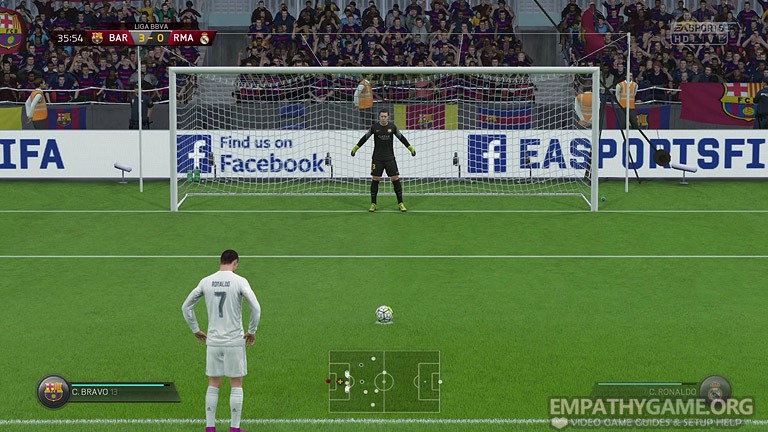
FIFA 16 is at its best when it makes an ordinary football decision feel important. Looking for the right passing angle, holding a defensive position instead of diving into a tackle, or choosing which young midfielder to develop can matter more than simply having the quickest players. Manager Career gives those choices a longer history, while broadcast presentation and women’s teams broaden the experience.
Controls and animations do not always support the intelligence the game demands. Slow possession can become repetitive, headers feel unreliable, and a poorly handled rebound can undo a move that was otherwise read perfectly. Players who want quick, open, end-to-end football may reasonably prefer FIFA 15’s more immediate style. For those who enjoy shaping attacks, patient defending and long club rebuilds, FIFA 16 has its own identity. It asks you to think more carefully about football. Most of the time, that is its strongest quality.
FIFA 16 Pros & Cons
- Pro: More deliberate defending and midfield interceptions make positioning and passing choices matter.
- Pro: Career Mode adds practical depth through Player Training and Pre-season Tournaments.
- Pro: Twelve women’s national teams broaden the offline match and tournament selection.
- Pro: Licensed clubs, stadium atmosphere and local multiplayer support a strong offline football package.
- Pro: Established PC modding tools can extend squad and competition customization for existing owners.
- Con: Retired online services eliminate the original Ultimate Team and online multiplayer experience.
- Con: No normal official PC purchase route remains, and legacy activation complicates access.
- Con: The slower build-up play and occasional rigid animations can make attacking feel less fluid.
- Con: Women’s teams are limited to selected modes rather than the full range of men’s club and career competitions.
FIFA 16 PC System Requirements
The following are EA’s published original Windows PC requirements for FIFA 16, not updated Windows 11 compatibility guarantees. Both configurations require a 64-bit operating system and DirectX 11-capable graphics.
MINIMUM:
OS: Windows 7, Windows 8 or Windows 8.1 (64-bit)
CPU: Intel Core i3-2100 at 3.1 GHz
RAM: 4 GB
GPU: AMD/ATI Radeon HD 5770 or NVIDIA GeForce GTX 650
DirectX: 11.0
Storage: 15 GB available space
RECOMMENDED:
OS: Windows 8, Windows 8.1 or Windows 10 (64-bit)
CPU: Intel Core i5-2550K at 3.4 GHz
RAM: 8 GB
GPU: AMD/ATI Radeon HD 6870 or NVIDIA GeForce GTX 460
DirectX: 11.0
Storage: 15 GB available space
Additional PC Performance & Setup Notes
Older requirements versus the newer launcher: EA’s FIFA 16 specifications date from the game’s original release. The EA app itself now requires 64-bit Windows 10 or Windows 11, so Windows 7/8 compatibility in FIFA 16’s historical specification does not mean the replacement launcher supports those systems. Neither EA’s original table nor a modern GPU alone guarantees that the game will activate and run correctly on Windows 11.
Display and controllers: FIFA 16 supports conventional PC widescreen resolutions and gamepad input. Start with a standard 16:9 resolution and default game graphics settings before experimenting with frame-rate limits, overlays or unofficial ultra-wide fixes. Standard 16:9 play does not require a community widescreen patch. The PCGamingWiki technical reference documents additional display and input behavior, including limitations that may affect ultra-wide setups.
Back up the right data: The PC game’s local data is associated with the Documents\FIFA 16 folder. Back up existing Career Mode saves and configuration files before installing a large roster/database mod or starting a new modified career. Do not assume saves made using different mod databases are interchangeable.
Online service versus offline activation: The closure of FIFA 16’s online match services is permanent, but that fact alone does not prove that every licensed copy will or will not activate on a specific modern PC. EA’s original PC license required online authentication, and the EA app may require account access even for offline modes. For a title missing from your library or failing activation, use EA’s official download and launch troubleshooting rather than a modified executable.
Official Trailer
Note: EA Sports’ official gameplay presentation demonstrates FIFA 16’s defensive movement, midfield control and attacking changes. The written guide above explains what remains useful for PC owners after the online-service shutdown.
Frequently Asked Questions
Can you still play FIFA 16 Career Mode offline?
Yes. Manager Career and Player Career remain playable offline with an installed, properly activated copy of FIFA 16. You can manage transfers, develop players, play league matches, and progress through seasons without the retired FIFA online servers, although the PC version may still require EA Account authentication during installation or activation.
Are FIFA 16’s online servers and Ultimate Team still working?
No. EA permanently retired FIFA 16’s official online services on February 14, 2023, across PC and consoles. Ultimate Team, Online Seasons, Pro Clubs, online friendlies, matchmaking, and other server-dependent features are no longer available through EA’s original services.
Can you play FIFA 16’s single-player FUT Draft offline?
No. Although FIFA 16 originally offered FUT Draft matches against computer-controlled opponents, the mode was still part of FIFA Ultimate Team and required EA server connectivity. The server shutdown also made single-player FUT Draft inaccessible, unlike ordinary offline Kick Off and tournament matches.
Can two or more people play FIFA 16 on the same PC?
Yes. FIFA 16 supports local multiplayer for up to four players on one Windows PC, using compatible controllers and, where configured, keyboard input. Players can compete against each other or cooperate on the same team in supported local matches. Everyone shares the normal football-pitch camera rather than using separate split-screen views.
Can women’s national teams play against men’s teams in FIFA 16?
No. FIFA 16 keeps its twelve women’s national teams separate from men’s teams, so mixed men’s-versus-women’s matches are not supported in the original game. Women’s international matches use their own team selection and competition options.
Can you use women’s teams in FIFA 16 Career Mode or Ultimate Team?
No. The original FIFA 16 does not include women’s clubs or national teams in Manager Career, Player Career, or Ultimate Team. Women’s teams are available in Kick Off and dedicated offline tournament play, while their original online-friendly functionality is no longer accessible.
How do you play a women’s tournament in FIFA 16?
Choose the Women’s International Cup through the game’s tournament options, then select from the twelve available national teams, including the United States, Germany, England, Brazil, and France. You can play or simulate fixtures and progress through the competition offline. This is a dedicated women’s tournament rather than a women’s Career Mode.
How does Player Training work in FIFA 16 Career Mode?
Manager Career allows you to assign up to five training drills each week to develop selected players’ attributes, including passing, shooting, and other football skills. You can complete the drills manually or simulate them, with training performance influencing the results. Concentrating on promising younger players can be useful for building a squad over several seasons.
Do pre-season tournaments increase your transfer budget in FIFA 16?
Yes. FIFA 16’s Manager Career offers pre-season tournament invitations before the domestic campaign, giving you opportunities to test formations, rotate players, and earn prize money. Better tournament results can contribute additional funds to your transfer budget, which is particularly useful when managing a smaller club.
How many seasons can you play in FIFA 16 Career Mode?
FIFA 16’s standard Manager Career and Player Career modes have a limit of 15 seasons per save. This gives enough time for long-term squad rebuilding, youth development, transfers, and multiple title challenges, but the original game does not offer an unlimited career simulation.
How do you turn off the FIFA Trainer in FIFA 16?
Open the in-match Pause menu and change the FIFA Trainer setting to Off, or adjust it through the game’s control settings. With the standard controller layout, pressing the right stick can also toggle the Trainer display during play. You can enable it again whenever you want contextual passing, defending, and shooting suggestions.
Does FIFA 16 have The Journey story mode?
No. The Journey, featuring Alex Hunter, was introduced in FIFA 17 rather than FIFA 16. FIFA 16 instead offers traditional Manager Career and Player Career progression without the cinematic story chapters, character dialogue choices, and scripted narrative associated with The Journey.
Does FIFA 16 work on Windows 11?
FIFA 16 was released before Windows 11 and has no official Windows 11 compatibility guarantee. Some existing owners have successfully launched it on newer Windows systems, but results can depend on EA app activation, installed components, graphics drivers, and system configuration. Meeting the original hardware requirements does not guarantee successful installation or launch.
What should you try if FIFA 16 crashes or fails to launch on PC?
First confirm that your EA Account owns the game and that the installation is accessible through the EA app. EA recommends repairing game files, clearing the app cache, checking drivers, and temporarily disabling the EA in-game overlay when troubleshooting launch problems. These steps cannot restore retired online features or guarantee that every legacy activation problem can be resolved.
Can you continue an existing FIFA 16 Career Mode save after installing FIFA Infinity Patch?
Not reliably. Major FIFA Infinity Patch versions replace or expand squad databases, leagues, and tournament structures, potentially making existing Career Mode saves incompatible with the modified installation. Back up your original saves and game files, follow the patch’s installation instructions, and preferably begin a new career with the chosen patch database and competition configuration.
Why are the original women’s national teams missing after installing FIFA Infinity Patch 16?
FIFA Infinity Patch 16 Version 9 removes the original women’s national teams while introducing extensive replacements and additions to men’s clubs, leagues, squads, and competitions. This is an intentional modification rather than a problem with the original FIFA 16 installation. Preserve an unmodified game backup if you want to retain EA’s original women’s national teams alongside a separate modded setup.
Still have questions?
Check the FIFA Career Mode Reddit community for gameplay and career discussions, FIFA Infinity Patch 16 page for mod information and troubleshooting discussions, or official EA Help for account, ownership, installation, and activation support.
Sources & References
Key factual and technical information in this guide was checked against relevant official and specialist sources, including:
- Electronic Arts — FIFA 16 Launch Announcement — original PC release, developer, platforms and gameplay modes
- Electronic Arts — Online Service Shutdown List — FIFA 16 retirement and removal from EA Play
- EA SPORTS — FIFA 16 PC System Requirements — official minimum and recommended Windows specifications
- EA Help — Download and Play EA App Games — legitimate library, ownership and installation procedure
- Electronic Arts — Original PC Product Disclosures — FIFA 16 account, activation and serial-code limitations
- PCGamingWiki — FIFA 16 — independent PC input, display, save-location and legacy compatibility reference
- FIFA Infinity — FIFA Infinity Patch 16 — community mod scope, installation cautions and database changes
Similar Games Like FIFA 16
Found something worth playing through DecideGame?
DecideGame.com is an independent gaming project run by Editor Zero. If this guide helped you discover a game, solve a problem, or find useful information, you can support DecideGame.com and help keep new and updated game guides coming.
DecideGame — PC Game Guides, Reviews & Setup Help