
📅 Game released: 2013
Rust is a hardcore online survival sandbox where gathering, building, PvP, raids, and server wipes turn every alliance and base into a risk. This PC guide covers the official Steam download and installation, Windows and macOS requirements, DLC, server types, Premium and Secure access, Easy Anti-Cheat, Steam Deck limitations, performance, and beginner survival decisions.
 By Editor Zero — independently researched, edited, and maintained.
Last updated: 13 November 2026
Last reviewed: 13 November 2026
Table of Contents
- Quick Facts
- Official PC Stores, Download & Installation
- Rust Review
- Pros & Cons
- PC System Requirements
- Frequently Asked Questions
- Similar Games
Rust Quick Facts
- Game: Rust
- Developer: Facepunch Studios
- Publisher: Facepunch Studios
- Genre: Survival, Crafting, Open World, Multiplayer, FPS
- Release: Steam Early Access — December 11, 2013; full release — February 8, 2018 (Windows PC and macOS)
- Platforms: Windows PC, macOS
- Modes: Online PvP and co-op on persistent servers; official, community, modded, PvE, and roleplay configurations
- Server Security: Easy Anti-Cheat on protected servers; Premium servers have an inventory-value gate, while Secure-tag servers can require TPM 2.0 and Secure Boot
- Steam Deck: Unsupported; Valve cites an anti-cheat configuration that does not support Steam Deck or SteamOS
- Engine: Unity
- Standalone Steam DLC: Warhammer 40,000 Pack, Instruments Pack, Sunburn Pack, Voice Props Pack, and soundtrack; other skins and décor use separate item stores
- Community: Reddit Rust, Steam Discussions, Official Rust Website
- PC modding: Steam Workshop skin creation, custom maps, and server-side plugins; unauthorized client-side cheats or recoil scripts can lead to bans
- Metacritic score: 69/100 (PC)
- IGN score: 8/10 (PC)
- Steam user reception: Very Positive overall
Official PC Stores, Download & Installation
👇 Use Steam as the official PC route to purchase, download, install, update, and manage Rust.
- Official Steam version: Rust’s official PC client is sold through Steam for Windows and macOS. Steam handles installation, game updates, achievements, the server browser, Workshop access, DLC ownership, and item-store purchases.
- PC operating systems: Steam’s listed Windows minimum is Windows 11 64-bit. The supported Mac version starts at macOS Monterey 12 with Apple M1 hardware; see the separate requirements tables below.
- Online and server access: Rust is built around online multiplayer servers. A Steam account and broadband connection are needed for normal live-server play, while population, moderation, wipe schedules, group limits, and PvP rules vary.
- Console version: Rust Console Edition is a different product developed and supported by Double Eleven for PlayStation and Xbox. Console ownership, servers, progression, and purchases do not transfer to the Steam PC version, and PC-console cross-play is not supported.
- DLC and optional items: The base game provides the main survival experience. Steam lists the Warhammer 40,000 Pack, Instruments Pack, Sunburn Pack, Voice Props Pack, and soundtrack as standalone DLC; other building skins, décor, hazmat skins, and cosmetic or utility items have separate store listings.
- Premium Servers: Facepunch’s eligibility guidance specifies at least $15 in qualifying Rust Steam inventory value, including supported Permanent Store and tradable items. Standalone packs such as Instruments, Sunburn, and Voice Props do not count toward that threshold. Check the in-game Premium tag for your eligibility before purchasing items specifically for access; the rules can change.
- Secure-tag servers: Some servers require TPM 2.0 and Secure Boot under Facepunch’s phased anti-cheat rollout. These are not universal requirements on every Rust server, so inspect the Secure tag before changing your PC’s firmware settings.
- Easy Anti-Cheat: Launch Rust through Steam so the anti-cheat service starts correctly. If protected servers reject authentication or integrity checks, verify Steam game files and follow Facepunch’s official EAC troubleshooting guidance before reinstalling the game.
- Workshop and modifications: Steam Workshop primarily supports the skin-creation ecosystem, while custom maps and server-side plugins are available on community servers. Avoid unauthorized client-side scripts, recoil tools, cheats, or other unfair gameplay modifications.
- Ownership and hosting: Rust is excluded from Steam Family Sharing according to Steam metadata. Dedicated-server software is available separately for hosting, but every player joining the live game still needs legitimate access to the Rust client.

Visit the Official Rust Website

Rust Review
A brutal player-driven survival sandbox where every secure door creates another reason to worry.
The first time you spawn into Rust, you are cold, half-naked, holding a rock, and surrounded by people who may already have firearms. It is an efficient introduction to a game that refuses to separate survival from the intentions of other players. Hunger, weather, wildlife, and radiation create immediate problems, but none is quite as unpredictable as the person who notices you gathering wood.
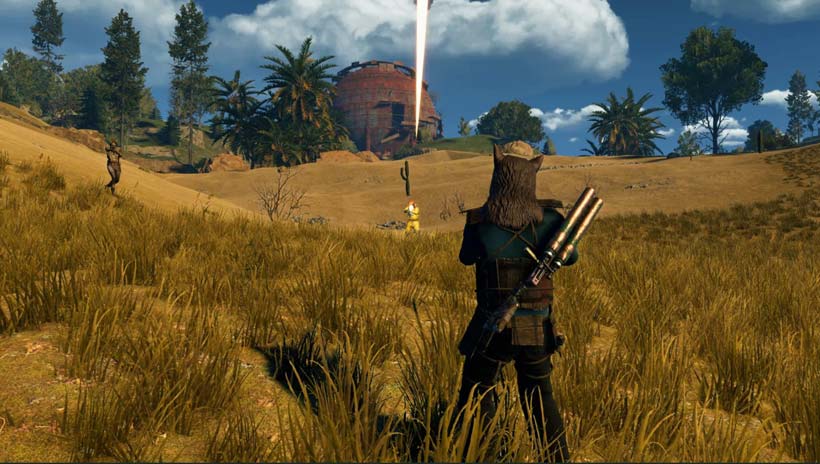
Small achievements consequently carry unusual weight. Crafting your first tools matters. Placing a sleeping bag matters. Returning with a full inventory while footsteps follow you through the trees can feel more consequential than winning a scripted boss fight. The attraction is not simply that Rust is difficult. It is that nearly every decision leaves something exposed, and the island gives other people plenty of ways to exploit it.
Story
Rust has no conventional campaign with quest chains, cutscenes, or companions. Abandoned roads, military monuments, locked crates, hostile scientists, and radioactive sites hint at a wider history without insisting that you follow it. These locations provide atmosphere and objectives, but not a story that progresses independently of the server.
Instead, the narrative comes from interactions nobody planned in advance. A stranger on the beach might help build a starter base, only to change the door code later. A neighboring group can become a trading partner, a persistent enemy, or the target of a raid that another clan finishes first. The stories are often petty and occasionally hilarious. They work because their consequences are real within that particular wipe: trust changes who can enter your home, and a feud can dictate where you dare to travel.
Gameplay
A World That Does Not Forgive
Rust’s forests, rivers, beaches, deserts, and snowy slopes can appear almost peaceful. Then a wolf appears, the temperature drops, or a geared player crosses the ridge ahead. Gathering resources, crafting, building shelter, exploring monuments, collecting components, and fighting over territory form the basic loop. What makes that loop absorbing is the constant need to decide whether another trip is worth the risk.
The opening hours show this clearly. A stone hatchet, sleeping bag, and cramped 2×1 starter base can feel like serious achievements when you have repeatedly died before placing a door. Yet choosing where to put that base matters almost as much as building it. A home near roads and recyclers encourages frequent component runs; one beside a contested monument brings more opportunities and more unwanted visitors. Snow, desert, and forest locations create different gathering routines. The map is not just scenery around your base. It quietly determines how you will spend much of the wipe.
This also explains why solo survival benefits from restraint. Scouting a neighborhood before committing to it, placing backup sleeping bags, and choosing an overlooked activity while larger groups fight over high-value areas can achieve more than repeatedly challenging a clan head-on. Rust rewards aggression, but it also rewards recognizing the fights you cannot afford.
If you enjoy scavenging and construction but prefer cooperation to suspicion, Abiotic Factor offers a useful contrast. Its improvised survival inside a scientific facility shifts the pressure toward shared PvE challenges rather than strangers trying to locate your front door.
From Rock to Rocket Launchers
Progression gives every scavenging run a purpose. Primitive bows and crossbows eventually give way to firearms, protective equipment, stronger doors, and explosives. Workbenches divide crafting into tiers, while blueprint fragments, pages, and books support advancement through their respective tech trees. Scrap remains useful for researching specific found items at the research table. That distinction matters: access to a valuable weapon is not quite the same as having a reliable way to make another one.
A modest pistol that can be crafted again after a defeat may be more useful than a powerful rifle taken from another player. The latter wins attention; the former makes it possible to keep leaving home equipped without treating every loss as a disaster. Rust’s progression is at its most convincing when it turns an occasional lucky find into repeatable independence. Reaching better monuments and contested loot can accelerate that process, but it increases your exposure to people pursuing the same goal.
Base-building creates a parallel kind of progression. Airlocks, honeycombing, tool cupboards, sheet-metal doors, garage doors, traps, and external walls are not decorative upgrades. Each changes the cost, route, or uncertainty of an attack. A poorly planned compound can lose everything through one vulnerable entrance; a thoughtful layout may force raiders to spend far more explosives than the loot is worth.
Later, electricity and industrial components can turn a home into a working production system. Storage adaptors and conveyors move resources between containers, while automated sorting and furnace arrangements reduce the chores after a successful run. There is a real shift in satisfaction here: returning from a dangerous expedition no longer means spending the next stretch of play organizing boxes by hand. The base starts supporting its owner’s preferred activities rather than constantly demanding attention. Of course, building that convenience takes materials, knowledge, and time that can all disappear in a raid.
There is a particular tension in approaching home with scrap and components you cannot easily replace. You avoid open fields, listen for gunfire, and relax only when the door shuts. Even then, logging off never feels completely secure. A locked base is protection, not a guarantee that it will exist when you return.
The Social Experiment
Other players are what make Rust more than a demanding crafting game. Voice chat can turn an encounter into a negotiation, joke, threat, or distraction while an unseen teammate approaches. Giving a newcomer food might create an ally. It might also reveal where your supplies are stored. Rust makes kindness possible without making it automatically sensible.
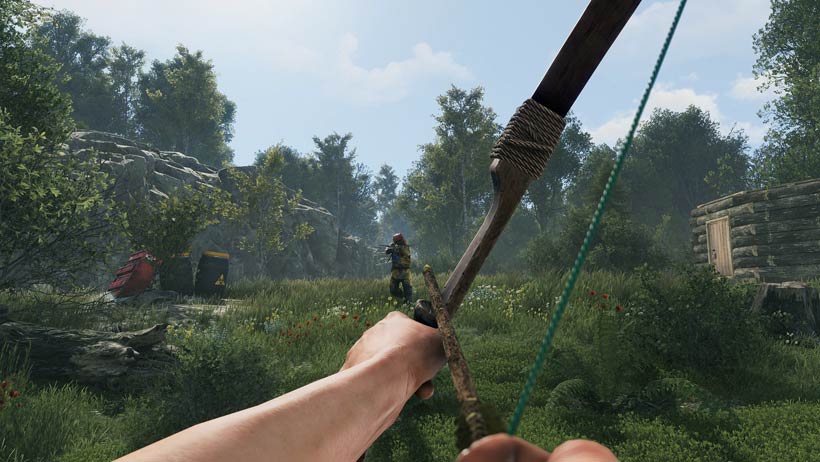
Joining a group solves some problems while introducing others. Extra hands make resource runs and raid defense easier, but shared codes, disputed loot, leadership, and trust can become problems of their own. A stranger outside the wall may be alone, baiting a fight, or quietly memorizing the location. The important question is not always whether you can win an encounter. Sometimes it is whether responding will make tomorrow harder.
For a more solitary version of starting vulnerable and learning to control hostile territory, Far Cry Primal uses hunting, primitive tools, and environmental awareness to create danger without Rust’s player-driven betrayals. Both reward reading the world, but only one allows another person to dismantle your plans while you sleep.
Raids, Combat, and High Stakes
Rust’s gunfights gain their edge from what can be lost afterward. Dying on a monument run can erase a bag of scrap; losing a fight outside your base can expose your doorstep to attackers. Positioning, recoil control, terrain, and patience matter, but information can be just as valuable as aim. Shooting first may win a duel while revealing the position you spent hours trying to keep hidden.
Raiding raises the stakes further. Explosives require considerable preparation, and choosing an entry path means judging materials, likely loot rooms, defensive turrets, and the cost of every breached wall or door. An attack can produce more equipment than a group could gather normally, yet an unsuccessful raid can consume the work of several evenings. The numbers matter, but so does uncertainty: defenders might be online, reinforcements might arrive, and another group may hear the explosions.
Good defense also involves more than thick walls. A carefully designed electrical network can lose its value if one destroyed room cuts power or control to every turret and alarm. Separating essential circuits and avoiding obvious single points of failure can make a base less tidy but harder to disable. It is an unusually satisfying design problem because the best solution is not always the most efficient one on paper.
When rockets begin striking the walls, the experience becomes a chaotic mixture of fighting, replacing doors, sealing breaches, and moving valuables. Offline raids remain particularly frustrating because the owner may never get the opportunity to respond. Rust’s willingness to let one group undo another’s work is responsible for some of its best stories and some of its least welcoming moments.
Replayability and Wipe Culture
Wipes reset the contest and give familiar systems a different context. The opening rush for building spots, resources, and monuments can be exhausting, especially for anyone who cannot play long sessions. Yet the changing landscape of bases, alliances, and rivalries keeps subsequent attempts from feeling like a fixed campaign replay. A weekly high-population PvP server moves at a very different pace from a quieter solo, community, or PvE server.
What helps Rust last is that combat dominance is not the only credible ambition. A player can focus on electricity, traps, farming, transport, or running a trading operation. A merchant who continually sells tea and supplies rather than hoarding inventory changes the meaning of base security: an empty storeroom can be almost as useful as another armored wall. That strategy still requires patience and sustained work, but it shows how the game’s economy can support a completely different sort of endgame.
Farming offers a similar choice between perfection and practicality. Plant genetics and cloning can become a deep optimization project, but a productive greenhouse does not require flawless plants to supply useful teas. Accepting decent strains and spending the saved time elsewhere is a legitimate way to engage with the system. Rust is often described as a relentless race toward better guns; its quieter activities reveal how much of that race is optional, depending on the server and the goals players set for themselves.
For players more interested in gathering materials, building a safer home, and exploring dangerous places together than defending against raids, Subnautica 2 is an instructive PvE-focused contrast. It preserves the satisfaction of gradually reaching farther with better equipment while removing the threat of hostile human neighbors.
Final Verdict
Rust is demanding not only because its combat is unforgiving, but because progress never buys complete peace of mind. A clever base can be breached, a trusted teammate can become an enemy, and an expensive weapon can disappear during an ordinary resource run. The same systems also support thoughtful survival, ingenious engineering, improbable friendships, and unusual goals that have nothing to do with winning a firefight.
Its weaknesses are substantial. Solo play can feel uneven against organized groups, offline raiding undermines the satisfaction of building, and regular wipes can make the time commitment exhausting. Yet for players who enjoy creating their own objectives and accepting the consequences, Rust remains a remarkably flexible survival sandbox. Its most memorable reward is rarely the loot itself, but the precarious little world built around acquiring and protecting it.
Rust Pros & Cons
- Pro: Brutal, memorable survival sandbox where server wipes create new bases, rivalries, alliances, raids, and player-made stories
- Pro: Deep progression through gathering, monuments, scrap, research, workbenches, weapons, electricity, farming, vehicles, and increasingly expensive base defenses
- Pro: Excellent social tension through proximity voice chat, alliances, betrayal, territorial pressure, PvP, online raids, and the constant risk of losing carried resources
- Pro: Huge server variety across official, community, modded, solo/duo/trio, PvE, roleplay, Premium, Secure, high-pop, and lower-pop experiences
- Pro: Long-running post-launch support, Steam Workshop integration, custom maps, server-side modding, and a mature dedicated-server ecosystem
- Con: Extremely punishing for beginners who choose high-pop or poorly moderated servers without understanding wipe rules and base security
- Con: Offline raids, cheating, griefing, hostile voice/text chat, and clan-size imbalances can ruin a wipe even when your own progression is going well
- Con: Large bases, high entity counts, crowded servers, memory pressure, and slow storage can make performance much heavier than the game’s age suggests
- Con: Steam Deck and SteamOS remain Unsupported for protected play because the anti-cheat configuration is not enabled for those platforms
- Con: Progression can demand substantial time, especially for solo players or groups trying to rebuild after a raid late in a wipe
Rust PC System Requirements
OFFICIAL WINDOWS PC REQUIREMENTS:
MINIMUM:
OS: Windows 11 64-bit
CPU: AMD Ryzen 5 1400 / Intel Core i5-6600
RAM: 12 GB
GPU: AMD Radeon RX 470 / NVIDIA GeForce GTX 1060 / Intel Arc A580
DirectX: Version 11
Network: Broadband internet connection
Storage: 45 GB available space
Drive: SSD highly recommended; slower drives can produce longer-than-average loading times
RECOMMENDED:
OS: Windows 11 64-bit
CPU: AMD Ryzen 7 3700X / Intel Core i7-6700K
RAM: 16 GB
GPU: AMD Radeon RX 6600 XT / NVIDIA GeForce RTX 3060 / Intel Arc B580
DirectX: Version 12
Network: Broadband internet connection
Storage: 45 GB available space
Drive: SSD required
macOS Requirements
MINIMUM:
OS: macOS Monterey 12
CPU/GPU: Apple M1
RAM: 12 GB
Network: Broadband internet connection
Storage: 45 GB available space
RECOMMENDED:
OS: macOS Monterey 12
CPU/GPU: Apple M1 Pro / M1 Max / M1 Ultra
RAM: 16 GB
Network: Broadband internet connection
Storage: 45 GB available space
Additional PC Performance and Setup Notes
- Install Rust on an SSD whenever possible. Steam requires an SSD for the recommended configuration and warns that slower storage can cause substantially longer loading times even at the minimum specification.
- Performance depends on more than the local graphics preset. Server population, map size, nearby entities, very large bases, deployables, skins, background applications, available memory, and the server’s own simulation performance can all affect frame rate or responsiveness.
- Windows 11 is the current minimum Windows version listed on Steam. Windows 10 may still launch on some systems, but it is no longer the officially listed minimum and should not be presented as guaranteed support.
- Secure-tag servers can require TPM 2.0 and Secure Boot. This is a server security requirement rather than part of Steam’s universal minimum hardware table, so check the selected server before changing firmware settings.
- Steam Deck and SteamOS are officially Unsupported because Rust’s anti-cheat is not configured for those platforms. Facepunch also does not provide an officially supported Linux/Proton client for normal protected-server play.
- Rust Dedicated Server remains available for Windows, Linux, and macOS hosts. Facepunch’s server documentation recommends substantial free RAM and prefers SSD/NVMe storage, with actual requirements increasing with map size, player population, entities, and plugins.
- If Easy Anti-Cheat reports an authentication or integrity error, launch Rust through Steam, verify the game files, repair or refresh EAC using Facepunch’s support instructions, restart Steam and Windows, and check whether security software is interfering before reinstalling the whole game.
- If Rust crashes or stutters, test with updated graphics drivers, fewer background applications, clean launch options, adequate virtual memory, lower demanding graphics settings, and a different server before assuming the client installation itself is faulty.
Official Trailer
Note: Facepunch’s official trailer presents Rust’s survival loop through scavenging, base-building, PvP, vehicles, monuments, raids, and player conflict, while the written guide adds current Steam ownership, DLC, server types, anti-cheat requirements, system specifications, wipes, Steam Deck limitations, performance, and setup guidance.
Frequently Asked Questions
Is Rust Console Edition the same game as Rust on PC, and is there cross-play?
No. Double Eleven develops and supports Rust Console Edition for PlayStation and Xbox as a separate game with separate ownership and servers. Console players cannot join the Steam PC/macOS servers, even though supported consoles may play with one another.
Does Rust have an offline campaign or a story?
Rust has no conventional offline story campaign. Monuments, scientists, abandoned infrastructure, and radiation zones establish the world, but the central experiences come from exploration, survival, conflict, and relationships on multiplayer servers; a locally hosted or private server can provide a quieter practice space.
What is the difference between official, community, and modded servers?
Official servers emphasize the standard ruleset, while community servers are privately operated with their own moderation and rules. Modded servers can change gathering rates, building, progression, maps, plugins, or PvP limits, so always read a server description before joining.
What sort of Rust server should a beginner choose?
A moderated low-population, solo/duo/trio, or PvE community server is usually easier for learning building and monuments than a busy unrestricted PvP server. Compare the ping, group cap, gather rates, raid rules, and wipe schedule; these choices affect the experience more than the server label alone.
How do Premium Servers work in Rust?
Premium-tag servers check the value of qualifying items in your Rust Steam inventory; Facepunch lists a $15 eligibility threshold, but this may change. Standalone Steam DLC packs do not contribute to this requirement. The in-game Premium tag shows whether the account qualifies.
Do Secure-tag Rust servers require TPM 2.0 and Secure Boot?
Yes, participating Secure-tag servers can require both features as part of Easy Anti-Cheat checks. The restriction applies to selected servers rather than every Rust server, so check the server browser before changing UEFI/firmware settings.
Is Rust playable on Steam Deck or Linux with Proton?
Valve lists Steam Deck as Unsupported because Rust’s anti-cheat is not configured for Steam Deck or SteamOS. Facepunch does not officially support the Linux/Proton client for normal protected-server play; hosting a Linux dedicated server is a separate matter.
When do Rust servers wipe, and are blueprints always reset?
A map wipe resets a server’s world and bases, often on a weekly, biweekly, or monthly schedule; the default monthly timer aligns with the first Thursday. Blueprint resets are a separate decision and are not automatically identical on every server, so check that server’s wipe information before investing in long-term research.
What should a beginner do first after spawning?
Gather wood, stone, and cloth for basic tools and a sleeping bag, then secure a compact base with a tool cupboard, locks, and an airlock. Make short resource trips and avoid carrying all your useful materials at once until you understand the neighborhood.
How do tool cupboards, upkeep, and honeycombing work?
A tool cupboard controls building privilege and holds materials for upkeep; missing upkeep can cause structures to decay. Honeycombing adds protective layers to force raiders through more building pieces, but it also raises construction and upkeep costs.
How do blueprint fragments, pages, books, scrap, and workbenches work?
Tech-tree progression uses blueprint fragments, pages, and books for its three tiers. Scrap is still used to research specific found items at a research table but is no longer spent on the tech trees; workbenches define which tier of equipment you can craft. Looting and upgrading blueprint materials gives scavenging routes an additional purpose.
Can Rust be played solo or without PvP?
Yes. Solo play is possible but harder against organized groups, while solo-only, PvE, roleplay, and limited-PvP community servers can reduce the pressure. Standard unrestricted Rust still allows other players to attack and raid you.
What is offline raiding, and can a server prevent it?
Offline raiding means attacking a base while its owners are disconnected. It is allowed on many servers, but some community servers use raid windows, offline protection, or PvE rules to limit it; check those rules before committing to a long wipe.
Are Rust DLC packs and paid skins necessary to progress?
No. The base game includes the core survival, crafting, raiding, and combat loop. Optional Steam DLC adds thematic items, instruments, voice props, and cosmetics, while separately sold building or utility items can have practical differences that buyers should evaluate before purchasing.
Does Rust support mods and custom maps?
Yes. Community servers can use custom maps and server-side plugins, and Steam Workshop supports skin-related community creations. This does not authorize client-side cheats, scripts, ESP, or aim-assistance tools, which can lead to bans.
How can I fix Rust Easy Anti-Cheat authentication errors?
Start Rust through Steam, verify the installed files, restart Steam and Windows, and follow Facepunch’s EAC repair guidance. An anti-cheat problem can prevent joining protected servers even when the client itself opens.
Why does Rust stutter or load slowly on PC?
Rust can become demanding around populated servers, large bases, many entities, and memory-heavy scenery. An SSD, sufficient RAM, fewer background processes, appropriate graphics settings, and a healthy server can help; the Windows requirements and SSD guidance are listed above.
Can I host a private Rust server?
Yes. Facepunch offers Rust Dedicated Server software for self-hosting, including Windows and Linux hosts. Population, map size, plugins, networking, upkeep, backups, and moderation determine how much hardware and administration the server needs.
Does Rust support controllers on PC?
Rust on PC is primarily built for keyboard and mouse. Steam Input can provide customized controller mapping, but aiming, building, and fast inventory management can be more cumbersome without a mouse.
Is Rust suitable for children?
Rust includes violent combat, optional nudity, unmoderated encounters, player-created content, and open voice/text communication. Parents should evaluate both its mature content and the moderation standards of the specific server community.
Still have questions? Check the official Facepunch Rust Support center, Steam Discussions, or Rust community on Reddit for technical help, server discussions, and community guidance.
Sources & References
Key release, gameplay, store, server-security, and PC compatibility details were checked against these sources:
- Rust on Steam — official PC purchase route, supported systems, DLC, requirements, reviews, and Steam Deck status
- Facepunch: Early Access — the first public Steam release milestone
- Facepunch: Printed and Polished — blueprint fragments, pages, books, scrap research, and enduring progression changes
- Facepunch: Premium Servers — qualifying inventory values and DLC exclusions
- Facepunch: TPM and Secure Boot — Secure-server eligibility and anti-cheat requirements
- Official Rust Wiki: Server Wipe Timer — monthly, biweekly, and weekly wipe configuration
- SteamDB: Rust App Metadata — Unity engine identification and Steam Family Sharing exclusion
Similar Games Like Rust





Found something worth playing through DecideGame?
DecideGame.com is an independent gaming project run by Editor Zero. If this guide helped you discover a game, solve a problem, or find useful information, you can support DecideGame.com and help keep new and updated game guides coming.
DecideGame — PC Game Guides, Reviews & Setup Help