
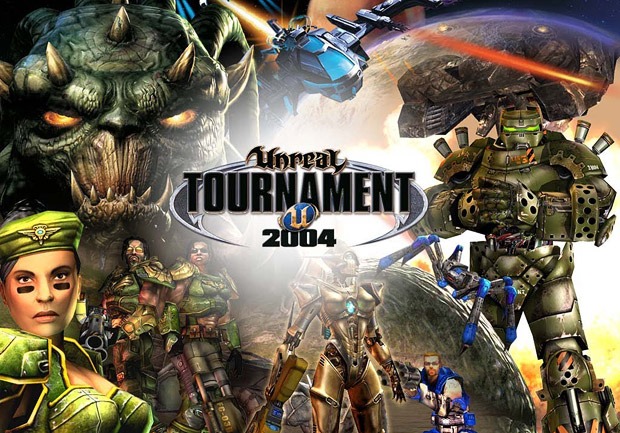
📅 Game released: 2004
Use this updated 2026 Unreal Tournament 2004 PC guide to check Epic-authorized OldUnreal download availability, install the Editor’s Choice Edition, configure community multiplayer servers, review system requirements, and understand modern Windows compatibility, Steam Deck support, mods, and gameplay modes.
 By Editor Zero — independently researched, edited, and maintained.
Last updated: 20 October 2026
Last reviewed: 20 October 2026
Table of Contents
- Quick Summary
- Quick Facts
- Official PC Stores, Download & Installation
- Unreal Tournament 2004 Review
- Pros & Cons
- PC System Requirements
- Frequently Asked Questions
- Similar Games
Unreal Tournament 2004 Quick Summary
✔ Fast-paced science-fiction arena FPS developed by Epic Games and Digital Extremes, combining weapon pickups, double jumps, dodge movement, jump pads, futuristic environments, and competitive first-person combat.
✔ Onslaught introduces vehicle-based team battles around interconnected power nodes, while Assault focuses on sequential attack-and-defense objectives. Traditional Deathmatch, Team Deathmatch, and Capture the Flag deliver smaller, faster encounters.
✔ Similar to Overwatch through its futuristic multiplayer arenas, distinctive weaponry, team-based objectives, fast combat, and emphasis on movement and positioning, although UT2004 uses arena weapon pickups instead of fixed hero abilities.
✔ The original Steam and GOG editions are no longer sold to new customers, but the OldUnreal project distributes an Epic-authorized game installer and maintains compatibility updates for modern PCs.
✔ Epic’s original online master-server services have ended. Community alternatives can restore server discovery, while offline bot matches and LAN play preserve substantial functionality without reliance on public matchmaking.
✔ The Editor’s Choice Edition includes expanded maps, vehicles, and characters, while UnrealEd and community modifications provide extensive opportunities for custom maps, game types, and long-term replayability.
Unreal Tournament 2004 Quick Facts
Official PC Store Status, Download & Installation
👇 Use the verified information below to understand Unreal Tournament 2004’s official purchase status, Epic-authorized OldUnreal installation route, and the steps needed to restore modern multiplayer functionality.
- Official PC store status: Unreal Tournament 2004 was previously sold through Steam and GOG, but the publisher withdrew those digital purchase listings. New buyers should not expect a normal Steam, GOG, or Epic Games Store purchase page for the original game.
- Epic-authorized community release: The OldUnreal project provides a game installer with Epic Games’ permission. This community-maintained distribution is available without purchasing a new retail license. OldUnreal is independent of Epic Games, and its patches are not official Epic-produced releases.
- Recommended Windows installation: Visit OldUnreal’s verified Full Game Installers page, obtain the Windows UT2004 installer, and run it. The installer retrieves the authorized Editor’s Choice Edition disc content, extracts the game into the folder you select, and applies the maintained OldUnreal patch automatically. The Windows installer supports Windows 7 and later. Choose a simple writable game folder outside protected locations such as Program Files.
- Linux and macOS installation: OldUnreal also documents installation through its FullGameInstallers GitHub project. Follow the operating-system-specific instructions rather than attempting to run the Windows executable directly. Linux and macOS compatibility and installation dependencies are described in the project’s documentation.
- Existing Steam and GOG ownership: Players who purchased the game before its removal should check their existing store libraries for reinstallation access. Retired purchase listings do not automatically establish that previously granted licenses have been revoked. Existing installations can also be maintained with OldUnreal’s compatible patches.
- Editor’s Choice Edition: OldUnreal uses the Editor’s Choice Edition game image rather than requiring users to obtain the original six-CD release. The ECE content incorporates additional Onslaught maps, vehicles, and characters. Some historically distributed bonus modifications and tutorial materials were separate additions, so do not assume every original physical special-edition extra is included.
- Updating an existing installation: Existing UT2004 owners can use the OldUnreal patch repository. Back up the complete game folder before applying a patch manually. OldUnreal recommends stable releases for ordinary gameplay and multiplayer; its full installer handles the required base content and patch preparation automatically.
- Community multiplayer servers: Epic discontinued the original UT2004 master-server service. OldUnreal includes community master-server support, and 333networks documents replacement server discovery for older installations. After using OldUnreal’s installer, check the in-game server browser before attempting manual configuration. Public server availability, active game modes, and player population vary.
- Offline and LAN play: Local bot battles and the offline tournament structure do not depend on Epic’s retired public master server. LAN games are also supported by the original design. Internet access is needed for initial installation through OldUnreal and for public online play, but the arena gameplay itself is not an online-only service.
- Steam Deck and handhelds: Valve rated the historical Steam edition Playable, with controller-interface and on-screen keyboard caveats. For a new installation without Steam ownership, OldUnreal’s Linux setup can be attempted through Steam Deck Desktop Mode. The old Steam rating does not guarantee that every community installer, renderer, or custom controller configuration will work identically.
- Mods and custom content: UnrealEd, maps, mutators, and community game types can expand UT2004 substantially. Start with an unmodified, updated installation, then verify that each modification supports your game build. Older custom packages may not work correctly with all modern patches or online servers.
 Get the Epic-Authorized UT2004 Installer from OldUnreal
View OldUnreal’s UT2004 Compatibility Patches
 View UT2004 Community Multiplayer Setup Instructions

Unreal Tournament 2004 Review
Brilliant movement and weapon interplay survive the leap from intimate duels to chaotic vehicle warfare, even when team AI and campaign pacing falter.
Unreal Tournament 2004 is at its best when a firefight refuses to stay in one place. An opponent disappears over a ledge, a rocket turns a doorway into a hazard, and the route to a shield pickup becomes as important as the next shot. Its deeper pleasure lies in navigating arenas more intelligently than whoever is trying to kill you.
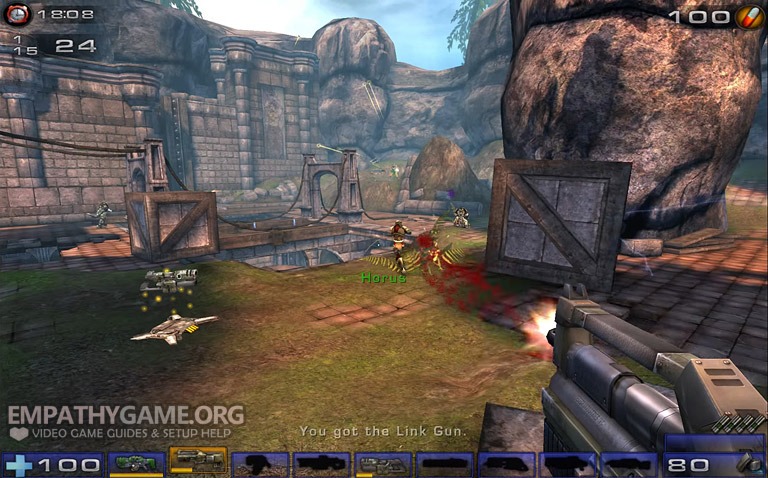
Epic Games and Digital Extremes built on the tight arena combat of Unreal Tournament 2003 while making room for something much larger. Deathmatch remains a contest of prediction, aim and equipment control; Onslaught adds vehicles and a shifting network of objectives; Assault turns individual maps into elaborate attacks with distinct stages. The modes remain connected by the same combat rules, though not every addition is equally strong. The tournament’s economy adds busywork, teammates can lose track of objective priorities, and the game’s quick movement creates a demanding first impression. Its appeal depends less on collecting wins than on enjoying the process of becoming harder to hit and harder to outthink.
Movement Makes Every Arena a Tactical Space
Running and shooting are only the starting point. Double jumps reach raised platforms; a quick directional dodge evades a projectile; a dodge jump turns that burst into rapid traversal. Wall dodges add another escape route when a corridor appears to have none. A staircase may be the obvious route upward, but a wall dodge can reach a valuable pickup first.
This mobility works because UT2004’s weapons seldom end a fight instantly. Rockets and energy projectiles remain visible long enough to evade, while hitscan weapons punish opponents who repeat the same jump at the same point. Jumping carelessly can be as dangerous as standing still. A clever opponent waits for the committed arc, then fires where the target must descend.
Health vials, shield packs, weapon spawns and sightlines form a second contest beneath the gunfire. Winning a close encounter is satisfying; arriving at the next fight with armor while the defeated opponent scrambles for equipment is how a lead grows. The same principles make an uneven match recoverable. A weak respawn becomes dangerous again by collecting armor and approaching from a different angle. Mastering that spatial logic is also the game’s steepest barrier: beginners are rarely told how much of a defeat happened before either combatant pulled the trigger.
Distinctive Weapons Create Choice, but Not Perfect Balance
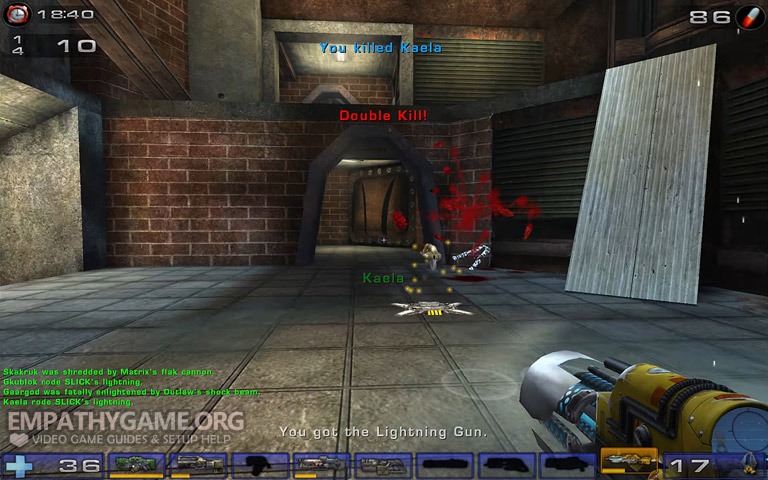
Each weapon asks for a different kind of commitment. The Flak Cannon punishes anyone rounding a tight corner, but loses authority across an open courtyard. Rockets allow prediction rather than pinpoint tracking: a volley aimed at the floor or an exit can force a dodging opponent into a worse position. The Lightning Gun and classic Sniper Rifle make distant exposure risky, while the Link Gun’s sustained beam rewards a target that remains within reach. Alternate firing modes mean the decision is rarely just which weapon to equip; it is how to use it in the next few seconds.
The Shock Rifle captures both the brilliance and the potential frustration of this design. Its accurate beam detonates the secondary-fire sphere in a powerful Shock Combo. The satisfying version catches an opponent who misjudges the sphere’s path. The less elegant version repeatedly detonates those spheres around a choke point, using wide explosions to deny passage. That can feel oppressive in a cramped defense, particularly when one skilled combatant controls the tempo. Its versatility can overshadow the arsenal, though consistent combos demand ammunition and precision.
Not everything in the arsenal deserves equal praise. The default Assault Rifle is a functional emergency weapon, but its loose fire and bouncing, delayed grenades can make a fresh spawn feel badly outmatched against someone holding a specialized gun. Learning to escape rather than insist on an unfavorable duel is essential. Conversely, a Bio-Rifle projectile placed along a pursuit route can be more useful than a direct hit from a supposedly stronger weapon. Timing and terrain often matter more than raw firepower.
Onslaught Turns Vehicle Combat Into a Battle Over Connections
Onslaught is the game’s defining achievement because its huge maps still have a clear strategic center. Teams cannot simply rush the opposing Power Core. They first have to establish a connected chain of Power Nodes, which concentrates otherwise scattered fighters around contested positions. On Torlan, capturing one node opens an attacking lane, but losing the link behind it can halt the push. The most useful teammate is often the one rebuilding a vulnerable connection rather than topping the scoreboard.
The vehicles give those shifting fronts distinct shapes. A Manta can ferry a combatant toward an exposed node or skim past infantry with dangerous speed. A Goliath can lock down an approach with heavy fire, while a Raptor threatens ground positions from above. The Hellbender rewards coordinated passengers, and the imposing Leviathan brings serious force at the cost of speed and an obvious profile. A tank can secure a lane but cannot answer every shift in the node network.
Crucially, infantry have work to do even when vehicles dominate the skyline. The AVRiL can punish an aircraft or armored target if the shooter maintains a lock, and the Link Gun repairs friendly vehicles while accelerating node construction or restoring damaged nodes. A successful push can involve a Raptor distracting defenders while infantry capture and repair a node.
Without coordination, a lone player may travel across a huge map toward a node allies have already abandoned. Onslaught works best when everyone understands where the front line has moved.
Assault’s Set Pieces Are Memorable and Sometimes Brittle
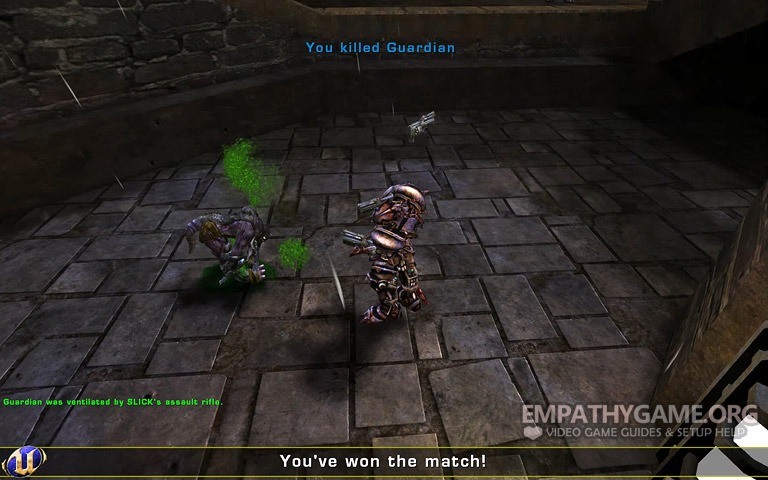
Assault trades open-ended control for a series of attacks and defenses. AS-Convoy turns an armored vehicle column into moving terrain, with successive objectives shifting the fight along its route. AS-Mothership begins in spacecraft before attackers breach a landing bay and continue through the ship on foot. Those transitions give matches a dramatic arc absent from Deathmatch.
The satisfaction comes from recognizing an objective, choosing a safer approach and coordinating a push. But elaborate scripting also narrows what counts as useful action. Someone unfamiliar with the objective sequence can fight brilliantly in the wrong corridor, and an experienced defending team can turn predictable approach routes into repetitive bottlenecks.
Bot behavior makes this tension sharper. In a straightforward shootout, computer teammates can navigate and fight convincingly; in a complex Assault sequence, they do not always distribute themselves sensibly. AS-Mothership’s move from space combat to the landing and interior objectives is a particular pressure point. Allies may bunch up around the human leader or wander away from the immediate task, leaving one combatant to activate objectives while the others trade shots nearby. A different order may help, but not reliably enough to replace good coordination.
With coordinated people, Assault’s carefully staged chaos can be a highlight. Alone, the same theatrical design occasionally exposes how dependent it is on the right teammates doing the right jobs.
The Smaller Modes Reveal Different Sides of the Same Design
Capture the Flag stretches movement mastery into a team problem. Entering an enemy base efficiently is only half the challenge; a carrier needs a safe return route, escorts need to anticipate pursuit, and defenders must know when to abandon a chase to protect their own flag. Bombing Run redirects similar skills toward passing and transporting a ball, while Double Domination asks teams to hold two points together rather than gather isolated kills. Invasion supplies a more straightforward cooperative fight against waves of monsters.
CTF-FaceClassic emphasizes exposed crossings and sniper sightlines; enclosed arenas demand different improvisation. A three-person LAN session on an oversized CTF map can feel strangely quiet despite the game’s speed: most of the time goes into crossing empty ground rather than encountering rivals. Smaller maps or additional bots solve more of that problem than raising the frag limit. Map size must suit the number of combatants.
Its Tournament Fiction Adds Character Rather Than Story
The Liandri Corporation’s bloodsport provides a memorable context for the violence without turning it into a traditional narrative shooter. Malcolm’s Thunder Crash team, Xan’s robotic competitors and the other named rosters give opponents a recognizable identity. The championship offers little character development. A player looking for character arcs or a plot-driven campaign will find more atmosphere than storytelling.
The personality is carried by the arenas. Towering platforms, machinery, alien structures and spaceships turn each match into a different kind of futuristic spectacle. Bright projectiles and strong silhouettes help readability despite dated textures and animation. The music blends electronic momentum with heavier industrial tones; impacts, charging weapons and the gleefully excessive announcer reward aggressive play with unmistakable feedback.
It is not a restrained presentation. Several explosions, vehicle effects and announcer calls arriving at once can overwhelm the scene, particularly in crowded team fights. Yet that excess reinforces the game’s central fiction: this is a professionalized arena spectacle, not a simulation trying to hide its absurdity.
The Offline Campaign Is More About Managing a Team Than Growing a Hero
The single-player tournament gives bot matches a ladder, cash prizes and a roster to manage. Credits cover entry fees and hiring, and they can also disappear into wages and treatment for injured teammates. That creates a modest strategic question between rounds: is a costly recruit actually helping enough to justify the continuing expense? Buying the most impressive-looking lineup is not necessarily the efficient choice. A cheaper teammate who reliably contributes may leave more money available for later matches and unexpected injuries.
The system provides some stakes, but it can also make the campaign drag. Extra matches may be needed to recover finances, while early ladders spend a long time on familiar formats before opening the larger team battles. The teammates have statistics and recognizable behavior, not the evolving personalities or deep management choices of a proper sports career. Credits matter mainly because they regulate access to more shooting.
The strongest payoff is the eventual test of what the player has learned. The tournament finale on DM-HyperBlast2 takes place aboard a low-gravity arena ship, where the decisive advantage is not always superior aim. Malcolm is one possible final rival, alongside other leading team captains; facing him can become a struggle to control the circular outer route, deny valuable shield pickups and anticipate his pursuit. The Bio-Rifle’s lingering hazards or carefully placed explosives can punish a predictable approach, while repeated armor collection changes the survival equation. The encounter distills the campaign’s better lesson: even a frighteningly accurate bot can be approached as a problem of space and resources.
Instant Action and Custom Maps Keep the Rules Flexible
Instant Action is a better expression of UT2004’s longevity than its fixed tournament ladder. Map selection, bot difficulty, match rules and mutators can radically change familiar spaces. Instagib strips combat down to accuracy and positioning, while Low Gravity alters jumps and makes trajectories more difficult to judge. Adrenaline abilities, where enabled, also introduce brief tactical shifts: a burst of speed can support an escape, while a well-timed Booster changes how aggressively someone can contest a fight.
Custom content expands those possibilities beyond standard matches. Community Assault Trials maps can turn combat systems into cooperative obstacle courses and physics challenges. One kind of stunt asks players to propel a Scorpion toward a distant platform using Spider Mines, with success depending more on shared timing than combat proficiency. It’s an amusing reminder that players can build entirely different games from the same movement and vehicle tools.
For solo play, some custom arenas lack bot pathing and oversized Onslaught maps feel empty. Replayability depends on pairing the right opponents with a suitable map and mode.
Final Verdict
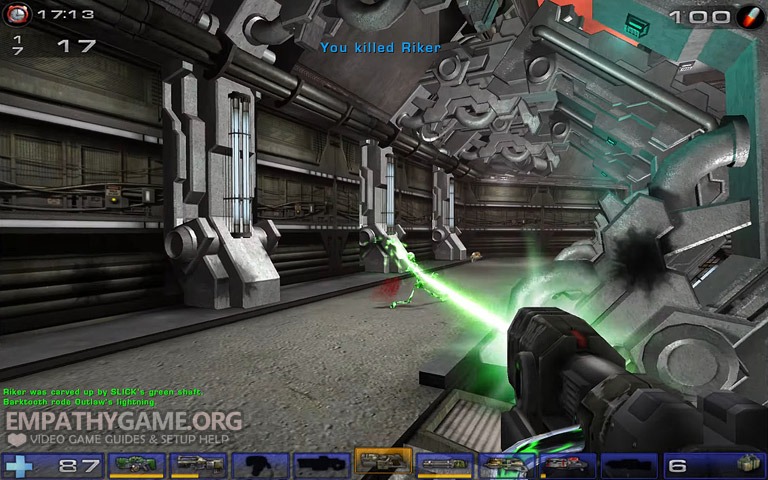
Unreal Tournament 2004 works because its expansion of scale never completely overwhelms the precision of its original arena combat. A dodge jump, an expertly placed Shock Combo and a carefully timed shield pickup can decide a small duel; the same awareness of timing and position carries into an Onslaught battle when nodes, vehicles and allied repairs all compete for attention. Assault offers dramatic objectives, while the traditional modes keep that familiar loop flexible.
The problems are real. A newcomer faces a substantial movement and map-knowledge gap, the starting weapon can make weak respawns feel worse, and objective-heavy matches expose uneven bot priorities. The single-player ladder is valuable as a guided sequence of challenges, but paying teammates and healing injuries add more friction than depth. Community creations multiply the possibilities without always accommodating solo play. None of these flaws is erased by the impressive amount of content.
What remains distinctive is how often the game rewards understanding rather than reflexes alone. Choosing an escape route, denying an armor pickup, repairing the right node or selecting a map appropriate to the number of competitors can matter more than another impressive kill. UT2004 is a poor fit for someone seeking relaxed shooting or a story-led campaign. For anyone who enjoys learning a demanding competitive system—and discovering how the same system behaves in wildly different modes—it remains a remarkably rich arena shooter.
Unreal Tournament 2004 Pros & Cons
Unreal Tournament 2004 PC System Requirements
The following specifications describe the original Windows PC release and are based on its published retail and Steam requirements. They are historical minimum and recommended specifications, not measured performance targets for Windows 10 or Windows 11. Modern OldUnreal installations also have separate operating-system and 64-bit processor requirements.
ORIGINAL WINDOWS PC REQUIREMENTS:
MINIMUM:
OS: Windows 98 / Me / 2000 / XP (original retail compatibility)
CPU: Intel Pentium III 1.0 GHz or AMD Athlon 1.0 GHz processor
RAM: 128 MB
GPU: 32 MB Windows-compatible graphics card
DirectX: DirectX 9.0b
Storage: 5.5 GB available disk space
Sound Card: Windows-compatible sound card
Network: TCP/IP connection for LAN or internet multiplayer; original internet minimum 33.6 Kbps
RECOMMENDED (ORIGINAL PUBLISHED GUIDANCE):
OS: Windows 2000 / XP
CPU: Pentium III or AMD Athlon 1.2 GHz or faster
RAM: 256 MB or more
GPU: 64 MB NVIDIA or ATI hardware T&L graphics card
DirectX: DirectX 9.0b
Storage: 5.5 GB available disk space, excluding additional custom content
Sound Card: Windows-compatible sound card
Network: Broadband internet recommended for multiplayer
Modern OldUnreal Compatibility Requirements
OldUnreal maintains newer game binaries for modern operating systems. These requirements are separate from the original retail-era specifications above.
OS: Windows 7 or later for the current Windows installer; modern Linux distributions and supported macOS releases through platform-specific builds
CPU architecture: 64-bit Intel/AMD-compatible or supported 64-bit ARM platform
GPU: Hardware compatible with the selected OldUnreal renderer; exact performance depends on the device and graphics backend
Storage: Allow at least the original 5.5 GB game footprint, with additional space for extracted content, installer files, patches, and optional maps
Internet: Required to retrieve game content through the community installer and to access public online servers
OldUnreal does not publish a universal modern CPU/GPU benchmark specification equivalent to the original retail minimum and recommended tiers. The original requirements should therefore not be interpreted as a guarantee of performance on every modern device.
Additional PC Performance and Setup Notes
Windows 10 and Windows 11: Use the OldUnreal installer rather than depending on the original retail executable. Its maintained binaries address modern operating-system compatibility, stability, and rendering issues. The project recommends installation outside protected Program Files directories.
Widescreen and ultrawide displays: The OldUnreal compatibility patches include improved widescreen-aware HUD elements and menus for 16:9, 16:10, and wider aspect ratios. The installer configures the updated main menu automatically. For an existing manually patched installation, open System/UT2004.ini, find [Engine.GameEngine], and set MainMenuClass=GUI2K4.UT2K4MainMenuWS. Restart the game after saving the file. Back up the configuration before editing it.
Graphics renderers: OldUnreal supplies updated rendering options, including a modern OpenGL-based renderer and Direct3D 11 on supported Windows hardware. Start with the installer defaults, then experiment with another renderer if you encounter graphics problems. Some older modifications may behave differently across renderers.
Frame rate and input: UT2004 rewards precise mouse movement, stable frame pacing, and low input delay. Avoid assuming that removing every frame-rate limit is always beneficial: extremely old game code and community modifications may respond differently at unusually high frame rates. The maintained patch provides configurable frame-rate controls.
Controls: Mouse and keyboard remain the most natural control scheme for aiming, strafing, weapon selection, dodging, and translocator movement. Controllers can be configured through the available input options or platform-specific mapping tools, but the original game does not provide the same streamlined controller experience as a modern console-focused FPS.
Multiplayer connection problems: If the public server list is empty, first verify that the game uses an updated OldUnreal installation. For a legacy installation, follow the 333networks UT2004 master-server instructions. Firewall rules, incompatible game versions, unavailable servers, and server-specific modifications can also prevent a successful connection.
Modding and backups: Test the unmodified game before adding custom maps or mutators. Make a copy of your game installation and important configuration files before installing older packages or experimenting with community builds. Unreal Archive provides a large UT2004 content catalogue, but compatibility and maintenance vary between individual submissions.
Official Trailer
Note: This archived Unreal Tournament 2004 promotional trailer, published through IGN, showcases the game’s science-fiction arenas and fast-paced shooter combat. The written guide provides the additional information needed for legitimate installation, modern PC compatibility, and community multiplayer access.
Frequently Asked Questions
Is Unreal Tournament 2004 worth playing in 2026?
Yes. Its fast movement, distinctive weapons, varied objective modes, and capable offline bots still make it an enjoyable arena shooter. The biggest limitations are its aging presentation and unpredictable online population, so it is especially appealing to players who enjoy skill-based FPS combat without modern progression systems.
Does Unreal Tournament 2004 have a single-player campaign?
Yes, but it is a tournament campaign rather than a traditional story-driven adventure. Players compete against increasingly difficult AI teams, recruit teammates, earn credits, and eventually face elite opponents such as Malcolm, Xan, or Clanlord. There are no conventional story missions or cinematic exploration levels.
What is the difference between Instant Action and Single Player in UT2004?
Instant Action lets you choose a map, game mode, bot difficulty, and match rules without campaign progression. Single Player follows a structured tournament ladder with team management, credits, and increasingly difficult challenges. Instant Action is usually the better choice for experimenting with unfamiliar modes or practicing specific maps.
How do credits and team recruitment work in the UT2004 tournament?
Winning tournament matches earns credits that can be spent on recruiting teammates and covering tournament-related expenses. As more teams are defeated, additional AI competitors become available for recruitment, making it possible to improve your roster before difficult matches. Selecting suitable teammates matters because their individual abilities affect team performance.
Can you play Unreal Tournament 2004 against bots without other players?
Yes. Instant Action supports configurable computer-controlled opponents across the game’s major modes, including Deathmatch, Capture the Flag, Assault, and Onslaught. You can adjust their difficulty and numbers, making offline practice useful even when no public servers are populated.
Is Unreal Tournament 2004 the same game as Unreal Tournament 2003?
No. UT2004 is a standalone successor that retains much of UT2003’s content while expanding the maps, weapons, movement, and gameplay options. Its largest additions include Onslaught, vehicle combat, and the return of Assault, making it the more comprehensive of the two releases.
How does Onslaught mode work in Unreal Tournament 2004?
Two teams compete to control interconnected Power Nodes and ultimately destroy the opposing Power Core. A team’s node network must connect to the enemy core before that core becomes vulnerable. Controlling strategically important nodes also provides access to vehicles and forward positions, making map control more important than simply accumulating kills.
How do you repair Power Nodes and vehicles in Onslaught?
Use the Link Gun’s secondary-fire beam on a friendly Power Node or damaged allied vehicle. The beam can repair nodes, construct newly captured nodes faster, and restore vehicle health. Multiple players can link their Link Guns together to improve construction and repair efficiency, but the main Power Core cannot be repaired this way.
What is the difference between Assault and Onslaught?
Assault is an attack-and-defense mode in which one team completes a sequence of objectives while the other tries to prevent or delay them. Onslaught is a more open vehicle-based battle focused on capturing Power Nodes and destroying an enemy Power Core. Assault emphasizes completing staged missions, while Onslaught emphasizes controlling a connected battlefield.
How does Bombing Run work in UT2004?
Two teams compete for a ball and attempt to score through the opposing team’s goal. Throwing the ball through the goal scores three points, while carrying it through scores seven. The ball carrier cannot use conventional weapons while holding it, so passing and teammate protection become essential.
How do you score in Double Domination?
Your team must capture both control points and hold them simultaneously for ten seconds. Touching a point captures it, but an opponent can interrupt the countdown by taking either point back. After a successful score, the points reset to neutral and another contest begins.
Does Unreal Tournament 2004 have a cooperative survival mode?
Yes. Invasion is a PvE-style mode in which players fight together against successive waves of hostile creatures. Eliminated players normally return between waves if their team survives, making it a distinct alternative to the game’s competitive modes.
How do Adrenaline combos work in Unreal Tournament 2004?
In modes that enable Adrenaline, collecting enough points allows you to activate temporary abilities through movement-key sequences. At 100 Adrenaline, pressing Forward four times activates Speed, Backward four times activates Booster, Forward twice then Backward twice activates Berserk, and Right twice then Left twice activates Invisibility. Some modes and server configurations disable Adrenaline entirely.
How do you perform dodge jumps in UT2004?
Quickly tap a movement direction twice to dodge, then press Jump during the dodge to perform a longer dodge jump. Double jumping and wall dodging provide additional movement options. Learning these techniques helps with avoiding projectiles, reaching pickups, and crossing arenas faster.
How do you perform a Shock Rifle combo?
Fire the Shock Rifle’s slower secondary-fire energy sphere, then strike it with the primary-fire beam before it disappears. This detonates the sphere in a powerful area-of-effect explosion. Timing and positioning are important because opponents can move away before the beam connects.
Can you use the Translocator while carrying the flag?
You can activate it, but teleporting causes you to drop the flag at your original position. The Translocator is therefore useful for reaching enemy territory and repositioning quickly, but it cannot transport a captured flag directly back to your base.
What weapons are effective against vehicles in Onslaught?
The AVRiL is designed for anti-vehicle combat and can track targets when its lock is maintained. Rocket Launchers, Shock Rifle attacks, and coordinated team fire can also threaten vehicles, while the Link Gun helps keep friendly vehicles operational. Against aircraft such as the Raptor, the AVRiL is particularly valuable for infantry.
What are mutators in Unreal Tournament 2004?
Mutators are optional rule modifications that can change how an existing game mode plays without replacing the entire mode. Examples include Instagib, which emphasizes one-hit eliminations, and Low Gravity, which changes movement and jumping behavior. Additional community-made mutators can introduce new weapons, abilities, and gameplay rules.
Can you play Unreal Tournament 2004 cooperatively with a friend?
Yes. You can join the same team in supported multiplayer modes, cooperate against AI-controlled opponents, or survive together in Invasion. However, the single-player tournament ladder is not a dedicated cooperative campaign with shared story progression.
Does Unreal Tournament 2004 support split-screen or couch co-op?
No. The original PC game does not provide native split-screen or multiple independently controlled local players on one display. Playing together normally requires separate computers connected through LAN or online multiplayer.
Can Unreal Tournament 2004 be played over LAN?
Yes. Players on the same local network can host and join LAN matches without using Epic’s discontinued public master-server infrastructure. Each participant needs a working game installation, and local firewall settings must permit the required network traffic.
Can you host a dedicated Unreal Tournament 2004 server?
Yes. UT2004 supports dedicated servers that run independently of the graphical game client. Server administrators can configure maps, bot populations, game modes, mutators, passwords, and community master-server listings. Hosting a publicly accessible server may require additional firewall and router configuration.
Are Unreal Tournament 2004’s official multiplayer servers still online?
Epic discontinued the original online master-server services, but community-operated game servers and replacement master servers allow multiplayer to continue. OldUnreal supports this community infrastructure. Available matches depend on individual server operators rather than a centrally maintained Epic matchmaking service.
Why does a UT2004 server kick me with an AntiTCC error?
Some older servers use AntiTCC security modifications that do not recognize newer OldUnreal game builds. This can result in an immediate kick even when your installation is legitimate. The server administrator generally needs to install a compatible AntiTCC version; clients should not disable security protections or obtain unknown replacement executables.
Why does a UT2004 server show players but appear empty after joining?
Some servers populate matches with AI bots, and their reported player counts do not necessarily represent human participants. Server filters, inaccurate listings, and connection problems can also contribute to confusion. Checking the scoreboard after joining and consulting community discussions can help identify servers with genuine human activity.
How can I find traditional UT2004 servers without extensive modifications?
Look for servers advertising standard Deathmatch, Capture the Flag, Assault, or Onslaught rules, and inspect their map names and mutator settings. Some community servers use heavily customized game types that differ substantially from the original experience. UT2004 community discussions are useful for identifying servers that preserve traditional gameplay.
Can you play the OldUnreal version of UT2004 on Steam Deck?
OldUnreal provides a Linux installation route that can be used on Steam Deck through Desktop Mode. Installation requires following the project’s Linux instructions, and controller mapping may need additional attention. The historical Steam edition’s Playable rating should not be interpreted as a guarantee for every OldUnreal installation or configuration.
Why does UT2004 keep reverting to windowed mode or forgetting my resolution?
This can happen when the game cannot save changes to its configuration files, particularly if the installation directory is protected or the files are read-only. Check that the relevant configuration files are writable, apply the maintained OldUnreal compatibility update, and select a supported renderer and resolution before testing again.
Still have questions? Check the Unreal Tournament Reddit community, UT2004 Steam Discussions, or OldUnreal Discord community for help with gameplay, multiplayer servers, installation, compatibility, and community modifications.
Sources & References
Key factual and technical information in this guide was checked against relevant official and community sources, including:
- OldUnreal — UT2004 Full Game Installers — documents the Epic-authorized community distribution, Editor’s Choice Edition installer, supported Windows systems, and automatic installation process.
- OldUnreal — UT2004 Patch Repository — explains Epic’s authorization, modern operating-system support, updated renderers, widescreen features, patch installation, and compatibility precautions.
- 333networks — Unreal Tournament 2004 Master-Server Instructions — documents community multiplayer server discovery and configuration for legacy installations.
- Steam Support — Unreal Tournament 2004 — preserves original Windows PC system requirements and historical product information.
- SteamDB — Unreal Tournament 2004 — verifies the retired Steam listing, original release metadata, overall Steam reception, and archived Steam Deck compatibility information.
- Metacritic — Unreal Tournament 2004 — documents the original PC release’s aggregate critic reception.
- Unreal Archive — Unreal Tournament 2004 — provides community-maintained information about authorized installation availability, maps, mutators, models, and other custom content.
Similar Games Like Unreal Tournament 2004
- Overwatch 1
- Call of Duty: Black Ops III
- Aliens versus Predator 2
- DOOM: The Dark Ages
- Battlefield 1942
- Call of Duty: Black Ops II
Found something worth playing through DecideGame?
DecideGame.com is an independent gaming project run by Editor Zero. If this guide helped you discover a game, solve a problem, or find useful information, you can support DecideGame.com and help keep new and updated game guides coming.
DecideGame — PC Game Guides, Reviews & Setup Help