
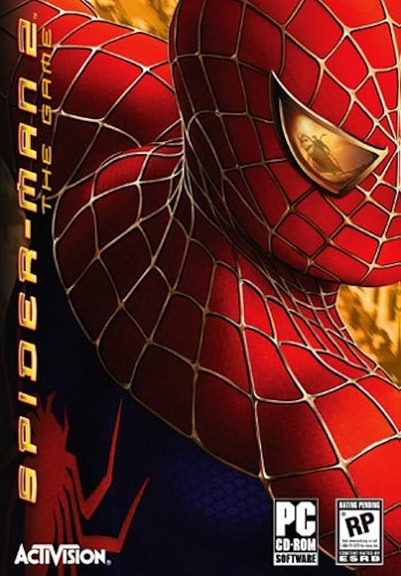
📅 Game released: 2004
Use this updated 2026 Spider-Man 2 (2004) PC guide to check official download availability, understand why the original Windows game differs from the classic console release, set up an owned PS2 or GameCube copy through PCSX2 or Dolphin, and review emulator system requirements, controller support, graphics settings, and compatibility before swinging through New York.
 By Editor Zero — independently researched, edited, and maintained.
Last updated: 8 October 2026
Last reviewed: 8 October 2026
Table of Contents
- Quick Summary
- Quick Facts
- Official PC Stores, Download & Installation
- Spider-Man 2 (2004) Review
- Pros & Cons
- PC System Requirements
- Frequently Asked Questions
- Similar Games
Spider-Man 2 (2004) Quick Summary
✔ Open-world superhero action-adventure based on Sam Raimi’s second Spider-Man film, following Peter Parker through Manhattan as he balances ordinary responsibilities, rescues civilians, fights criminals, and confronts Doctor Octopus.
✔ Treyarch’s PS2, GameCube, and Xbox versions feature a continuous 3D New York City with physics-based web-swinging, wall-running, aerial tricks, street crimes, exploration challenges, and collectible upgrades.
✔ Similar to Ultimate Spider-Man through its freely explorable Manhattan, rooftop traversal, web-swinging, superhero battles, and comic-book villains, although Spider-Man 2 emphasizes a more momentum-driven swinging system.
✔ The official 2004 Windows game is a substantially different, more linear release developed by The Fizz Factor. It does not contain the same open-world Manhattan or advanced swinging mechanics found in the Treyarch console editions.
✔ Neither original version has a verified current official Windows storefront purchase option. For the classic console experience on PC, PCSX2 and Dolphin provide practical emulation routes using properly created backups from legally obtained console copies.
✔ The original console game remains a single-player experience, with Hero Point upgrades, story chapters, optional rescue activities, races, collectibles, and post-story exploration rather than online multiplayer or downloadable expansions.
Spider-Man 2 (2004) Quick Facts
Official PC Store Status, Download & Installation
👇 Spider-Man 2 (2004) has an official historical Windows release, but no verified current major PC storefront purchase option. Use the notes below to distinguish the two original games and understand ownership-based installation or emulation.
- Official Windows availability: The original Spider-Man 2 Windows edition was commercially released by Activision, but it is not currently offered as a normal purchasable product through Steam, GOG, Epic Games Store, or Microsoft Store. There is no verified official digital re-release or replacement download for new Windows buyers.
- Two different games: The 2004 PC edition developed by The Fizz Factor is not a conversion of Treyarch’s PS2, GameCube, or Xbox game. Activision explicitly confirmed this distinction when the games launched. The Windows edition uses simpler controls, smaller and more directed environments, and substantially different mission design.
- Best version for the classic experience: Choose the Treyarch-developed PS2, GameCube, or original Xbox release if the goal is the famous open-world Manhattan with momentum-based swinging. The 2004 Windows game should be treated as its own product, not a technical alternative that reproduces the console experience.
- Physical ownership: Original console discs and Windows retail copies may still be found through secondhand markets. These are historical commercial products rather than new official digital storefront purchases. Check the exact platform and region before buying, because owning one edition does not provide another platform’s game files.
- Recommended PS2 emulator: PCSX2 runs the original PlayStation 2 edition on compatible PCs. Its compatibility documentation lists Spider-Man 2 as Playable on Windows, while recording specific issues and older fixes. Use a maintained emulator build rather than assuming an old configuration guide is still necessary.
- PS2 game backup: PCSX2 can read a backup created from an original disc you own. Its official disc-dumping guide explains how compatible optical drives and supported disc-preservation utilities can create an appropriate game image. Local copyright rules regarding backups may vary.
- PS2 BIOS requirement: PCSX2 requires proprietary PlayStation 2 BIOS files. These are not included with the emulator and must be obtained from your own PS2 hardware according to the project’s BIOS-dumping documentation. A game disc alone does not satisfy this requirement.
- PCSX2 setup: Install PCSX2 from its official website, configure your own PS2 BIOS, add the backup created from your game disc to the game library, and map a compatible controller. Begin with default graphics settings, then test a higher internal resolution or an alternative renderer only when necessary. Keep normal in-game memory-card saves rather than relying exclusively on emulator save states.
- GameCube alternative: Dolphin can emulate the Treyarch GameCube edition. It does not require a separate GameCube BIOS dump for ordinary use, but you still need your own properly created GameCube game backup. Dolphin’s documentation describes disc preservation using compatible Wii hardware and tools. The emulator’s Spider-Man 2 wiki rates the game Playable while documenting rendering and widescreen limitations.
- Windows retail edition: Owners of the original PC disc should use their authentic installation media and any legitimate installation or support materials retained with their purchase. This old Windows application was built for a different operating-system generation; compatibility on Windows 10 or 11 is not guaranteed. No modern officially supported replacement executable or compatibility upgrade was verified.
- Save data and graphics: PCSX2 supports virtual memory cards, controller mapping, and internal-resolution scaling. Dolphin provides comparable emulator-level configuration. Preserve ordinary save files before experimenting with widescreen codes, frame-rate modifications, or major configuration changes, since unofficial adjustments can produce glitches or alter game behavior.
- Modern Spider-Man 2 distinction: Marvel’s Spider-Man 2, developed by Insomniac Games and released for Windows in 2025, is a different game. Buying that release through Steam does not grant the 2004 Activision game, its original Windows version, or the Treyarch console release.
 Get the PCSX2 Emulator from Its Official Website
Get the Dolphin Emulator from Its Official Website

Spider-Man 2 (2004) Review
A remarkable swinging system gives an uneven superhero adventure its lasting freedom.
The most enjoyable journey in Spider-Man 2 is often the one between missions. A destination several blocks away is an excuse to dive from a rooftop, catch a web line just above traffic, curve around a building and turn an almost disastrous landing into a wall-run. Treyarch’s open-world adaptation of Sam Raimi’s second film understands something important about Spider-Man: moving through New York should be an activity worth mastering, not a shortcut between fights.
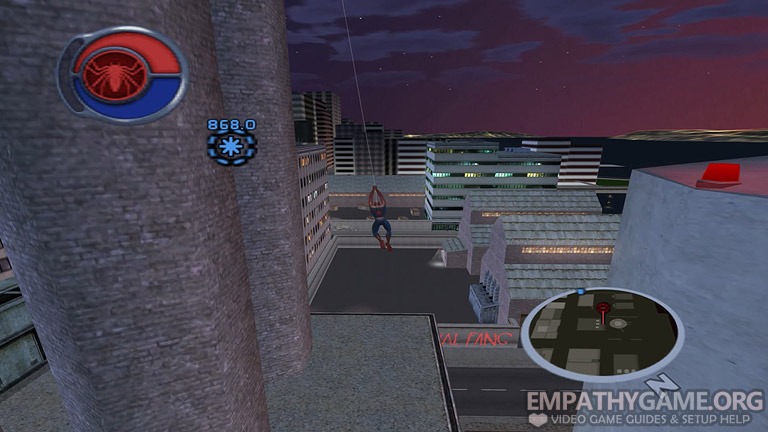
That achievement sits inside a much less consistent action-adventure. Manhattan offers buildings to climb, crimes to interrupt and challenges to complete, but too many diversions repeat familiar ideas. Combat is serviceable, and chapter progression makes optional heroics feel compulsory. The game still has a clear audience: anyone who enjoys learning a movement system well enough to improvise their own routes. Its superhero campaign is uneven; its sense of physical freedom is considerably harder to forget.
Web-Swinging Makes the Skyline Playable
Unlike the earlier movie tie-in, where webs could apparently find attachment points somewhere above the city, Spider-Man 2 ties swinging to nearby structures. Buildings become part of the control scheme. Launch a line too early and Spider-Man may arc toward the wrong street; release at the right point and he can round a corner without losing much speed. Altitude, anchor placement and release timing all shape the route.
The distinction between Easy and Normal swinging helps explain the system’s unusual balance of accessibility and precision. Easy simplifies releasing a web, while Normal demands deliberate line changes and permits more complex maneuvers. Narrow streets invite low, fast arcs; open stretches offer fewer convenient anchors. The occasional awkward camera angle or missed attachment can interrupt that rhythm, but successful recovery is part of the appeal.
Movement is also more varied than continuously holding a swing button. Charged jumps, wall-sprints, wall-crawling and Web Zip let Spider-Man cross gaps or regain height without committing to a complete pendulum arc. A fully charged jump can clear a rooftop but send him so high that a target disappears ahead. A shorter jump into an upward wall-run can be quicker and more controllable, making height management as important as speed.
There is a wonderfully scrappy quality to getting the route wrong. Dropping toward the pavement need not mean stopping; a late web attachment, wall contact or quick zip can salvage the descent. It may not look elegant, but a mistake can become the beginning of another move. At its best, the skyline becomes a continuous sequence of decisions.
Chases and Challenges Reveal the Movement System’s Depth
Black Cat’s rooftop pursuits are among the best demonstrations of what this traversal model can do. Keeping up with Felicia Hardy means more than swinging as quickly as possible in her general direction. She cuts across rooftops and changes elevation, making a wide, beautiful web arc potentially slower than simply sprinting and jumping straight over the next gap. Preserving a direct line, swinging only across larger gaps and using Web Zip to repair a bad jump matters more than spectacle.
The optional timed challenges explore that idea more aggressively. A basic race might ask for speed across several blocks, but harder courses demand exact approaches to checkpoints and clean transitions between surfaces. Around Central Park, routes can involve lamppost swings, trees, short landings and changes of direction where touching down at the wrong angle bleeds away the momentum needed for the next marker. Even the camera’s orientation can influence how comfortably Spider-Man fires the next line. These courses expose clumsy controls while proving that swinging has a genuine skill ceiling.
Pizza deliveries provide a surprisingly different test. Mr. Aziz’s customers impose time limits, but simply travelling at full speed is not enough: double jumps and heavy landings can damage the pizzas. A reliable delivery therefore requires smoother routes and more restrained landings than an ordinary trip across Manhattan. The same tools that encourage aerial showmanship are suddenly needed to protect something fragile.
Hero Points Turn a Living City Into a Chore List
Manhattan makes an inviting first impression because trouble appears almost everywhere. Someone needs rescuing from a ledge; a criminal is escaping in a car; an injured pedestrian needs to reach a hospital; a street encounter interrupts a journey to the next mission. These interruptions fit a hero who abandons personal errands when someone needs help.
Unfortunately, the list of situations is smaller than the city suggests. After several hours, many rescues and crimes resolve through the same short sequence: reach the marker, pursue or defeat the culprit, collect the reward, move on. Pedestrians have little personality, and the city rarely reacts in a lasting way to his work. Side activities are most persuasive as brief excuses to use the traversal system, not as stories in their own right.
The Hero Point economy amplifies that weakness. Completing missions, stopping criminals, collecting tokens, taking Daily Bugle photographs and finishing challenges earns points to spend at Spidey Stores. Unfortunately, chapters repeatedly demand specific totals before the next story objective opens. Once the fresh rescues are gone, a supposedly optional activity becomes something to repeat because the campaign will not move forward without it. This is the game’s central pacing problem: it allows players to enjoy Manhattan on their own terms, then interrupts that freedom with a quota.
Combat Has More Tricks Than Its Enemies Demand
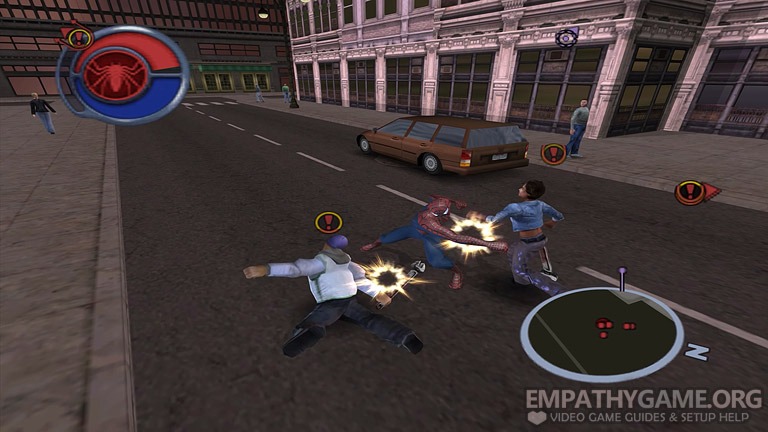
Combat expresses Spider-Man’s agility through dodges, aerial attacks, webbing and disarms. Spider-Sense flashes a warning before incoming blows, while Spider Reflexes temporarily slow the action enough to read an armed group’s attacks or create a safer opening. Pulling a gun away from a criminal or launching an opponent into the air feels appropriately acrobatic. Ordinary thugs often go down to repeated strikes, while the camera struggles when enemies crowd close to walls.
There is more personality here than the simplest fights reveal. Certain strike-and-web sequences can leave an enemy suspended from a nearby lamppost, turning the environment into part of an elaborate finishing move. It is exactly the sort of mischievous combat detail that suits Spider-Man, but the input requirements are easy to overlook if ordinary attacks already finish encounters efficiently. The move list offers possibilities most fights never require; combat encourages experimentation less effectively than traversal.
Bosses bring welcome changes of pace without consistently fixing that imbalance. Rhino and Shocker provide recognizable physical threats, while Mysterio’s stranger set pieces break away from the usual pattern of clearing street criminals. Some confrontations ask for patience and awareness of a particular attack window; others are undermined by rigid scripting, obstructive scenery or a camera poorly suited to enclosed spaces. The most satisfying encounters leave room to move and choose an approach. The least satisfying simply keep Spider-Man near an opponent until the next opening appears.
Peter Parker’s Story Works Better in Small Moments
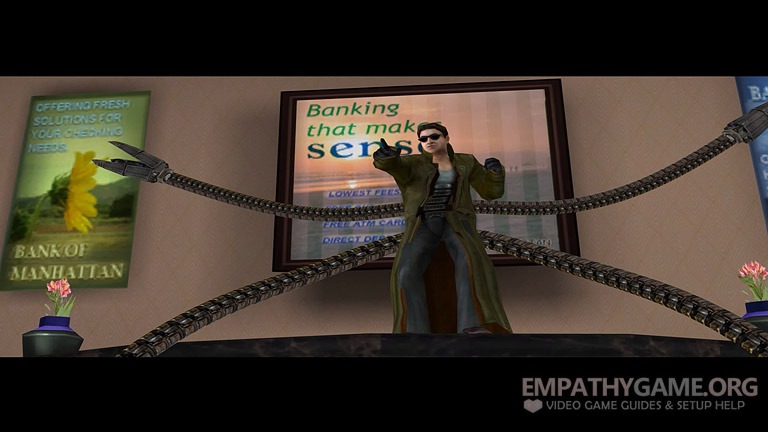
The central storyline follows Peter’s struggle to protect New York without completely losing his ordinary life, using Mary Jane Watson, Harry Osborn and Otto Octavius to connect the game to Raimi’s film. This conflict suits a world where another emergency arrives just as Peter should be somewhere else. The game also finds space for Black Cat, Rhino, Shocker and Mysterio, bringing a more comic-book flavour to the film material.
The wider cast creates variety but not a graceful narrative. Major events are separated by errands, chases and mandatory Hero Point collection, so Peter’s relationships rarely have room to develop before another villain demands attention. Black Cat works partly because her presence changes the way the player navigates rooftops, whereas some other appearances feel like a reason to stage one more fight. The extra characters make the adventure broader, not necessarily richer.
Its personality is often strongest away from the dramatic cutscenes. Peter’s muttered comments while going about his work can be more convincing than a formal exchange meant to carry the plot. Bruce Campbell’s dry tutorial and hint-marker commentary regularly punctures the superhero seriousness, while the slightly exaggerated designs of supporting villains reinforce the comic-book side of the adaptation. Tobey Maguire and Alfred Molina provide welcome connections to the film, but the voice work as a whole varies in energy. Odd errands involving Peter’s civilian obligations sometimes capture the game’s playful tone better than its drama.
Manhattan Is Spectacular From Above, Less Convincing Below
The city succeeds first through scale and silhouette. The recognizable shape of Manhattan, the bridges, the changing light and the sheer number of reachable rooftops make the space rewarding to cross. Skyscrapers are not flat scenery sealing off mission areas: they can be climbed, circled, jumped from and used as anchors for another route. A tall building becomes memorable because of the climb and the dive that follows.
At street level, the illusion becomes thinner. Pedestrians animate stiffly, cars and sidewalk encounters lack much variation, and close views expose faces and environments that were never the production’s strongest feature. The soundscape also cannot always match the freedom above it; long stretches of travel can feel comparatively quiet between music cues and repeated calls for help. The city is more exciting as an athletic playground than as a simulation of everyday New York.
Upgrades Improve Movement More Than the Campaign
Hero Points are most rewarding when spent on locomotion. Swing Speed upgrades gradually expand what feels possible across the map, and techniques such as Web Zip can transform an awkward recovery into a fluid crossing. Combat purchases add combinations and situational options, but enemies rarely change enough to make every new move feel essential. There are also collectibles to hunt on skyscrapers, around the waterfront and inside criminal hideouts, alongside arcade challenges and photography assignments. These provide goals rather than alternative character builds.
Finishing the story does not close Manhattan. Races, uncollected tokens and remaining activities still provide reasons to stay, and the post-campaign Fight Arena offers a more substantial test of combat than most street scuffles. Purchased through a Spidey Store, the arena repurposes Shocker’s warehouse for timed and endurance rounds before opening more demanding boss challenges. Facing several recognizable villains in the same space changes the priorities: separating threats, watching for attacks from a distance and deciding when to spend Spider Reflexes become more important than simply punching the nearest enemy.
Yet the long-term rewards are not as imaginative as the movement. Compared with the earlier movie tie-in, there is less emphasis on surprising unlockable costumes, alternate appearances or novelty ways to revisit the adventure. Another campaign run largely repeats familiar chapters. For dedicated players, the strongest reason to return is less tangible: perfecting a difficult challenge, finding a cleaner path across the skyline or swinging with no mission marker in mind.
Final Verdict
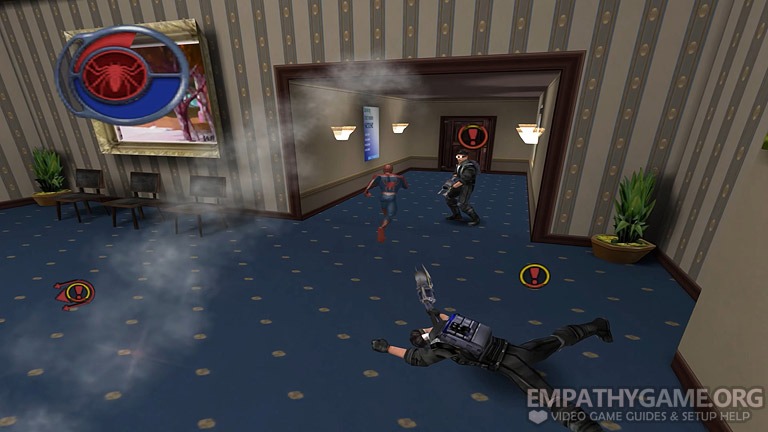
Spider-Man 2 is an unusually clear example of one excellent system giving an entire game its identity. Treyarch made web-swinging depend on the height and placement of the surrounding city, then provided enough jumping, wall-running and aerial recovery options for movement to become expressive. The best challenges reward understanding those interactions, and even a routine journey across Manhattan can produce a satisfying little sequence of risks and recoveries. Few of the story missions need to be particularly memorable for that pleasure to survive.
The limitations are just as clear. Crimes and rescues repeat, Hero Point requirements interrupt the campaign’s rhythm, and the combat does not consistently take advantage of its own more imaginative techniques. The movie story supplies familiar faces but struggles for momentum, while the street-level world is much less engaging than the rooftops above it. Post-story challenges offer something for dedicated players, though completion rewards remain modest beside the freedom to roam.
Anyone looking for consistently inventive missions or finely tuned superhero brawling may find the adventure surprisingly ordinary. Anyone fascinated by responsive, skill-based traversal has a stronger reason to persist. Its most important accomplishment is not that it makes the player feel powerful. It makes speed, altitude and a successful landing feel like things the player has actually earned.
Spider-Man 2 (2004) Pros & Cons
Spider-Man 2 (2004) PC System Requirements
Important: The Treyarch-developed open-world Spider-Man 2 has no native Windows version, so there are no official Windows system requirements for that specific game. The specifications below are from the PCSX2 emulator project and describe the host-PC hardware used for PS2 emulation, not requirements published by Activision for the game itself.
PCSX2 EMULATOR — MINIMUM:
OS: Windows 10 22H2 or compatible newer supported Windows release
CPU: x86-64 processor with SSE4.1; PassMark single-thread score of at least 1500
CPU Cores: Two physical cores with simultaneous multithreading
RAM: 8 GB
GPU: Graphics hardware supporting Vulkan 1.1, Direct3D 11 Feature Level 10.0, or compatible OpenGL 3.3 features
GPU Performance: PassMark G3D Mark score of at least 600
Storage: Space for PCSX2, an owned-game disc backup, emulator memory cards, and optional configuration files
Additional Notes: A PS2 BIOS dumped from your own console is required. Meeting minimum emulator specifications does not guarantee a particular game speed or the performance of increased rendering resolutions.
PCSX2 EMULATOR — MODERATE PERFORMANCE TIER:
OS: Windows 11
CPU: x86-64 processor with AVX2; PassMark single-thread score of at least 2000
CPU Cores: Four physical cores
RAM: 16 GB
GPU: Graphics hardware supporting Vulkan 1.3, Direct3D 12 Feature Level 11.0, or OpenGL 4.6
GPU Performance: PassMark G3D Mark score of at least 6000
VRAM: 4 GB
Additional Notes: This is PCSX2’s general moderate hardware tier, not a guaranteed Spider-Man 2 benchmark or official game-specific recommendation.
Original Windows Edition — Historical Requirements
The separate Windows release was designed for early-2000s PCs rather than modern Windows hardware. In Activision’s original product announcement, the publisher stated that this version required a 600 MHz processor and 128 MB of RAM. These are historical baseline specifications, not verified modern Windows 10/11 compatibility requirements.
A complete currently maintained official minimum/recommended specification sheet for that original Windows release could not be verified. Rather than mixing requirements from the two substantially different games, this guide uses the actively maintained PCSX2 documentation for the recommended console-emulation route.
Additional PC Performance and Setup Notes
- Start with native game timing: Use the emulator’s standard speed settings first. Increasing an internal rendering resolution improves image clarity, but it does not redesign the game’s animations, AI, or original frame pacing.
- PCSX2 compatibility: The game’s PCSX2 wiki documents earlier hardware-rendering issues as fixed, while a separate prolonged-session save-state issue remains marked for retesting. Keep ordinary memory-card saves and close the emulator periodically if persistent problems appear.
- Dolphin rendering: The GameCube version has documented skybox flickering and widescreen-related issues. Avoid assuming that Dolphin’s general Widescreen Hack produces a correct image. Test the default aspect ratio before considering a game-specific widescreen code.
- Controller choice: A modern dual-stick gamepad is recommended for either console version. Match the original console buttons carefully, particularly jump, web-swinging, attack, camera control, and movement abilities.
- Graphics backends: Use the emulator’s recommended automatic/default renderer first. PCSX2 offers modern hardware rendering, while Dolphin supports multiple graphics backends. Changing renderers may solve some problems but should not be treated as a universal performance improvement.
- Handheld PCs: Windows handhelds and Steam Deck devices may be capable of running compatible emulators, but this is not the same as an official Steam Deck rating or an officially supported Spider-Man 2 handheld release.
- Save protection: Back up your virtual memory cards and ordinary in-game saves before installing patches, applying experimental widescreen modifications, or making major emulator changes.
Video Trailer
Frequently Asked Questions
Is Spider-Man 2 (2004) worth playing in 2026?
Yes, particularly the PS2, GameCube, or Xbox version if you enjoy skill-based web-swinging and exploring Manhattan without constant mission pressure. The freedom of movement remains distinctive, although repetitive street activities, dated combat, and occasional camera problems make it less polished than modern superhero games.
Why is the Spider-Man 2 PC version different from the PS2 game?
Activision released two substantially different games under the same name. Treyarch developed the open-world PS2, GameCube, and Xbox versions, while The Fizz Factor created a simpler Windows game with 18 missions, nine environments, point-and-click-style controls, and a more linear structure. The Windows release is not a reduced-graphics port of the console game.
Is Spider-Man 2 (2004) the same as Marvel’s Spider-Man 2?
No. Spider-Man 2 (2004) is an Activision-published adaptation of Sam Raimi’s film, while Marvel’s Spider-Man 2 is Insomniac Games’ much newer sequel featuring Peter Parker and Miles Morales. They have different stories, mechanics, maps, progression systems, and PC releases.
Does the original Spider-Man 2 PC game work on Windows 10 or Windows 11?
Compatibility is not guaranteed because The Fizz Factor’s Windows edition was designed for much older Windows systems. Some installations may encounter legacy setup or display problems, and there is no verified modern official compatibility update. The console releases running through maintained emulators are a separate option and should not be confused with native Windows compatibility.
Can a controller make the 2004 Windows version play like the console game?
No. A controller may provide a different input method, but it cannot replace the Windows edition’s mission design or simplified swinging system. To experience Treyarch’s physics-based movement and open-world Manhattan, you need one of the original console versions.
Can the original Xbox version of Spider-Man 2 run on PC?
The original Xbox emulator xemu lists Spider-Man 2 as Playable based on community compatibility testing, although some issues may remain. It requires the appropriate original Xbox system files and a legitimately created game copy. PCSX2 and Dolphin are the more extensively covered alternatives in this guide.
How does physics-based web-swinging work in Spider-Man 2?
In Treyarch’s console versions, web lines connect to surrounding structures rather than automatically attaching to invisible points in the sky. Spider-Man’s speed, height, momentum, and release timing influence his movement, so learning when to hold or release a line is essential for crossing Manhattan efficiently.
What is the difference between Easy and Normal web-swinging?
Easy swinging simplifies web-line handling, allowing players to release a line by letting go of the swing button. Normal mode gives more manual control over releasing and changing lines, including advanced techniques involving two simultaneous web lines. Easy is more approachable, while Normal offers greater flexibility once the controls become familiar.
How can I swing faster and reach higher buildings?
Build momentum by using the sprint input while swinging, then release your web line during the faster part of the arc instead of waiting until Spider-Man loses speed near the top. Charged jumps and purchased Swing Speed upgrades also help. Practicing the timing is more effective than simply holding the swing button continuously.
What does the Web Zip upgrade do?
Web Zip pulls Spider-Man rapidly toward an anchor point, helping him cross short gaps, recover from an awkward jump, or reach a rooftop without beginning a complete swinging arc. It is especially useful during fast pursuits and challenges where a normal swing would take too long.
What is the fastest way to earn Hero Points?
Helping citizens in distress, stopping street crimes, completing races, delivering pizzas, and collecting exploration tokens all provide Hero Points. For steady early progression, combine nearby rescue activities with collectibles instead of travelling across the entire city for one reward. Successful missions provide points, while failing certain citizen requests can reduce your total.
Why is the next story chapter not starting?
Spider-Man 2 uses chapter-specific to-do lists rather than advancing only through story missions. Check the objectives for any remaining Hero Point requirement, mandatory movement or combat upgrade, or unfinished visit to a character or location. The next chapter normally begins after all required tasks have been satisfied.
Where can I buy upgrades in Spider-Man 2?
Visit the Spidey Stores marked with dollar-sign icons on the city map. Hero Points can be spent on swinging improvements, combat combinations, air tricks, and other abilities as they become available during the campaign. Some upgrades are also required to advance particular story chapters.
How do Spider Reflexes work in combat?
Spider Reflexes temporarily slow the action, giving Spider-Man more time to evade attacks and land combinations against dangerous enemies. The ability uses a limited meter that can be replenished through movement and other actions. It is particularly helpful against groups of armed criminals or during difficult boss encounters.
Why does Spider-Man’s head flash during fights?
The flashing effect warns that an enemy attack is approaching and provides an opportunity to dodge. Evading at the right moment can lead into counterattacks, while web attacks can help disarm armed opponents or interrupt their movement. Learning to respond to this warning is more important than repeatedly attacking without defending.
How do you keep up with Black Cat during chase missions?
Follow Black Cat’s visible trail and watch the distance indicator so she does not move too far ahead. Try to maintain rooftop height, use charged jumps to cross gaps, and avoid unnecessary turns that interrupt momentum. Swing Speed upgrades and Web Zip can make later pursuits easier, but learning the route and timing remains important.
Are pizza delivery missions required to complete Spider-Man 2?
The pizza parlor appears during story progression, but the repeatable delivery challenges are primarily optional activities for earning Hero Points and improving traversal skills. Deliveries involve reaching destinations within a time limit, making them useful practice for fast swinging and controlled landings.
What is the arcade used for in Spider-Man 2?
The arcade contains training-style challenges that help players practice movement and combat techniques beyond the opening tutorial. Completing these exercises can contribute toward the game’s awards. Some advanced challenges become easier after purchasing additional combat upgrades.
What collectibles count toward completing Spider-Man 2?
The console game includes several collectible categories, such as Secret Tokens, Skyscraper Tokens, Hideout Tokens, Buoy Tokens, and Hint Markers. They contribute to rewards and completion goals, while races, missions, and purchased upgrades also matter. Check the Awards screen in the pause menu to see which objectives remain unfinished.
Does Spider-Man 2 follow the movie’s story exactly?
No. The main storyline follows Peter Parker’s struggle with his responsibilities and his conflict with Doctor Octopus, but the game adds characters and encounters from Spider-Man comics. Black Cat, Rhino, Shocker, Mysterio, and other additional threats give the campaign more variety than a straightforward retelling of the film.
Can you play as Venom, Black Cat, or other characters?
No. Peter Parker as Spider-Man is the playable protagonist in the original Treyarch console game, although certain story scenes briefly involve his civilian identity. Black Cat participates in the story but is not a freely selectable playable character, and Venom is not available as an unlockable character.
Can you unlock the black Symbiote suit in Spider-Man 2 (2004)?
No. The original Treyarch game does not include a standard unlockable Symbiote costume or the extensive suit-selection system found in newer Spider-Man games. Claims about black-suit gameplay often refer to a different Spider-Man title or unofficial modifications rather than a feature of the original release.
Can you continue exploring Manhattan after finishing the story?
Yes. Completing the main Doctor Octopus storyline does not end free-roam gameplay. You can continue swinging around Manhattan, responding to crimes, completing races, collecting missing tokens, purchasing remaining upgrades, and working toward the game’s completion awards.
Does Spider-Man 2 (2004) have New Game Plus?
No traditional New Game Plus mode carries all purchased abilities into a newly restarted campaign. After the main story, you can continue exploring and completing remaining activities with your existing progress. Replaying the campaign from the beginning requires starting a fresh game rather than selecting a modern New Game Plus feature.
Does Spider-Man 2 (2004) support multiplayer, co-op, or split-screen?
No. The original PS2, GameCube, and Xbox game is a single-player adventure without cooperative campaign play, split-screen, LAN multiplayer, or online matchmaking. Emulator support for multiple controllers does not add multiplayer functionality to the game.
Still have questions? Check the Spider-Man Reddit community for discussion of the classic games, the PCSX2 Spider-Man 2 compatibility page for PS2 emulation issues, or the Dolphin Emulator Forums for GameCube setup and compatibility help.
Sources & References
Key factual and technical information in this guide was checked against relevant publisher reporting, original release coverage, emulator documentation, and platform-specific compatibility records, including:
- GameSpot — Activision Confirms Separate Spider-Man 2 PC Game — contemporary reporting containing Activision’s confirmation that The Fizz Factor’s Windows release is a different product from Treyarch’s console game, including historical hardware specifications.
- Metacritic — Spider-Man 2 Console Reviews — original PS2, GameCube, and Xbox review-score information for Treyarch’s open-world release.
- Metacritic — Spider-Man 2: The Game for Windows — separate PC reception and version identification, helping prevent confusion between the two products.
- PCSX2 Wiki — Spider-Man 2 — PlayStation 2 compatibility classification, release identifiers, historical technical issues, and known emulator limitations.
- PCSX2 — Official System Requirements — emulator minimum and moderate hardware specifications used for the PC setup recommendations.
- Dolphin Emulator Wiki — Spider-Man 2 — GameCube compatibility information, graphics rendering observations, and widescreen-related limitations.
Similar Games Like Spider-Man 2 (2004)
- Ultimate Spider-Man
- Spider-Man: Web of Shadows
- Spider-Man: Shattered Dimensions
- The Incredible Hulk: Ultimate Destruction
- Batman: Arkham City
- Prototype



Found something worth playing through DecideGame?
DecideGame.com is an independent gaming project run by Editor Zero. If this guide helped you discover a game, solve a problem, or find useful information, you can support DecideGame.com and help keep new and updated game guides coming.
DecideGame — PC Game Guides, Reviews & Setup Help