
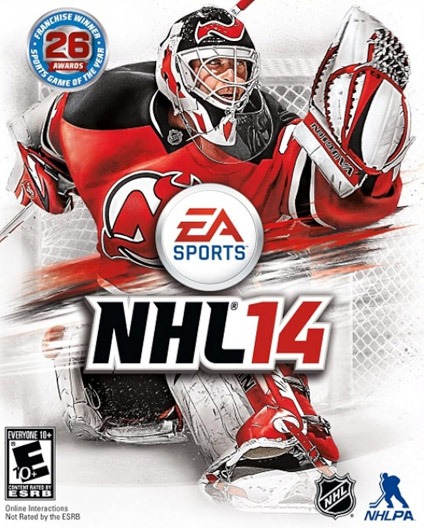
📅 Game released: 2013
NHL 14 is EA Canada’s ice hockey simulation built around physical checking, responsive skating, one-touch dekes, and the nostalgic NHL 94 Anniversary Mode. This PC guide explains why there is no official Windows game download, how to prepare an owned PS3 edition for RPCS3 emulation, controller and firmware setup, emulator system requirements, and important offline-play limitations.
 By Editor Zero — independently researched, edited, and maintained.
Last updated: 21 November 2026
Last reviewed: 21 November 2026
Table of Contents
- Quick Facts
- Official PC Stores, Download & Installation
- NHL 14 Review
- Pros & Cons
- PC System Requirements
- Frequently Asked Questions
- Similar Games
NHL 14 Quick Facts
- Game: NHL 14 / EA SPORTS NHL 14 (2013)
- Developer: EA Canada
- Publisher: Electronic Arts (EA SPORTS)
- Genre: Sports, Ice Hockey Simulation, Multiplayer (local; official online discontinued)
- Release: September 10, 2013 (North America); September 13, 2013 (Europe); no native Windows PC release
- Platforms: PS3, Xbox 360
- Notable modes: NHL 94 Anniversary Mode, Live the Life, Be a GM, Season, Playoffs; original online HUT/EASHL modes no longer use EA servers
- Best PC Emulation Route: Legally owned PS3 version through RPCS3 (compatibility and performance vary)
- Multiplayer: Offline local play; EA’s official NHL 14 online services retired June 6, 2022
- Engine: EA SPORTS’ proprietary NHL game technology, including True Performance Skating, NHL Collision Physics, and the Enforcer Engine; no single underlying engine name verified
- Community: EA NHL on Reddit, RPCS3 Forums
- PC modding: No official native Windows release or official PC mod tools; emulation-related tweaks are unofficial and version-dependent
- Metacritic score: 80/100 (PS3); 81/100 (Xbox 360)
- IGN score: 8.3/10 (original console release)
- GameSpot score: 6/10 (original console release)
Official PC Store Status, Download & Installation
👇 NHL 14 has no official Windows PC download on Steam, EA app, Epic Games Store, GOG, or Microsoft Store. The practical PC route covered here is RPCS3 with a legally obtained copy of the PlayStation 3 edition—not a downloadable PC port of the game.
- Original versions and ownership: Electronic Arts released NHL 14 for PS3 and Xbox 360. If you want the original game on original hardware, look for a legitimate pre-owned console disc from a reputable retailer or seller. A physical copy does not automatically grant a Windows license, and no official Windows version was released.
- Why RPCS3 is the primary route: RPCS3 is a maintained PS3 emulator with official Windows builds, graphics configuration, controller mapping, and documentation for privately dumped PS3 games. This guide focuses on the original PS3 edition; it does not require the Xbox 360 edition.
- Download the emulator safely: Get RPCS3 only from its official download page. Follow the project’s Quickstart for current Windows prerequisites and installation. The free emulator does not include NHL 14 or other copyrighted games.
- Install official PS3 firmware: Download Sony’s PS3 system software update (the
PS3UPDAT.PUPfile), then open RPCS3 and choose File > Install Firmware. Use Sony’s original firmware download, not a firmware or BIOS file from an unrelated website. - Prepare your owned game copy: Follow the RPCS3 Wiki’s disc-dumping instructions for your own PS3 copy. Depending on your hardware, the guide covers compatible Blu-ray drives and dumping from a PS3. A normal PC DVD/Blu-ray drive does not necessarily read and decrypt PS3 games. Local rules on making personal backups vary; buying a disc is not permission to download someone else’s game files.
- Add and start NHL 14: Once you have a correctly prepared, decrypted backup from your own game, use RPCS3’s File > Add Games for a compatible game folder, or the appropriate File > Add ISO Games option for supported disc-image formats on builds that offer it. Check that the game appears in the library and use RPCS3’s dump-validation guide if installation or loading fails.
- Configure the controller: Open Configuration > Pads, select a supported gamepad handler, and map both analog sticks, triggers, face buttons, and shoulder buttons. A PlayStation-style or XInput-compatible controller is preferable to a keyboard for skating, stick handling, shooting, and defensive controls. Test the bindings in an offline exhibition game before starting a longer season.
- First graphics settings: Start from RPCS3’s normal defaults with the Vulkan renderer where supported, and keep the initial resolution scale at 100% until you have confirmed stable gameplay. Raise the scale in small steps only afterward. PS3 emulation is highly CPU-dependent, and stronger PC hardware does not guarantee that every cutscene, menu, or game mode works properly.
- Known compatibility limitations: NHL 14 has been the subject of RPCS3 bug reports involving occasional freezes and rendering-resolution changes after certain scene transitions. Results depend on the game revision, emulator build, graphics driver, and PC. Check the RPCS3 compatibility database and documented NHL-series graphics report before assuming that upscale settings, every mode, or an entire season will work without problems. Save frequently.
- Official online modes no longer work: EA retired NHL 14’s official online servers on June 6, 2022. That affects historical Hockey Ultimate Team, EA SPORTS Hockey League, and other EA-hosted network functions; it does not remove offline console modes. Unofficial community-run online restorations, where available, are separate services with their own limitations and are not official EA support.
- Xbox 360 emulation is not the recommended alternative: The Xbox 360 edition belongs to a different emulation ecosystem. A public Xenia compatibility report for NHL 14 documented crashes when entering a match, so this guide does not claim that Xenia provides a reliable drop-in replacement for RPCS3. Buying the Xbox 360 disc does not give you the PS3 version.
 Download RPCS3 from the Official Website
 Read EA’s Official NHL 14 Features

NHL 14 Review
More responsive skating and punishing checks create exciting hockey, though the game sometimes mistakes aggression for realism.
A defender can read a rush correctly, close the passing lane and still lose the puck carrier because the turn began half a second too late. That is one of the things NHL 14 gets right about hockey. EA Canada’s simulation builds on the momentum-based skating of NHL 13, making movement more responsive while keeping the consequences of speed and positioning. Stronger collisions, easier dekes and more involved fights give matches a noticeably rougher character. Career and franchise modes add depth, although the new aggression sometimes competes with the thoughtful simulation underneath.
Skating Feels Better When Every Turn Has a Cost
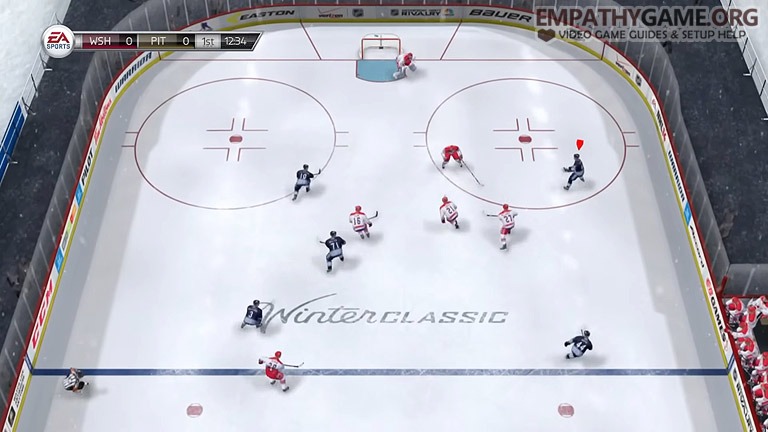
True Performance Skating remains the foundation. A forward moving at full speed cannot reverse direction immediately, and a defender who approaches from the wrong angle may struggle to recover. Quicker pivots, a sharper first stride and improved lateral movement make these restrictions feel less cumbersome than in NHL 13. The players retain their weight without fighting every adjustment. Slowing down before receiving a pass, or taking a wider route around a defender, can accomplish more than simply holding the acceleration input.
The effect is especially noticeable around the blue line. A poorly timed breakout forces the puck carrier to hesitate while teammates get onside. A cleaner pass into open ice can turn the same situation into a threatening rush. Unfortunately, teammate AI does not always understand the opportunity. Supporting skaters can ignore useful passing lanes, hesitate on breakouts or drift into positions that offer little help. With control of the whole team, those mistakes are easier to correct. When locked to one player, they can undermine decisions that were sound in the first place.
Attacking offers worthwhile variety beyond skating into the slot and shooting. One-timers reward quick passing, point shots can produce deflections and rebounds, and cycling behind the net can pull defenders away from dangerous areas. Poke checks and stick lifts similarly provide ways to defend without committing to a hit. One-Touch Dekes make escaping a challenge more accessible through a button and the left stick, though their contextual animations do not always give the precision of deliberate right-stick handling. The best goals emerge from several small decisions.
Faceoffs and Line Changes Have More Depth Than They First Suggest
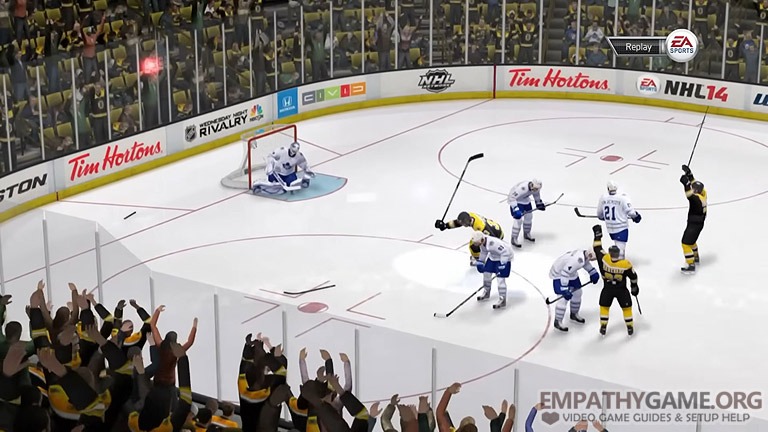
Faceoffs reveal how much of the game’s difficulty comes from understanding its controls. The center needs to establish a forehand or backhand grip before the puck drops, then time the draw. Missing that first step can lead to repeated losses even when the player reacts quickly or lowers the difficulty. It is an awkward way to teach a fundamental mechanic. Once the preparation becomes familiar, though, faceoffs make more sense as contests of anticipation and execution rather than hurried button presses.
Manual line changes create a different kind of pressure. Tired skaters need a rest, but changing several players while an opponent moves up ice can leave an easy route through the defense. Over a long period, deciding when to rotate the forwards becomes part of protecting possession and controlling space. Fatigue becomes more than an isolated stamina bar. A well-timed change passes almost unnoticed; a poor one can be punished immediately.
Not every aspect of the physics is as convincing. Loose pucks and rebounds add useful uncertainty, but dump-ins can produce oddly exaggerated bounces against the boards. Reading where the puck will go should be part of the challenge. When it springs away in an unnatural direction, an otherwise sensible retrieval can feel like guesswork. That jars with the believable momentum of the pursuing skaters.
The Collision System Adds Risk, but Also Too Much Spectacle
NHL Collision Physics makes contact a genuine tactical consideration. Speed, angle, balance and player attributes affect how skaters react, and a hard collision can knock someone down without the familiar look of a canned checking animation. Meeting an attacker at the right angle may disrupt a rush before the puck reaches the slot. If the defender steps out and misses, the reward for the attacking team can be an open lane and a clear chance on goal.
Hip checks, battles near the boards and incidental contact are most convincing when the players’ movement explains the impact. The trouble is that NHL 14 seems very eager to show off the new system. Huge hits can become so common that ordinary fixtures take on the rhythm of heated rivalry games. Penalties do not always provide an equally convincing boundary between acceptable physical play and dangerous contact. The excitement sometimes resembles a highlights compilation more than a complete match.
The Enforcer Engine follows the same philosophy. A heavy check can provoke retaliation, leading to a third-person fight with grappling, dodging and punches. Having a teammate step in makes the confrontation feel connected to what happened on the ice instead of appearing as a separate minigame. The actual exchanges are comparatively limited, and repeated interruptions soon lose their novelty. A careful defensive read can be more satisfying than yet another fight.
Playing Goaltender Demands a Different Kind of Attention
Goalie-locked matches change the experience more than a different camera angle might suggest. Positioning still matters, but standing in the right place is not always enough to produce a save. Holding the post against a sharp-angle attempt, choosing when to drop into the butterfly and committing to a desperation reaction all involve risk. The shooter might change direction after the goalie moves, while a delayed response can leave too little time to recover. The challenge is studying the attack and choosing when to commit.
Computer-controlled goalies are harder to trust. A netminder can stop an excellent cross-ice opportunity and later allow a much less threatening attempt. The unpredictability sometimes creates drama, but also weakens the reward for creating good chances. At higher difficulties, the frustration becomes particularly noticeable when patient attacking produces less than an awkward shot from a poor angle.
The Arenas Feel Lively, Even When the Broadcast Repeats Itself
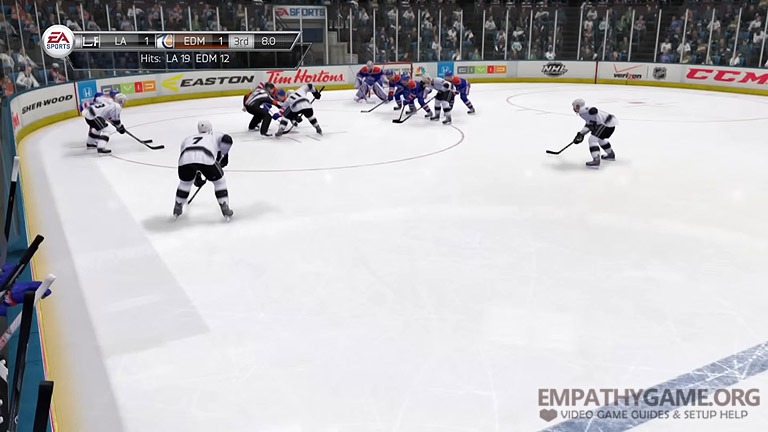
Licensed teams, recognizable arenas, rivalries and the changing score provide enough character. Protecting a narrow lead late in the third period has its own drama: tired defenders, a defensive-zone faceoff and the possibility that one failed clearance will undo an entire match. Crowd reactions, goal celebrations and the sounds of play support that atmosphere, although aging animations sometimes make the presentation feel less dynamic than the skating.
Gary Thorne and Bill Clement provide familiar broadcast commentary, but the repetition becomes obvious across a long season. Custom arena music gives the presentation an interesting personal touch. Imported tracks can be assigned to goals and other in-arena events, allowing home fixtures to develop their own sound. Preparing clips takes work, but it gives each home team a different identity.
NHL 94 Anniversary Mode offers an entirely different mood. Blue ice, star-shaped player markers, organ music and simplified controls recall the 16-bit original, while relaxed rules encourage quick attacks instead of careful positional play. Without the usual penalties, offsides and icing restrictions, it becomes a good option for lively local matches or a short break from franchise hockey. Mistakes no longer have to be taken so seriously.
That does not make it a faithful remake of NHL 94. The modern player models, animations and underlying systems remain recognizable beneath the retro styling. As a tribute, it succeeds in recalling the older game’s atmosphere. As a way to experience its exact handling and rhythm, it falls short. Still, the faster, less disciplined hockey has its appeal.
Live the Life Makes Career Progress More Compelling Than Its Dialogue
Live the Life expands the familiar Be a Pro career with interviews, endorsements and relationships involving fans, teammates, management and family. Pre-draft answers and later decisions can influence the player’s standing, giving an off-ice dimension to the career. In practice, these interactions are largely text prompts and relationship meters. Their consequences rarely feel as interesting as the game seems to expect, particularly once similar questions begin appearing again.
The actual hockey progression tells a better story. Beginning in the Canadian Hockey League allows a prospect to spend meaningful time in junior competition before the NHL draft. A strong draft position is not assured, and the path forward can involve the AHL, limited ice time or fighting for a place on a higher NHL line. That makes each successful shift part of a longer ambition, not another career-menu number.
The mode wants the player to feel responsible for building a career, yet position-locked play can leave important moments in the hands of unreliable teammates. A winger may find open ice and never receive the pass. A promising breakout can stall before there is any opportunity to contribute. Live the Life works best for someone willing to accept those frustrations as part of playing one role, rather than expecting the control that comes with directing an entire team.
Be a GM Turns Individual Matches Into Long-Term Decisions
Be a GM is appealing for almost the opposite reason: the decisions extend well beyond the next shift. Trades, contracts, prospects, drafts and the salary cap force choices between immediate results and future stability. An established veteran might help with a playoff run while consuming money that could otherwise support developing players. A talented prospect may require patience before becoming dependable. Strong roster ratings provide no guarantee of success once the team reaches the ice.
Development is not always easy to interpret, either. A noticeable increase in a skater’s overall rating after one season may not represent lasting improvement; the number can move back toward an earlier level later on. It becomes risky to treat a temporary-looking rise as the basis for a long contract. The uncertainty adds something to the management side, but the game could do a better job of communicating the difference between short-term form and genuine long-term growth.
Across its 25-season limit, Be a GM can become a career shaped by rebuilding projects, changed clubs and disappointing playoff exits rather than a straight climb toward one championship. Familiar menus and questionable computer decisions occasionally weaken the illusion of running a real organization, but the wider perspective gives every match a purpose beyond the final score. Season and playoff modes provide more direct alternatives, with the AHL, CHL and European leagues adding further variety.
Final Verdict
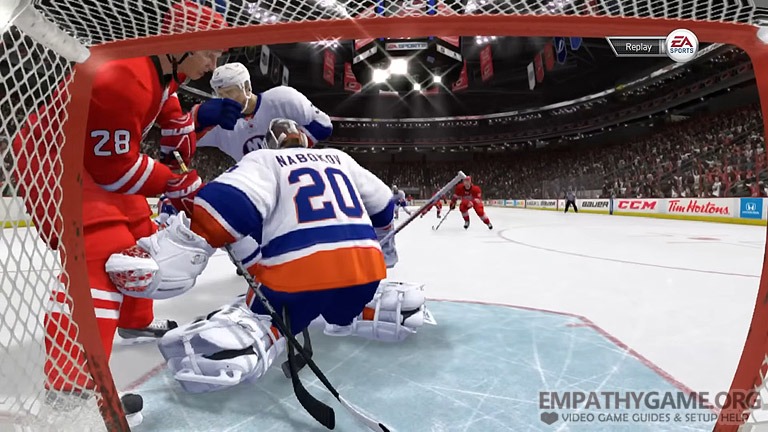
NHL 14 works best when several decisions come together naturally: taking the correct defensive angle, preparing for a faceoff, changing tired players safely and delivering the pass before a lane closes. Its improved skating makes those choices satisfying, while career and franchise play give them meaning beyond one match. The more forceful collision system can create memorable moments, but frequent fights and oversized hits sometimes push the game away from the thoughtful hockey it handles so well. Teammate AI, inconsistent goaltending, strange puck bounces and superficial career conversations remain genuine frustrations.
Fans who want fast, physical hockey with enough tactical control to reward practice will find a substantial game here, particularly if long careers or franchise rebuilding are part of the appeal. Someone who prefers a stricter simulation, dependable team movement or a true revival of NHL 94 has reasons to be less enthusiastic. The most satisfying moments often come from reading a play early enough that the big hit becomes unnecessary.
NHL 14 Pros & Cons
- Pro: True Performance Skating gives skating, acceleration, pivots, and puck movement more physical weight.
- Pro: NHL Collision Physics and the Enforcer Engine bring impactful body checks and more involved fights.
- Pro: NHL 94 Anniversary Mode provides a distinct, faster arcade-style alternative with retro presentation.
- Pro: Offline exhibition, season, career, and management options give the old console release substantial lasting content.
- Con: Teammate and goaltender AI can be inconsistent; some scoring patterns are easier to exploit than intended.
- Con: Its year-to-year changes do not transform the long-established series formula.
- Con: Official EA online modes and their progression are no longer accessible.
- Con: No native Windows version; RPCS3 setup is more demanding and may show crashes or visual artifacts.
NHL 14 PC System Requirements
NHL 14 has no official native Windows PC system requirements. EA released this particular game for PS3 and Xbox 360 only. The specifications below refer to the RPCS3 emulator running on a Windows host PC and are not published NHL 14 game requirements or a guarantee of stable full-speed gameplay.
RPCS3 WINDOWS HOST — GENERAL STARTING REQUIREMENTS:
OS: 64-bit Windows 10 or Windows 11
CPU: 64-bit x86 processor; PS3 emulation is particularly demanding on CPU performance
RAM: 8 GB as a basic emulator starting point
GPU: A graphics card supporting a current RPCS3 graphics backend; Vulkan support is strongly preferred
Firmware: Official Sony PS3 firmware installed in RPCS3
Game files: Valid backup prepared from a lawfully owned PS3 game copy
Controls: Keyboard mapping is available; analog gamepad strongly recommended
PRACTICAL TARGET FOR A BETTER EXPERIENCE — EDITORIAL GUIDANCE:
CPU: Modern desktop-class CPU with strong single-thread performance and at least six capable cores where practical
RAM: 16 GB dual-channel memory or more
GPU: Modern Vulkan-compatible dedicated or sufficiently capable integrated GPU
Storage: SSD for RPCS3, game data, shader caches, and saves; free space varies with the dumped edition and cache
Input: XInput or supported PlayStation-style controller with both analog sticks
Additional PC Performance and Setup Notes
For the first run, keep the emulator’s standard CPU settings, select Vulkan when the GPU supports it, and use 100% resolution scale rather than immediately forcing 1080p or 4K. A higher rendering scale sharpens rink markings and uniforms but does not fix gameplay slowdowns caused by a CPU bottleneck. NHL-series RPCS3 reports describe texture or resolution-scaling problems after replays and other scene transitions; a higher scale may not consistently survive those transitions. Review the current RPCS3 Quickstart and issue report before making unsupported per-game tweaks.
Aspect ratio: The original PS3 game supports standard widescreen 16:9 presentation. Do not stretch the image or add an unverified widescreen patch; use ordinary 16:9 output and adjust rendering scale only if gameplay remains stable.
Offline progress and saves: Season, career, and exhibition play rely on local game data rather than EA matchmaking. Back up your RPCS3 user save data periodically, particularly if changing emulator builds or experimenting with configuration. Do not assume old Hockey Ultimate Team or EA SPORTS Hockey League accounts can be restored through an emulator.
Official Trailer
Note: EA SPORTS’ original trailer introduces the game’s physical checking, Enforcer Engine fighting, and faster stick-handling ideas. The written guide above covers the console-only release status and lawful Windows emulation route that the original launch video does not address.
Frequently Asked Questions
Is NHL 94 Anniversary Mode the same as the original NHL 94?
No. NHL 14’s Anniversary Mode recreates the faster, arcade-style hockey of the 1993 classic using NHL 14’s modern game engine. It features blue ice, retro player indicators, organ music, simplified button controls, and matches without normal penalties, offsides, or icing rules. It is a tribute to NHL 94, not an emulated copy of the original game.
Which NHL 14 control scheme is best for beginners?
NHL 94 controls are the simplest starting point, using traditional buttons for essential hockey actions. Hybrid controls combine familiar buttons with additional stick-based options, while Skill Stick gives more direct analog control over shooting and puck handling. Beginners can start with Hybrid and switch to Skill Stick as they become comfortable with movement, passing, and positioning.
How do One-Touch Dekes work in NHL 14?
One-Touch Dekes let players perform quick evasive moves using the left stick and a deke button rather than requiring complicated sequences of right-stick movements. They are useful when changing direction around a defender or creating space for a shot. Timing and skating position still matter, especially against defenders who can interrupt a move with a poke check or body contact.
Does NHL 14 support local multiplayer, couch co-op, or split-screen?
Yes. The original console versions support offline multiplayer on one system, allowing friends to compete or play together in supported modes. Hockey matches use a shared rink view rather than separate split-screen cameras. On RPCS3, multiple controllers can be configured, although successful local multiplayer also depends on the game’s emulator compatibility.
Are NHL 14’s official online servers still available?
No. EA permanently retired NHL 14’s online servers on June 6, 2022. Online Versus, EA SPORTS Hockey League, GM Connected, and other server-dependent features can no longer be used through the original EA services. Offline exhibition, career, season, and local multiplayer modes remain available on compatible original consoles.
Can Hockey Ultimate Team, EASHL, or GM Connected be played offline?
No. These modes were designed around EA’s online infrastructure, including connected team data, multiplayer leagues, and account-based progression. The server shutdown prevents normal access to their original functionality, even if a game disc still contains their menu entries. For offline franchise management, use the separate Be a GM mode instead of GM Connected.
What is Live the Life mode in NHL 14?
Live the Life is a player-focused career mode where you control a created hockey player or an established professional. Alongside matches, you make decisions during interviews, interact with teammates, and handle opportunities such as endorsements. These choices affect relationships with fans, management, teammates, and family, adding an off-ice progression element to the traditional Be a Pro experience.
What is the difference between Live the Life and Be a Legend?
Live the Life follows a created or established player’s professional career, with performance and personal decisions shaping progression. Be a Legend uses a similar career structure but lets you play as an established hockey legend while pursuing major records, milestones, and legend-specific objectives. Choose Live the Life for a more personal career and Be a Legend for a historical-star challenge.
Can you play Be a GM without NHL 14’s online servers?
Yes. Be a GM is a separate offline franchise mode in which you manage a team’s roster, trades, player development, and season results for up to 25 seasons. You can also participate in matches rather than only managing the organization. Unlike GM Connected, the normal single-player Be a GM experience does not depend on EA’s retired multiplayer servers.
Can you play with AHL, CHL, and European teams in NHL 14?
Yes. Season Mode supports the NHL, American Hockey League (AHL), Canadian Hockey League (CHL), and included European leagues. These teams provide alternatives to the standard NHL season, although available competitions, rosters, and rules reflect the game’s original release rather than modern hockey seasons.
Can you create players and edit team rosters in NHL 14?
Yes. The Creation Zone allows custom players and teams, while Roster Management supports player movement, line editing, jersey numbers, and other adjustments. These local editing tools remain useful without online services, but the original EA roster-download service is no longer available. Custom changes must be managed locally rather than retrieved through the old official online roster system.
How can you make NHL 14 gameplay feel more realistic?
Start with a Simulation or Hardcore Simulation game style, then adjust sliders for game speed, fatigue, passing accuracy, shot accuracy, puck control, and goaltender reactions. Slowing movement and reducing passing assistance can create more deliberate possessions and less end-to-end scoring. Because the settings interact, make small changes and test several matches before settling on a configuration.
Can you reduce the frequency of fights and big hits in NHL 14?
Yes. NHL 14 includes gameplay and rules settings that let you adjust aspects of fighting and physical play. Lowering aggression, hitting power, or relevant fighting settings can make matches less dominated by collisions and interruptions. The Enforcer Engine remains part of the game, but its impact on the overall match rhythm can be reduced.
Can you play as a goalie or practice shooting in NHL 14?
Yes. Shootout Mode allows you to participate as either the shooter or the goalie, while Practice Mode includes drills for improving individual hockey skills. Tutorials also cover important controls and gameplay fundamentals. These modes are useful for learning positioning, timing, and shot selection without committing to a complete season.
Does NHL 14 include the Winter Classic and playoff tournaments?
Yes. NHL 14 includes a Winter Classic exhibition option, Playoff Mode, Battle for the Cup, and Tournament Mode. Tournament options include eight- or sixteen-team world tournaments and a Memorial Cup competition. These provide shorter, goal-oriented alternatives to a full Be a GM or Season Mode campaign.
Can the Xbox 360 version of NHL 14 be played on PC with Xenia?
Xenia is an Xbox 360 emulator, but NHL 14 has documented compatibility problems with it, including a report of matches crashing after the menus and training load successfully. That makes Xenia an uncertain alternative rather than a dependable recommendation. The main PC setup route in this guide uses the legally owned PS3 version through RPCS3, which also has compatibility limitations.
Does NHL 14 run smoothly on RPCS3 without crashes or graphical problems?
Smooth, uninterrupted gameplay is not guaranteed. RPCS3 results can vary with the emulator build, game revision, CPU, graphics hardware, and configuration, while reported NHL-series issues include freezes and rendering problems during scene transitions. Begin with standard settings and 100% resolution scaling, verify your owned game backup, and test several complete matches before committing to a long career or season.
Still have questions?
Check the EA NHL Reddit community, RPCS3 Forums, or EA Help for additional hockey gameplay discussions, emulator troubleshooting, and official support information. For emulator-specific problems, include your RPCS3 version, game serial, and a description of the issue without sharing copyrighted game files.
Sources & References
Key factual and technical information in this guide was checked against official EA, Sony, RPCS3, and contemporary review sources, including:
- Electronic Arts: NHL 14 in Stores Now — original PS3/Xbox 360 launch, developer, release date, and gameplay features
- EA Online Service Updates — official June 2022 shutdown of NHL 14 online services and preservation of offline console modes
- RPCS3 Quickstart — emulator prerequisites, Windows setup, Sony firmware installation, and general performance considerations
- RPCS3 Wiki: Dumping PlayStation 3 Games — legally owned PS3 disc and digital game backup workflows
- Sony: PS3 System Software — the authentic firmware download needed by RPCS3
- RPCS3: NHL-Series Resolution Scaling Bug Report — developer issue tracker documenting an emulation rendering limitation relevant to NHL 14
- Metacritic: NHL 14 — platform-specific original console critical reception
Similar Games Like NHL 14

Found something worth playing through DecideGame?
DecideGame.com is an independent gaming project run by Editor Zero. If this guide helped you discover a game, solve a problem, or find useful information, you can support DecideGame.com and help keep new and updated game guides coming.
DecideGame — PC Game Guides, Reviews & Setup Help