
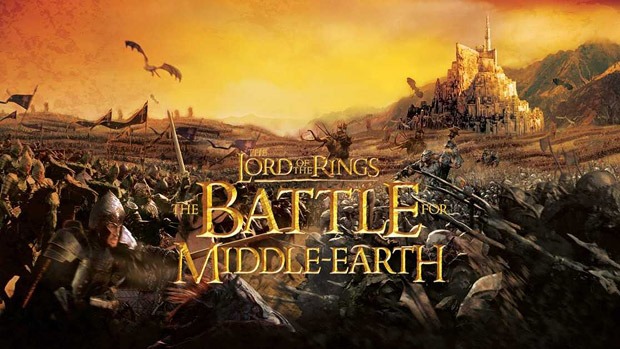
📅 Game released: 2004
The Lord of the Rings: The Battle for Middle-earth brings Gondor, Rohan, Isengard, and Mordor into a film-inspired real-time strategy game with two campaigns, hero powers, and persistent armies. This PC guide explains the official download status, legitimate retail-disc ownership, Windows 10/11 installation limitations, original system requirements, widescreen setup, mods, and multiplayer alternatives.
 By Editor Zero — independently researched, edited, and maintained.
Last updated: 15 November 2026
Last reviewed: 15 November 2026
Table of Contents
- Quick Facts
- Official PC Stores, Download & Installation
- The Lord of the Rings: The Battle for Middle-earth Review
- Pros & Cons
- PC System Requirements
- Frequently Asked Questions
- Similar Games
The Lord of the Rings: The Battle for Middle-earth Quick Facts
- Game: The Lord of the Rings: The Battle for Middle-earth
- Developer: EA Los Angeles
- Publisher: Electronic Arts
- Genre: Strategy, Fantasy, Real-Time Strategy
- Release: December 6, 2004
- Platforms: Windows PC
- DLC / Expansions: No expansion for the original game; The Battle for Middle-earth II is a separate sequel
- Modes: Single-player Good and Evil campaigns, skirmish, LAN multiplayer, and unofficial community-hosted online matches
- Engine: SAGE (based on the technology used for Command & Conquer: Generals)
- Community: GameReplays, ModDB, BFME Reddit
- PC modding: ModDB projects include graphical, balance, map, campaign, and overhaul modifications
- Metacritic score: 82/100 (Windows PC)
- IGN score: 8.3/10 (Windows PC)
- Steam user reception: Not available on Steam
Official PC Store Status, Download & Installation
👇 Check the game’s official PC download status, retail-disc ownership options, and safe compatibility guidance before trying to install the original Windows release.
- Official digital availability: No verified licensed PC edition is available for new purchase or download through Steam, EA app, Epic Games Store, GOG, or Microsoft Store. This was a native Windows PC game, but its original release is no longer sold through a verified official digital storefront.
- Why it is unavailable: An EA community manager confirmed that EA no longer holds the relevant Lord of the Rings licence. An official digital rerelease should not be assumed or treated as announced.
- Retail ownership: Original licensed Windows copies were distributed on physical media, including multi-CD and DVD editions depending on region. For a second-hand copy, check that the discs are complete and readable, and that any original product-key materials are present.
- Installing a legitimately owned copy: Use your own retail media and original product key. Insert the DVD or first CD (depending on your edition), run its ordinary installer, and follow the on-screen disc changes where applicable. Some older installers require administrative permissions; even a completed installation may still face modern-Windows disc-protection restrictions.
- Modern Windows compatibility: The retail release’s SafeDisc disc protection is incompatible with Windows 10 and Windows 11, so installing from your original disc does not guarantee that the protected game executable will launch. Windows compatibility settings alone cannot resolve every DRM limitation. This guide does not recommend unverified executable replacements or activation bypasses.
- No replacement game files: Emulators are not needed for this native Windows release. There is no verified official downloadable replacement for the copyrighted retail game, and this guide does not link to game disc images, repacks, mirrors, or product-key generators.
- Startup configuration: If a compatible installation crashes before reaching the menu, inspect
%APPDATA%\My Battle for Middle-earth Files\Options.ini. Missing configuration data is a documented separate startup problem, not a solution to the SafeDisc restriction. See the technical notes below and the PCGamingWiki game guide. - Widescreen setup: The original game can accept a custom resolution through its
Options.inifile, though some menus or 2D elements may stretch. Back up the file before editing it; setup details appear under PC System Requirements. - Original online service: The EA/GameSpy-based online service has ended. LAN play remains part of the original game. Independent communities offer unofficial online alternatives; their compatibility and service availability may change.
- Community online matches: BFME Online (formerly T3A:Online) documents an alternative multiplayer service. GameRanger is another historically used community route. Players should match game versions, maps, patches, and mods to avoid mismatches.
- Mods and community patches: Established projects offer visual work, custom maps, balance changes, and widescreen enhancements. Check version requirements, preserve backups, and avoid installing unfamiliar launchers or executables without checking their source and security.
- Steam Deck: There is no official Steam app or Valve compatibility rating for this release. Any SteamOS, Proton, or Wine setup is unofficial and may still face the original legacy-protection limitations.

The Lord of the Rings: The Battle for Middle-earth Review
A cinematic RTS where simple rules make territory and veteran armies matter.

The Lord of the Rings: The Battle for Middle-earth is at its best when strategy and spectacle become inseparable. Rohirrim do not merely move faster than infantry; a well-aimed charge can scatter an exposed formation. Mordor fights through Orc hordes, trolls, siege weapons, Nazgûl and mûmakil, while the defence of Helm’s Deep asks players to prioritise ladders, mines and reinforcements rather than win an ordinary open-field battle. The films shape how these armies behave, not just how they look.
Underneath the spectacle is a deliberately approachable RTS. One main resource, fixed construction plots and straightforward unit counters make decisions easy to understand, but they also limit economic experimentation. Optional battles can deteriorate into drawn-out contests of attrition against predictable AI. What keeps the design interesting is how its systems connect: a captured outpost changes the frontline, experienced units change the next campaign mission, and a spectacular hero power can rescue an otherwise poor tactical decision. The game values the feeling of directing the War of the Ring more than mastering a complicated economy.
Fixed Build Plots Make Territory Matter
Unlike an RTS that lets players arrange buildings freely, Battle for Middle-earth restricts construction to designated slots in bases, camps, outposts and settlements. Most resource structures generate income without constant supervision. Isengard and Mordor’s Lumber Mills are a notable exception, using labourers to harvest nearby trees. With no sprawling worker economy to manage, the central question is less about perfecting an economic routine and more about which limited positions are worth taking and defending.
A rear settlement can supply safer income; a forward outpost might hold production, healing or upgrades that allow an army to keep fighting far from home. Capturing one is therefore more consequential than collecting a temporary map bonus. It changes where reinforcements arrive and how long a push can last. Losing that foothold removes those advantages immediately, often forcing an army back before it has suffered decisive losses.
There is also more progression in those plots than first appears. Production buildings gain experience through training troops, improving their capabilities and durability. Replacing an established barracks is not quite the same as rebuilding an empty structure. Meanwhile, Lumber Mill workers consume command points, and survivors of a destroyed mill can continue occupying army capacity until reassigned or removed. These are small complications in an otherwise streamlined economy, but they give the best territorial decisions a longer shadow.
The restriction remains divisive. Once useful plots become familiar, there is little room to improvise a base layout, wall off a new route or outsmart an opponent through an unusual building arrangement. The system succeeds when holding a handful of contested locations feels urgent. It is less satisfying when another map becomes a predictable sequence of claiming the same slots.
Four Factions Create Clear Battlefield Personalities
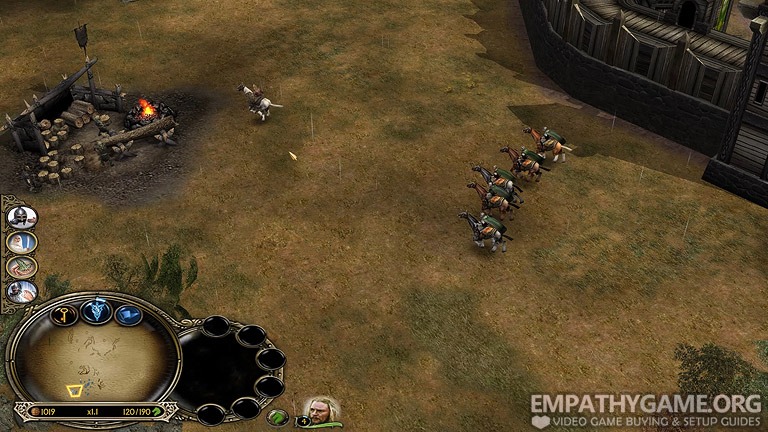
Gondor is the most conventional combined-arms faction, with sturdy infantry, archers, knights, walls and trebuchets. Rohan leans into mounted combat and strong heroes. Isengard fields disciplined Uruk-hai, Warg Riders, pikemen and dangerous siege equipment; Mordor substitutes disposable numbers and enormous creatures for neat formations. The four armies share an economic foundation but encourage noticeably different priorities.
Combat works through readable physical counters. Cavalry trample unprotected infantry but must respect pikes. Archers punish slow troops until mounted units close the distance, while siege weapons force defenders to leave the safety of their walls. The distinction is not merely theoretical. Isengard can combine Uruk Crossbowmen with pikemen to provide protection against a charge, whereas Mordor’s Orc Archers combine with Orc Warriors rather than equivalent anti-cavalry troops. Keeping valuable Mordor archers alive consequently calls for more careful positioning and separate protection.
Mordor’s economy also makes the idea of an expendable army unusually literal. Orcs can be sent into Slaughterhouses for resources, converting bodies that might die in battle into an immediate benefit. It is a tempting option when rebuilding under pressure, but sacrificing a veteran battalion has a cost that stretches beyond the present fight. The faction is not simply about producing the largest horde; it asks which troops are genuinely disposable.
Monsters add less predictable risks. Mûmakil can trample infantry and carry archers, yet fire attacks may send a wounded beast into a rampage. A panicked charge can threaten nearby troops regardless of which side intended to control the encounter. That possibility makes a supposedly obvious counter, concentrating fire on a huge target, feel more chaotic when both armies are packed together.
Heroes change the scale again. Gandalf’s area attacks can shatter a formation, Legolas excels at picking off targets, Aragorn brings leadership and frontline strength, and Saruman can punish tightly grouped enemies. Their abilities reward attention, but crowded encounters make that attention difficult to maintain. Leave a hero too far behind and experience comes slowly; send one into the thick of battle and selection, pathing or a missed threat can undo careful planning.
Evenstar and One Ring powers extend the tactical possibilities beyond individual units. Healing can preserve a veteran battalion, while the Army of the Dead or Balrog can transform a desperate engagement. The interesting decision is not simply when a power becomes available, but what problem it should solve. Breaking an enemy siege position may be worth much more than spending the same ability on troops that were already retreating.
The Living World Gives Armies a History
The campaigns move across the Living World map, allowing each side to choose among available territories between major story battles. Conquests can improve income, command capacity and Power Point progression. More importantly, surviving battalions retain their experience and heroes continue levelling. This gives ordinary units a continuity that most self-contained RTS missions lack.
A victory can therefore leave an uncomfortable question behind. Was destroying the last enemy base worth losing the cavalry that had survived several earlier battles? Fresh recruits replace the headcount, but not necessarily the effectiveness of experienced troops. Preserving a smaller elite force often makes more sense than spending everything to finish a single map quickly. That consideration gives even routine skirmishes a little emotional and strategic weight.
Helm’s Deep makes particularly good use of it. Eomer’s force can develop during earlier Rohan battles, then return as reinforcements when the fortress defence reaches its decisive stage. The arrival feels different when those soldiers are not anonymous help scripted into existence, but an army whose survival mattered earlier in the campaign. It is an elegant connection between the film spectacle and the game’s persistence system.
The Living World looks more elaborate than it plays, though. Its optional territories usually lead to familiar RTS battles rather than diplomacy, logistics or a deep strategic simulation. The map’s real achievement is continuity: it makes separate fights feel connected without requiring an entirely different layer of strategy.
Movie Battles Are the High Points, Attrition the Low
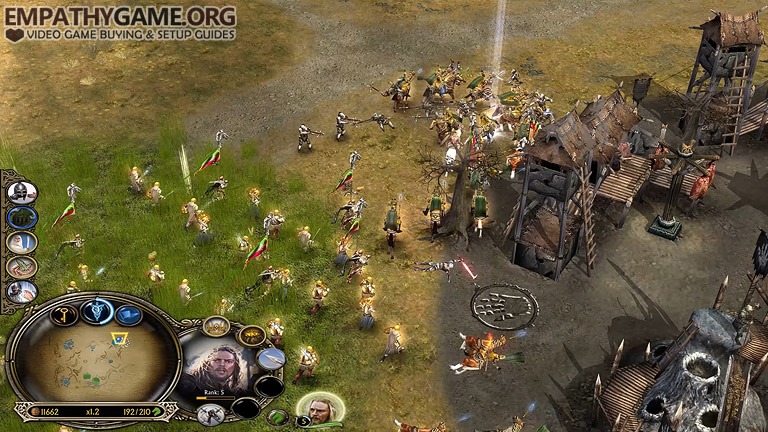
The strongest campaign missions do more than reproduce familiar scenery. Moria keeps the focus on the Fellowship, Amon Hen departs from ordinary base management, Ents make Isengard’s industry a battlefield target, and Minas Tirith centres on defending a city under overwhelming pressure. Each asks for a slightly different way of thinking, which makes the intervening territorial skirmishes feel comparatively plain.
Helm’s Deep is the clearest example. Archers on the wall cannot fire blindly into the nearest Uruk-hai. Ladders and siege equipment demand attention, while mine carriers approaching the Deeping Wall threaten a disaster out of proportion to their size. Destroying them in time, then striking at Isengard’s siege production when an opportunity appears, feels like defending an actual fortress rather than merely surviving waves of enemy units.
Other missions struggle to sustain that momentum. The Shelob’s Lair and Cirith Ungol sequence moves from Sam’s dangerous encounter with Shelob into taking an outpost, creating Gondor production, upgrading fresh troops and gradually clearing defenders. The change of perspective is unusual, but a focused character moment gives way to prolonged rebuilding. It illustrates the campaign’s uneven pacing: dramatic scenarios sometimes ask players to spend too long doing routine RTS work afterward.
Optional battles expose the AI’s limits more consistently. Enemy forces can be drawn into heavily defended approaches, and protecting a secure frontline while replacing losses often works too well. Resource denial can feel unsatisfying too: an opponent may appear to keep sending substantial reinforcements even after its economy has been badly damaged. That does not establish that the AI ignores resources, but it captures a real frustration with feedback. A successful raid should feel as though it has weakened the enemy, not merely postponed the next wave.
Presentation Does Heavy Strategic Work
The visual design does more than remind players of Peter Jackson’s films. Rohan’s moving cavalry, Gondor’s stonework, Isengard’s machines and Mordor’s monstrous silhouettes communicate the nature of each army before any statistics are examined. A troll arriving behind a wall of Orcs demands attention partly because it is immediately recognisable, even when the battlefield is crowded.
Howard Shore’s themes, additional music in a similar style, film footage and returning performers such as Ian McKellen and Christopher Lee help the campaigns feel like part of the same Middle-earth. Moria, Fangorn, Helm’s Deep, Minas Tirith and the Black Gate remain distinct places rather than interchangeable settings for battles. There is a particular pleasure in hearing familiar music as a carefully preserved army arrives at a recognisable location, because the presentation reinforces something the campaign systems have actually earned.
The interface is less graceful than the audiovisual direction. Dense battalions can conceal heroes, formation movement is sometimes clumsy, and selecting the right unit amid powers, creatures and siege effects takes more effort than the relatively simple counters ought to require. These shortcomings are most apparent precisely when the game looks its most spectacular.
Replayability Comes From Factions More Than Strategic Depth
The Good and Evil campaigns offer more than a change of colours. The Evil route turns familiar locations into targets for Isengard and Mordor, while the Good campaign places greater weight on defending and preserving Middle-earth. Skirmish loosens those narrative constraints and allows battles such as Gondor against Rohan or Isengard against Mordor, revealing combinations the campaigns rarely emphasise.
Human opponents can make the straightforward rules more demanding. A player who understands the value of a forward outpost will contest it rather than throw troops repeatedly into a fortified approach. In team or free-for-all matches of up to eight players, control of territory, scouting, unit counters and the timing of powers matter much more than they do against predictable campaign assaults.
The ceiling is nevertheless easy to see. Four factions, restricted construction, familiar territorial objectives and a modest range of economic decisions eventually reduce the surprises. What makes another run appealing is not an endlessly flexible competitive simulation, but the chance to command a very different army through the same war and notice how much that changes its familiar battles.
Final Verdict

The Lord of the Rings: The Battle for Middle-earth succeeds because nearly every simplification serves the experience it wants to create. Fixed plots make territory valuable, veterans make victories worth protecting, and the differences between cavalry, siege engines and monsters have immediate consequences. The landmark missions are especially good at making the trilogy’s battles feel like situations to solve rather than scenes to watch.
There is a price for that clarity. Base construction offers limited freedom, optional battles become repetitive, and AI opponents too often turn an interesting campaign into a war of attrition. Unit selection and hero management also grow awkward as the spectacle increases. Anyone who prefers deep economic optimisation or consistently inventive opposition may find the strategy too restricted.
Yet reducing its appeal to nostalgia would miss what is distinctive about it. Few licensed RTS games connect their battlefields, music, heroes and surviving armies quite so purposefully. It is not the most intricate way to play a strategy game set in Middle-earth, but it is unusually good at making a small tactical decision feel connected to a much larger war.
The Lord of the Rings: The Battle for Middle-earth Pros & Cons
- Pro: Excellent use of the film trilogy’s locations, battles, voice performances, music, creatures, heroes, and visual atmosphere
- Pro: Good and Evil campaigns give the same War of the Ring a dramatically different military perspective
- Pro: Persistent armies, levelling heroes, the Living World map, faction powers, cavalry charges, monsters, and siege battles give the campaign a distinctive identity
- Pro: Gondor, Rohan, Isengard, and Mordor have recognizable strengths instead of feeling like cosmetic versions of one faction
- Pro: A substantial community modding scene continues to provide visual upgrades, custom maps, balance work, campaign changes, and new content
- Con: No current official digital purchase option makes legitimate new ownership unusually difficult
- Con: Legacy SafeDisc protection and old configuration behaviour complicate installation on Windows 10 and Windows 11
- Con: EA’s original online service is permanently retired, so internet multiplayer now depends on unofficial community infrastructure
- Con: Fixed building plots and simplified resource management can feel restrictive beside deeper or more modern RTS games
The Lord of the Rings: The Battle for Middle-earth PC System Requirements
Original Windows PC system requirements (historical retail specifications; these do not guarantee Windows 10 or Windows 11 compatibility):
MINIMUM:
OS: Windows 2000 or Windows XP
CPU: 1.3 GHz processor or faster (Intel Pentium 4 / AMD Athlon-class)
RAM: 256 MB
GPU: 32 MB DirectX 9.0b-compatible card, such as NVIDIA GeForce 2 GTS or ATI Radeon 7500
DirectX: DirectX 9.0b
Storage: At least 3.5 GB free, plus additional space for saves and system caching
Disc Drive: Compatible CD-ROM drive for CD edition or 8x DVD-ROM drive for DVD edition
Sound Card: DirectX 9.0b-compatible sound hardware
Input: Keyboard and mouse
Network: Original internet or LAN multiplayer for 2–8 players; 56.6 Kbps for two-player internet matches, broadband recommended for larger matches
RECOMMENDED:
OS: Windows XP (historical supported OS)
RAM: 512 MB (also specified for original multiplayer matches with three or more players)
Disc Drive: 16x DVD-ROM drive for the DVD edition
Additional: A consistently documented full original recommended CPU/GPU tier could not be verified; the figures above reflect surviving requirement references rather than modern compatibility promises.
Additional PC Performance and Setup Notes
- Legacy disc protection: SafeDisc prevents the original protected retail executable from operating normally on Windows 10 and Windows 11. CPU and GPU upgrades do not fix that limitation.
- Legacy software: The game uses DirectX 9-era components. Some systems require older DirectX runtime libraries, which are separate from having DirectX 12 installed.
- Find the settings folder: Paste
%APPDATA%\My Battle for Middle-earth Filesinto Windows File Explorer’s address bar. ItsOptions.inistores resolution and other game options. - Startup configuration: A missing
Options.inican independently cause an access-violation crash on startup. Confirm the folder exists and consult the documented configuration guidance before modifying the file. Do not mistake an options-file fix for a disc-protection fix. - Set a widescreen resolution: Back up
Options.ini, open it in a text editor, and set theResolutionline to your desired width and height—for example,Resolution = 1920 1080. The game may display stretched 2D menus or campaign-map art at wider aspect ratios. The WSGF report documents these limitations. - Frame-rate caution: The engine’s simulation is sensitive to some unsupported frame-rate changes. Avoid assuming that forcing a higher FPS is a safe universal improvement.
- Keep backups: Copy the
My Battle for Middle-earth Filesfolder before editing settings, saves, patch configurations, maps, or overhaul mods. - Multiplayer file matching: Community-hosted games generally require matching game versions, maps, and modifications; mismatched installs can cause synchronization problems.
Official Trailer
Note: This archived IGN-hosted Battle for Middle-earth PC video shows the game’s cinematic Middle-earth battlefield presentation, while the written guide adds present-day delisting, modern Windows compatibility, system requirements, multiplayer, and mod guidance.
Frequently Asked Questions
How is the first Battle for Middle-earth different from Battle for Middle-earth II?
The first game is more tightly based on Peter Jackson’s film trilogy and uses fixed building plots, persistent campaign armies, and a Living World map. Battle for Middle-earth II expands the playable factions and Middle-earth setting while replacing the original plot-based construction with freer base building.
How do the Good and Evil campaigns work?
The Good campaign broadly follows the film trilogy toward the defeat of Sauron, while the Evil campaign presents an alternate version of the War of the Ring in which Isengard and Mordor conquer Middle-earth. Both combine scripted story battles with additional territorial battles selected through the Living World map.
Are the optional territories in the Living World campaign worth completing?
Yes. Optional victories can improve campaign-wide resources, command capacity, or power progression, while also giving veteran armies more opportunities to gain experience. You do not simply clear every territory in a fixed order, so deciding which available region to attack is part of campaign progression.
Do units and heroes carry over between campaign missions?
Yes. Surviving battalions and heroes can retain experience as their army moves into later battles, making veteran forces increasingly valuable. Losing experienced troops therefore matters more than it would in an isolated skirmish.
Which faction is easiest for a beginner to learn?
Gondor is a good starting choice because its walls, durable infantry, ranged units, cavalry, siege weapons, and strong heroes support several straightforward strategies. Rohan rewards cavalry control more heavily, while Mordor and Isengard can feel less conventional until you understand their economies and unit combinations.
How do Power Points and special powers work?
Combat earns Power Points that unlock abilities from the Good or Evil power trees. These range from healing and vision abilities to major battlefield effects and summoned forces, and campaign progression lets you gradually build a much larger collection of powers than a single skirmish normally allows.
Does Battle for Middle-earth have difficulty settings?
Yes. The original campaigns provide Easy, Medium, and Hard settings, while skirmish AI can also be adjusted. Beginners can learn the faction systems comfortably on Easy or Medium before dealing with the faster pressure and larger attacks found at higher difficulty.
Does Battle for Middle-earth have multiplayer or co-op?
The original game supports multiplayer skirmishes but not a cooperative version of its Good and Evil story campaigns. It has no split-screen or same-computer local multiplayer: each player uses a separate PC. Community projects sometimes offer custom cooperative maps, which are separate from the original campaigns.
Does Battle for Middle-earth support LAN multiplayer?
Yes. The original PC version supports LAN matches with up to eight players, making local-network play distinct from the retired GameSpy internet service. All participating computers should use compatible game files, maps, patches, and mods.
Are Battle for Middle-earth’s official online servers still available?
No. The original GameSpy-based online service was permanently retired. Independent services such as BFME Online provide unofficial alternatives for internet matches, while the original LAN mode remains separate.
Can you still buy Battle for Middle-earth on Steam, GOG, or the EA app?
No verified licensed digital Windows edition is available from those stores. EA has confirmed it no longer holds the relevant Lord of the Rings licence. Original physical Windows copies may be available second-hand, but that does not create an official digital download or guarantee compatibility with modern Windows.
Is Battle for Middle-earth II an expansion for the first game?
No. The Battle for Middle-earth II is a separate sequel with different campaigns, factions, maps, and major gameplay changes. The Rise of the Witch-king is an expansion for BFME II, not for the original Battle for Middle-earth.
Does Battle for Middle-earth work on Windows 10 and Windows 11?
The game was released for older Windows versions. Some community-supported configurations can run it on newer PCs, but the original retail SafeDisc protection is not supported by Windows 10 or Windows 11. A successful installation from original media does not, by itself, mean the protected executable can launch.
Why does Battle for Middle-earth crash or stop at the splash screen?
A missing Options.ini in %APPDATA%\My Battle for Middle-earth Files is one documented cause of startup crashes; legacy disc protection is another distinct obstacle. See the PCGamingWiki troubleshooting notes and back up settings before changes. Avoid unverified replacement executables.
Can Battle for Middle-earth run at modern widescreen resolutions?
Yes, where the game launches successfully. Set a custom Resolution = width height value in Options.ini. For example, Resolution = 1920 1080 sets a 16:9 resolution; some menus, 2D art, and camera framing may still look stretched or imperfect.
Can Battle for Middle-earth be modded?
Yes. ModDB and dedicated community projects host balance changes, visual upgrades, maps, campaigns, and larger overhauls. There is no official Steam Workshop integration because the original game was not released on Steam. Check game-version and mod compatibility before changing an installation.
Can you create custom maps for Battle for Middle-earth?
Yes. EA released the Battle for Middle-earth Worldbuilder, a map-development tool capable of creating multiplayer, skirmish, and scripted single-player maps. The community has continued to use Worldbuilder and related SAGE-engine tools for custom maps and larger modifications.
Does Battle for Middle-earth work on Steam Deck?
There is no official Steam app and therefore no Valve Steam Deck compatibility rating. Running this Windows-only game through SteamOS compatibility tools is community-driven rather than officially supported, with legacy DRM and configuration issues complicating setup.
Still have questions?
Check the Battle for Middle-earth Reddit community, BFME Online FAQ, or GameReplays strategy community for additional help, multiplayer information, and gameplay discussion.
Sources & References
Historical release details, PC availability, compatibility, and multiplayer information in this guide were checked against these sources:
- EA community-manager reply — confirms EA no longer holds the relevant Lord of the Rings licence.
- Metacritic: The Battle for Middle-earth — PC release date, platform, and aggregate critic reception.
- Ars Technica’s archived review roundup — contemporary report of IGN’s 8.3/10 review score.
- CNCNZ system requirements — historic minimum specifications, 3.5 GB storage, and original multiplayer limits.
- PCGamingWiki: The Battle for Middle-earth — SafeDisc issues, configuration file location, startup troubleshooting, and custom resolutions.
- Widescreen Gaming Forum report — custom aspect ratios and their limitations in menus and campaign-map art.
- BFME Online FAQ — unofficial replacement internet multiplayer service and mod-version matching.
Similar Games Like The Lord of the Rings: The Battle for Middle-earth
- The Lord of the Rings: The Battle for Middle-earth II
- Black & White 2
- Black & White
- Mount & Blade II: Bannerlord
- The Lord of the Rings: Conquest
- The Lord of the Rings: The Return of the King
Found something worth playing through DecideGame?
DecideGame.com is an independent gaming project run by Editor Zero. If this guide helped you discover a game, solve a problem, or find useful information, you can support DecideGame.com and help keep new and updated game guides coming.
DecideGame — PC Game Guides, Reviews & Setup Help