
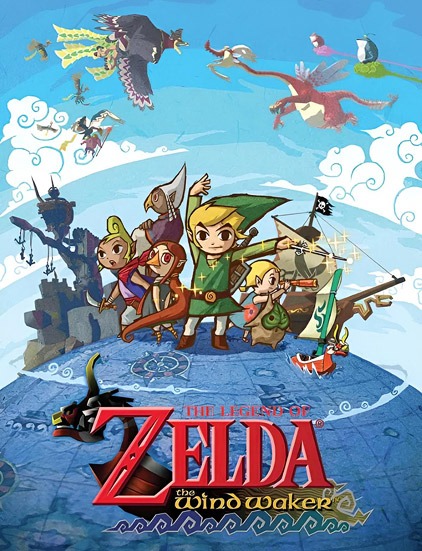
📅 Game released: 2002
The Legend of Zelda: The Wind Waker follows Link across a flooded Hyrule, combining island exploration, expressive sword combat, sailing, and puzzle-filled dungeons in a colorful seafaring adventure. This PC guide explains the absence of an official Windows download, how owners of the Wii U remaster can use Cemu, how the original GameCube edition works through Dolphin, the unofficial HD recompilation alternative, emulator system requirements, and the differences between both releases.
 By Editor Zero — independently researched, edited, and maintained.
Last updated: 23 November 2026
Last reviewed: 23 November 2026
Table of Contents
- Quick Facts
- Official PC Store Status, Download & Installation
- The Legend of Zelda: The Wind Waker Review
- Pros & Cons
- PC System Requirements
- Frequently Asked Questions
- Similar Games
The Legend of Zelda: The Wind Waker Quick Facts
- Game: The Legend of Zelda: The Wind Waker HD (2013 Wii U remaster); The Legend of Zelda: The Wind Waker (2002 GameCube original)
- Developer: Nintendo EAD; HexaDrive contributed technical and visual work to the HD remaster
- Publisher: Nintendo
- Genre: Action-Adventure, Puzzle-Solving, Fantasy
- Release: HD — September 20, 2013 (North American digital launch); Europe: October 4, 2013. Original — December 13, 2002 (Japan, GameCube); no official native Windows release for either version
- Platforms: HD — Wii U; original — GameCube, Nintendo Switch 2 (Nintendo GameCube – Nintendo Classics)
- Modes: Single-player; no campaign co-op or competitive multiplayer
- Best PC emulation route: HD Wii U edition via Cemu; original GameCube edition via Dolphin
- Community PC recompilation: ZeldaWWHDRecomp — unofficial project requiring your own properly prepared Wind Waker HD game files
- Engine: Proprietary Nintendo technology; an official engine name has not been reliably confirmed
- Community: r/zelda, Cemu Wind Waker HD compatibility page, Dolphin Forums
- PC modding: Unofficial Cemu graphics packs, GameCube emulator patches, and ZeldaWWHDRecomp community mods; no Nintendo-supported Windows mod tools
- Metacritic score: 90/100 (Wind Waker HD, Wii U); 96/100 (original, GameCube)
- IGN score: 9.8/10 (Wind Waker HD, Wii U)
- GameSpot score: 8/10 (Wind Waker HD, Wii U)
Official PC Store Status, Download & Installation
👇 Nintendo has not released The Wind Waker or The Wind Waker HD for Windows. Compare the official console ownership options and the legitimate PC emulator tools below; none of the emulators or community PC projects includes the copyrighted game.
- Official Windows download status: There is no Nintendo-issued Windows version, Steam listing, Epic Games Store edition, GOG edition, or Microsoft Store release for either The Wind Waker HD or the GameCube original. A Windows emulator or unofficial recompilation is not an official Nintendo PC port.
- Choosing a game version: The HD remaster is the main version in this guide. It has native 1080p widescreen presentation on Wii U, the Swift Sail, streamlined late-game chart collection, updated inventory handling, and optional Hero Mode. The 2002 original preserves the GameCube art direction and original sailing and treasure-hunting pace.
- Official ownership and availability: Wind Waker HD was released for Wii U on disc and digitally. The Wii U eShop stopped new purchases in March 2023, although Nintendo still allows eligible previous owners to re-download purchased Wii U software for the foreseeable future. Physical copies can be sought through legitimate second-hand sellers. Neither the Wii U disc nor an existing Wii U digital entitlement provides an official Windows download.
- Original game on Switch 2: The Nintendo GameCube – Nintendo Classics collection includes the original Wind Waker on Nintendo Switch 2 through the eligible Nintendo Switch Online + Expansion Pack membership. This is not Wind Waker HD, does not supply a PC license, and is not a Wii U game dump for Cemu.
- Recommended Windows route — Cemu: Download Cemu from its official project website. It is a Wii U emulator and has a dedicated Wind Waker HD compatibility page, which rates the game Perfect and recommends starting with default game settings. Install Cemu itself first; it does not include Nintendo game data.
- Prepare your owned Wii U game: Use your own lawfully obtained Wii U copy and console to create the game dump. The Cemu Guide’s Dumpling instructions explain the console-side requirements and how to copy disc or previously owned digital titles and saves. Backups and console modifications are subject to local law; ownership does not automatically make every extraction method lawful.
- Install the HD game in Cemu: After preparing a compatible decrypted game dump, open Cemu and choose File > Install game title, update or DLC; for an extracted title, select the game’s
meta/meta.xmlfile. Alternatively, add a supported game path or import a properly created.wuaarchive using Cemu’s documented workflow. Avoid third-party ROM bundles and unknown executable installers. - Controllers and second screen: In Options > Input settings, configure an Xbox-compatible or other supported controller and choose an appropriate emulated Wii U GamePad profile. Cemu can display the GamePad’s second screen with the Tab key, switch views with Ctrl + Tab, or open a separate window. Mouse/keyboard control exists, but a gamepad is the more natural option for Wind Waker’s sword combat, camera, and sailing.
- Graphics and saves: Begin with Cemu’s default profile and the Vulkan backend where your GPU supports it; the project recommends asynchronous shader compilation to reduce shader-related stutter. Optional community graphic packs can change resolution and presentation. Keep backups of your emulator save directory, especially before experimenting with mods or moving to another PC. GameCube and Wii U saves are not interchangeable merely by copying their files.
- Alternative HD route — ZeldaWWHDRecomp: ZeldaWWHDRecomp is an active, unofficial community recompilation that builds a locally playable PC version from a user’s own supported Wind Waker HD dump. Its official project releases contain the open-source tooling/runtime, not Nintendo’s game, keys, or assets. Follow its included setup interface and supported-region notes, and expect project-specific requirements and occasional changes rather than Nintendo-level support.
- Original GameCube route — Dolphin: If you own the GameCube edition, download Dolphin from its official download page. Use a backup made from your own disc and compatible hardware; Dolphin’s official disc-ripping guide explains supported methods such as CleanRip. Add the resulting GameCube image to Dolphin’s game library, configure a GameCube controller profile, and start with default settings before increasing rendering resolution.
- Original resolution and aspect ratio: The GameCube release was designed for 4:3. Dolphin can raise internal rendering resolution, but setting a widescreen output alone may stretch the picture. For a true 16:9 alternative, see the game-specific Dolphin Gecko-code instructions in the PC System Requirements section below; the HD release already supports widescreen natively.
- Historical online features: Wind Waker HD’s Tingle Bottle was connected to Nintendo’s Miiverse, which ended in November 2017. Its old message-sharing functions are unavailable through Nintendo’s discontinued service; the main single-player adventure, dungeons, and local quests remain the focus of the game. There is no official PC multiplayer or cross-play.
- Game files and legal boundaries: Cemu, Dolphin, and ZeldaWWHDRecomp are software projects, not sources of free Nintendo games. Do not obtain paid-game files, copyrighted keys, or firmware from random downloads. Consult official project documentation and applicable local rules before creating a personal copy.
 Download the Cemu Wii U Emulator (Official Website)
Download the Dolphin GameCube Emulator (Official Website)
 View The Wind Waker HD on Nintendo’s Official Game Page

The Legend of Zelda: The Wind Waker Review
A beautiful voyage where the freedom to wander matters more than the destination.
The ocean can look almost too large for the little boat crossing it. In The Legend of Zelda: The Wind Waker, a distant island is often the only reason Link needs to change course. It may hold a dungeon or just a cave with a few Rupees, and curiosity is not always rewarded equally. Nintendo’s Wii U remaster improves the pace of this GameCube adventure without changing its unusual priorities. Sword fights and puzzles matter, but so do quiet moments searching for something beyond the next objective.
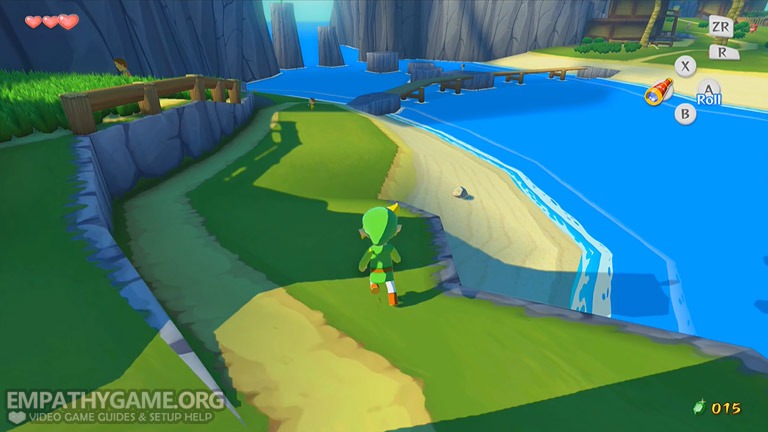
The Great Sea Makes Travelling an Adventure
The King of Red Lions takes Link across a world divided into 49 squares on a sea chart. A shape on the horizon gradually reveals a settlement or an island concealing a secret. Windfall Island’s busy streets and Dragon Roost Island’s steep cliffs are memorable partly because of the open water separating them. Arriving somewhere feels different when the route there has been part of the experience.
That openness is not quite as effortless as it appears. Simply finding an island does not name its square on the chart. Link also has to seek out a Fishman, feed him All-Purpose Bait, and listen to a hint before the location is properly recorded. Some clues reward investigation; vaguer ones turn mapping into a chore. The sea invites independent discovery, yet the chart insists on its own ritual before acknowledging what has already been found.
The HD-exclusive Swift Sail offers a more successful compromise. Won at Windfall’s auction, it doubles sailing speed and keeps the wind favourable automatically. On GameCube, turning often meant stopping to conduct the Wind’s Requiem. That repetition gave the magical baton a stronger connection to everyday sailing, but it also made crossing familiar stretches of water needlessly laborious. With the Swift Sail, the journey flows better. The cost is subtle: an instrument meant to command the elements becomes less essential to the act of travelling through them.
Enemy vessels, watchtowers, salvage spots, and the Ballad of Gales provide more to do or ways to travel. Even then, not every square offers much beyond a brief detour. The spaciousness can be wonderfully peaceful, but it requires patience with the possibility that exploration itself may be more satisfying than what is waiting at the end.
Dungeons Are Inventive, Even When Their Hints Are Not
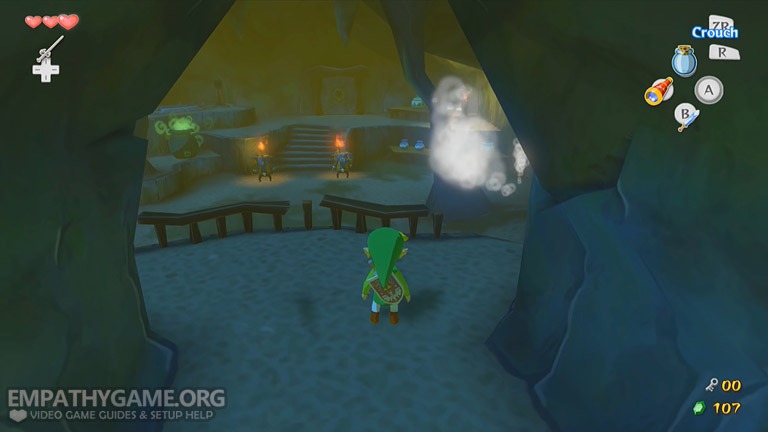
Dungeons replace wide horizons with interconnected rooms. Dragon Roost Cavern introduces the Grappling Hook as a way to swing across gaps, while the Deku Leaf lets Link glide and move air through mechanisms. The Boomerang can lock onto several targets in one throw. These items change how earlier obstacles are understood. A gap, a distant switch, or an unreachable ledge becomes a possibility to remember for later, not simply a problem solved once and forgotten.
The Earth Temple is especially interesting because Link cannot solve everything alone. The Command Melody lets him control Medli, placing her where the harp can reflect a beam of light while Link redirects it with his Mirror Shield. In the Wind Temple, Makar plants trees that become Hookshot targets, turning cooperation into a form of navigation. These companions give the later dungeons a stronger identity.
They also reveal an awkward side of the design. Conducting the melody, switching to a companion, adjusting their position, and switching back can slow down a puzzle whose solution is already clear. Stranger still, the game sometimes supplies hints after teaching the same principle repeatedly. Medli can point out the need to combine beams of light even when previous rooms have established exactly that interaction. Makar’s reminders and conspicuous camera cues can have a similar effect. The puzzles are clever enough to deserve a little more trust in the player.
There is also less choice in the temple order than the sea map suggests. The Earth and Wind Temples appear to be separate destinations, but Makar cannot be recruited for the Wind Temple until the Earth Temple is completed. Looking for him first can leave Link searching for a character who is not yet available. A fixed sequence is reasonable; misleading players about it is not.
Combat Is Easygoing Until the Room Gets Crowded
Swordplay is deliberately readable. Lock-on targeting, shielding, and contextual parries let Link circle enemies or slip past their guard, while defeated foes sometimes leave weapons he can turn against their companions. Bokoblins and Moblins telegraph attacks through exaggerated movements. Boss fights usually develop the same idea as the dungeons: understanding the newest item matters more than having exceptionally quick reactions.
This suits an adventure focused on exploration, though it also means that ordinary encounters rarely build much tension. Recovery hearts are plentiful in the standard game, and many enemies fall before their behaviour becomes especially interesting. Combat has personality, but not consistently demanding decisions.
Grouped Darknuts are a useful exception. Deep in the Savage Labyrinth, a parry that seems simple against one armoured knight becomes much harder to arrange when several are pressing forward. Which enemy Link targets, where the others stand, and whose attack is actually coming can all affect the opportunity to counter. The parry prompt may not appear as expected, though missed openings have no single proven cause. Separating opponents and holding a defensible position matters more here than simply waiting for a familiar button cue.
A Small Rescue Grows Into a Larger Story
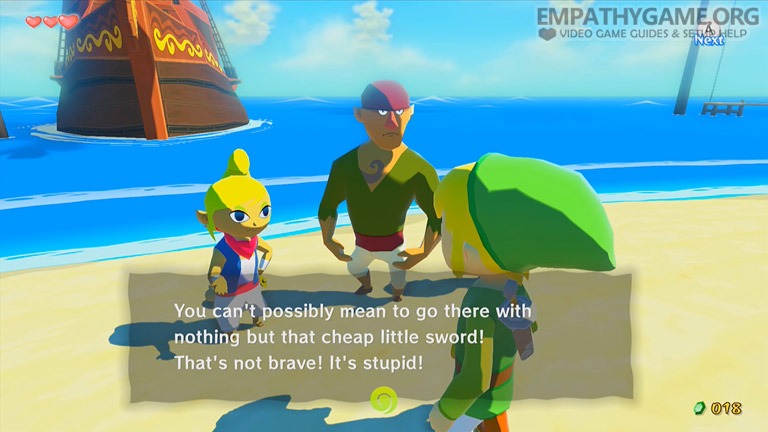
The opening gives Link an unusually personal reason to leave Outset Island. His sister Aryll is taken by the Helmaroc King, and Tetra’s pirate crew helps him reach the Forsaken Fortress. Before Hyrule’s history and Ganondorf’s ambitions enter the story, Link simply wants his sister home. His worried expressions and uncertain body language make that motivation convincing without spoken dialogue.
The first visit to the fortress is nevertheless a difficult introduction. With his sword taken away, Link must avoid searchlights, sneak around patrols, and sometimes hide under a barrel. It establishes vulnerability, but discovery can mean repeating a route rather than finding a new approach. It makes sense for the story and still feels restrictive beside the freedom the game soon provides. The contrast is intentional, yet the stealth itself is not especially satisfying.
Tetra’s impatience contrasts with the King of Red Lions’ measured guidance. As the rescue grows into something much older, the cheerful surface of the world acquires a melancholy quality. The islands are full of life, but the enormous spaces between them also suggest how much of Hyrule is gone. The story becomes more affecting because its larger mythology never entirely displaces that first, personal reason to set sail.
The Art and Music Make Empty Water Feel Alive
Cel-shading does more than distinguish the visuals. Link squints, recoils, and changes expression in ways that carry a scene even when nobody speaks. Windfall’s bustling residents feel unlike the people on sheltered Outset Island, with character animation providing much of the humour and warmth. Personality rarely needs spoken dialogue here.
Music completes the atmosphere. The sailing theme gives motion and optimism to long crossings, while Dragon Roost’s melody establishes a different mood from Windfall’s streets. Rain, waves, gulls, and shifting light help the Great Sea feel like a place rather than an empty corridor between levels. HD lighting improves clarity, although bloom can soften the GameCube version’s bold colour contrasts. The brighter edition is not automatically the more expressive one; both have an artistic appeal for different reasons.
Progression Rewards Looking Back as Well as Forward
Many of the most satisfying rewards come from remembering an island that could not be fully explored earlier. Bombs open passages and give the boat a cannon, the Hookshot creates new routes, and the Grappling Hook can salvage chests from the water. Pieces of Heart, Great Fairy upgrades, and Treasure Charts encourage returns to familiar places. Rewards vary, but reconsidering the map after gaining an item gives progression real purpose.
The HD Magic Armor creates an interesting use for the Rupees accumulated along the way. Unlike the GameCube version, which consumes magic, the remaster spends Rupees when Link would otherwise take damage. Money effectively becomes a reserve of protection. Because only taking hits costs money, the decision becomes whether a safer fight is worth spending treasure. This is particularly meaningful in Hero Mode.
The Nintendo Gallery takes collecting in another direction. Using the Picto Box to photograph creatures and characters encourages a closer look at details that can be missed when travelling directly to the next objective. Completing the figurines takes planning, and some chances can be missed. It is absorbing optional work for players who enjoy observing the world, but it is not necessary to appreciate the adventure.
The Triforce Hunt Exposes the Limits of the Sea
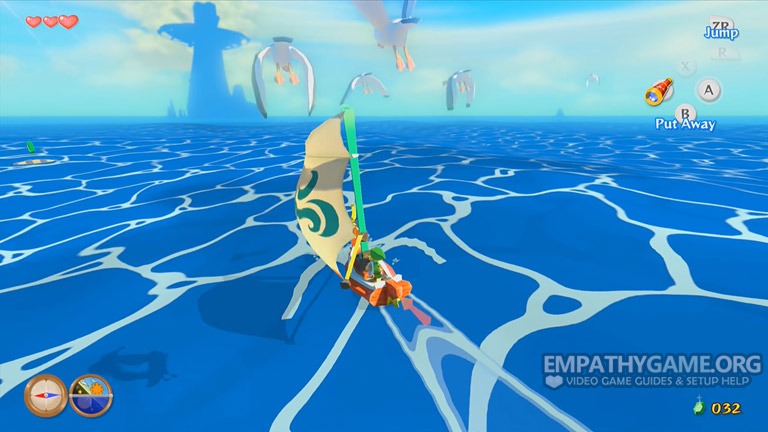
The late search for eight Triforce Shards is where exploration begins to feel less voluntary. After several inventive temples, the story requires another round of scattered objectives across the Great Sea. The HD edition reduces chart deciphering from eight paid charts to three, allowing five shards to be obtained directly. That trims expenses and backtracking, but the hunt remains less engaging than the preceding dungeons.
Bird’s Peak Rock shows why these smaller activities can be divisive. A Hyoi Pear lets Link control a seagull to activate distant switches, an unusual idea that gives a minor island its own mechanic. The bird can be awkward to manoeuvre, particularly with a hostile Kargaroc interfering, and the Pear may have received little attention during the rest of the journey. As a small experiment, the mechanic is appealing; as a required detour, it can become another interruption.
Hero Mode Adds Pressure Without Changing the Puzzles
Hero Mode doubles incoming damage and removes ordinary recovery-heart drops. Bottled fairies, healing supplies, positioning, and avoiding unnecessary damage therefore matter more, particularly in sections that offered little resistance on Normal. The rules do not give enemies new attacks or make puzzles more demanding, so the extra challenge remains uneven. Magic Armor can also trade Rupees for a measure of safety. It raises the stakes without redesigning combat.
Second Quest changes smaller details, including Link’s blue clothing and Picto Box convenience, without providing an entirely different campaign. Replaying rewards overlooked islands, unfinished collections, and new routes rather than a new storyline.
Final Verdict
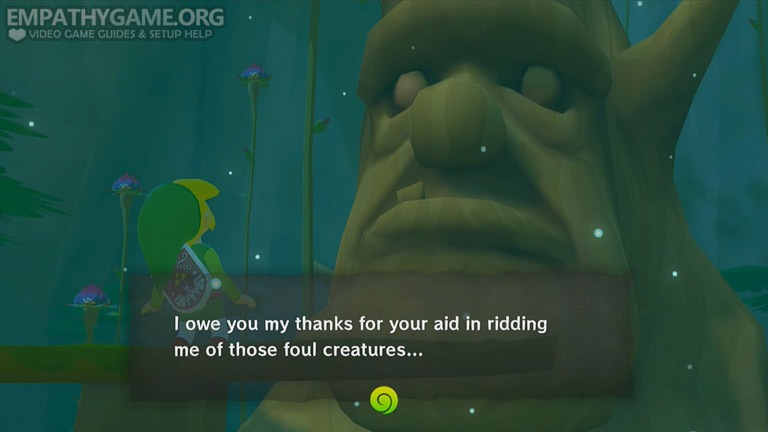
The Legend of Zelda: The Wind Waker is strongest when the next island matters less than the unexpected stop along the way. The Great Sea gives the game an unusually patient rhythm, supported by expressive characters, music, and dungeon tools that make the world worth revisiting. The Swift Sail eases travel but diminishes the original’s wind-management identity. Repetitive charting, overly eager puzzle hints, forgiving combat, and the late Triforce hunt still interrupt the magic, while the opening stealth sequence remains an awkward welcome. Players who appreciate atmosphere and discovering things at their own pace have plenty to enjoy here. Those looking for tightly paced action or meaningful rewards at every destination may find that the sea asks for more patience than they want to give.
The Legend of Zelda: The Wind Waker Pros & Cons
- Pro: Expressive cel-shaded art, memorable island settings, and a strong sense of seafaring adventure
- Pro: Inventive dungeon puzzles, versatile equipment, and responsive lock-on sword combat
- Pro: HD edition improves sailing speed, inventory use, and the late-game Triforce search
- Pro: Established PC emulator options for both owned console editions, plus a developing HD recompilation
- Con: Long stretches of ocean travel can still feel slow and thin on meaningful encounters
- Con: Some dungeons and the late-game collection quest are shorter or less satisfying than their strongest counterparts
- Con: HD lighting and bloom can obscure the flatter cartoon shading some fans prefer in the original
- Con: No official Windows edition; Wii U ownership, game dumping, and emulator setup add practical barriers
The Legend of Zelda: The Wind Waker PC System Requirements
Official Windows PC requirements: None have been published because Nintendo has not released either Wind Waker edition as a native Windows game. The specifications below belong to third-party emulators, not to a Nintendo PC edition. They describe emulator compatibility, not measured Wind Waker HD performance on a particular computer.
CEMU — WII U EMULATOR (PRIMARY HD ROUTE)
Host OS: Windows 7 (64-bit) or newer, according to Cemu’s published compatibility baseline; a supported, up-to-date Windows installation is the more sensible practical choice
CPU: 64-bit x86-64 PC; Cemu does not publish a game-specific minimum CPU model for Wind Waker HD
RAM: 4 GB minimum; 8 GB or more recommended by Cemu
GPU / graphics API: OpenGL 4.5 or Vulkan 1.2 support; Vulkan is generally preferred on suitable GPUs
Additional software: Microsoft Visual C++ 2017 x64 Redistributable, as listed by Cemu
Controller: Supported USB/Bluetooth gamepad recommended; keyboard input also supported
Game data: Lawfully prepared Wii U copy of Wind Waker HD; the emulator does not contain the game
Storage: Allow space for your own Wii U game dump, emulator files, shaders and saves; no official Windows game-storage requirement exists
DOLPHIN — GAMECUBE EMULATOR (ORIGINAL VERSION)
Host OS: A supported 64-bit Windows installation
CPU: A 64-bit x86-64 processor; required performance varies with processor architecture and emulator settings
GPU: A graphics device and backend supported by the installed Dolphin version
RAM / Storage: No official Wind Waker-specific host-PC minimum; allow memory and disk space for Dolphin, your own GameCube disc backup, and saves
Controller: Standard gamepad mapped to GameCube controls, or a compatible GameCube controller/adapter setup
Game data: Lawfully created personal backup of the original GameCube disc
ZELDAWWHDRECOMP — UNOFFICIAL NATIVE RECOMPILATION (ALTERNATIVE HD ROUTE)
Windows: The project’s x86-64 builds specify Windows 10 version 1903 or newer, or Windows 11; check its own documentation for supported ARM64 builds
Game data: A supported, unmodified USA or European Wind Waker HD base-game dump prepared from your own copy; consult the project for supported formats and version checks
CPU / GPU / RAM: No Nintendo-issued Windows requirements or reliably standardized game-specific tiers; consult the project’s current release notes before relying on a particular hardware target
Installation: Get the runtime from the project’s own release page; its first-run setup prepares local game code from the files you provide
Additional PC Performance and Setup Notes
- HD rendering: Wind Waker HD already uses 16:9 widescreen and was presented at 1080p on Wii U. In Cemu, start with the game default configuration; use a compatible graphics pack only if it provides a benefit your hardware can sustain. Do not confuse an increased rendering resolution with a higher game-frame-rate guarantee.
- 30 fps game logic: The official Wii U remaster targets 30 frames per second. Avoid assuming a generic 60 fps patch will work without gameplay, timing, animation, or event issues; any community frame-rate modification should be checked against its specific compatibility notes.
- GameCube 4:3 or true 16:9: The original GameCube release does not provide ordinary native 16:9 output. Dolphin’s project-maintained game settings include a title-specific 16:9 Widescreen Gecko code for the North American GZLE01 and European GZLP01 GameCube revisions. In Dolphin, right-click your added game, open Properties > Gecko Codes, enable the matching built-in 16:9 Widescreen code, then select 16:9 in Dolphin’s Graphics aspect-ratio settings. This expands the game’s rendered view instead of simply stretching 4:3; test HUD, menus and cutscenes for visual anomalies. Do not combine it with Dolphin’s generic Widescreen Hack or apply a code intended for another region. If your game build does not expose a verified matching code, retain the original 4:3 presentation.
- GamePad-dependent interface: With Cemu, configure an emulated Wii U GamePad and learn how to switch to its screen for inventory or map use. The original GameCube version has a conventional single-screen interface and does not require a Wii U GamePad layout.
- Save safety: Keep independent save backups for Cemu, Dolphin, and any recompilation installation; file locations and formats differ. Make a copy before changing emulator versions, patches, graphics packs, or save-import arrangements.
Official Trailer
Note: This Nintendo-published Wii U launch trailer introduces the HD remaster’s visual style, sailing, enemies, and environments. The written guide separately explains the two console editions and the ownership-based PC setup options.
Frequently Asked Questions
How do you get the Swift Sail in The Wind Waker HD?
The Swift Sail is obtained through the nighttime auction on Windfall Island after completing Dragon Roost Cavern. It doubles sailing speed and automatically adjusts the wind behind the King of Red Lions, eliminating the need to repeatedly use the Wind’s Requiem while travelling. The auction rotates between several rewards, so you may need to enter more than once before the Swift Sail appears. This upgrade is exclusive to the HD remaster.
Can you fast travel in The Wind Waker?
Yes. After obtaining the Hero’s Bow, Link can shoot Cyclos three times while he is inside a giant cyclone to learn the Ballad of Gales. Playing this song while aboard the King of Red Lions lets you warp between designated locations across the Great Sea. It works in both the original GameCube release and The Wind Waker HD, although not every island has its own warp destination.
How do you reveal the complete Great Sea map?
Find the Fishman jumping out of the water near an island and give him All-Purpose Bait. He will identify the island, fill in its square on your Sea Chart, and often share a useful hint. There are 49 chart squares to uncover, making it worthwhile to carry spare bait whenever you explore an unfamiliar part of the Great Sea.
How do you find sunken treasure using Treasure Charts?
Open a Treasure Chart and identify the corresponding island or sea location, then sail toward the marked spot. When you reach the correct area, look for the glowing ring on the water and use the Grappling Hook while aboard the King of Red Lions to lower the salvage crane and retrieve the chest. Treasure Charts can lead to Rupees, Pieces of Heart, and other rewards.
What does Hero Mode change in The Wind Waker HD?
Hero Mode makes enemies deal twice their normal damage and removes ordinary recovery-heart drops, so healing depends more heavily on potions, fairies, Elixir Soup, and Heart Containers or Pieces of Heart. It is available from the beginning of The Wind Waker HD and can be enabled or disabled when loading a save file. The original GameCube edition does not include this difficulty mode.
What is Second Quest, and how is it different from Hero Mode?
Second Quest is an alternate playthrough unlocked after completing the adventure. Link keeps his blue starting clothes instead of changing into the traditional green outfit, certain character details differ, and the Deluxe Picto Box is available from the beginning. Previously created Nintendo Gallery figurines can also carry over. Unlike Hero Mode, Second Quest primarily changes presentation and collectible convenience rather than increasing combat difficulty.
How is the Triforce Shard quest different in The Wind Waker HD?
Both versions require eight Triforce Shards, but the HD remaster reduces the number of Triforce Charts that must be deciphered by Tingle from eight to three. The other five shards can be collected directly from their respective locations. This significantly reduces the Rupees and repeated chart-related errands required near the end of the adventure without removing the underlying exploration.
Is the Savage Labyrinth required to finish The Wind Waker HD?
Link must reach the reward at the end of the first 30 floors of the Savage Labyrinth on Outset Island to obtain one of the Triforce Shards. Completing all 50 floors is optional and provides an additional reward. The labyrinth emphasizes consecutive combat encounters, so entering with enough health, healing supplies, and upgraded equipment is advisable.
How do you unlock the Deluxe Picto Box in The Wind Waker HD?
Visit Lenzo’s photography shop on Windfall Island, obtain the regular Picto Box, and complete his three photography assignments. In the HD version, finishing these tasks rewards the Deluxe Picto Box directly, allowing Link to capture color pictographs for the Nintendo Gallery and other side quests. Unlike the original GameCube version, no Forest Firefly is required for this upgrade.
Can you permanently miss Nintendo Gallery figurines?
Yes. Some characters and enemies appear only during particular story encounters, meaning their pictographs can become unavailable later in the same playthrough. Although The Wind Waker HD makes figurine creation more convenient, completing the collection still requires attention to one-time subjects. The Nintendo Gallery is optional for finishing the story, and Second Quest offers another opportunity to photograph missed subjects.
How do you unlock the Hurricane Spin sword technique?
Collect 10 Knight’s Crests from enemies such as Darknuts and bring them to Orca on Outset Island. He will teach Link the Hurricane Spin, an extended spinning sword attack that can hit surrounding enemies repeatedly. This technique is optional, and Knight’s Crests can be collected more efficiently by using the Grappling Hook to steal enemy spoils.
Can you explore every island immediately in The Wind Waker?
Not completely. The Great Sea becomes increasingly open as the story progresses, but some destinations and secrets require equipment such as Bombs, the Hookshot, Power Bracelets, or specific Wind Waker songs. Returning to previously visited islands after obtaining new items can reveal hidden caves, treasure, upgrades, and optional challenges that were inaccessible earlier.
Can you play The Wind Waker HD without a Wii U GamePad or motion controls?
Yes. The original Wii U release supports the Wii U Pro Controller as an alternative to the GamePad, and motion aiming is optional. On PC, Cemu can map ordinary controllers to supported emulated controller profiles, although you must select a compatible in-game control mode. GamePad emulation remains useful for accessing the separate map and inventory screen.
Can you continue exploring after defeating the final boss?
Yes, by reloading your existing adventure save from before the final battle. The ending does not create a separate post-game world, but you can return to the Great Sea to finish side quests, collect remaining upgrades, or challenge the final boss again. After the credits, the game also offers Second Quest; save that new playthrough in a different slot if you want to preserve your completed adventure.
How long does The Wind Waker HD take to complete?
A typical main-story playthrough takes approximately 25–30 hours, depending on exploration and familiarity with the puzzles. Completing major side quests, gathering Pieces of Heart, finding Treasure Charts, and working toward a full Nintendo Gallery can extend the adventure to roughly 40–50 hours or longer. The HD edition’s Swift Sail and streamlined Triforce quest can make progression less time-consuming than in the GameCube original.
What is a good way to earn Rupees for Tingle’s Triforce Charts?
Salvaging treasure from completed Treasure Charts is a reliable way to collect Rupees while exploring the Great Sea. Optional caves, enemy encounters, and island activities also provide opportunities to earn money. Consider obtaining wallet upgrades from Great Fairies so you can carry more Rupees without wasting rewards when your wallet is full.
Still have questions?
Check the Wind Waker Reddit community for gameplay, collectibles, and version comparisons, the Cemu Wind Waker HD compatibility page for Wii U emulation information, or the Dolphin Forums for help with the original GameCube version on PC.
Sources & References
Key factual and technical information in this guide was checked against relevant official and community sources, including:
- Nintendo — The Wind Waker HD — original Wii U platform, features, Hero Mode, HD visuals, and eShop closure notice
- Nintendo — GameCube Nintendo Classics — availability of the original game through the Switch 2 subscription library
- Cemu — Official Website and Wind Waker HD compatibility notes — emulator requirements, recommended settings, and game-specific support
- Cemu Guide — Dumping Games — Wii U ownership-based game-copy and save preparation
- Dolphin — Ripping Games Guide and GameCube widescreen code — original disc backup guidance and the region-specific 16:9 option
- ZeldaWWHDRecomp — Project Documentation — unofficial recompilation status, supported original game files, and PC setup requirements
- Metacritic — Wind Waker HD and GameSpot review — version-specific critical reception and editorial comparisons
Similar Games Like The Legend of Zelda: The Wind Waker
- The Legend of Zelda: Twilight Princess
- The Legend of Zelda: Breath of the Wild
- Kingdom Hearts 3
- Harry Potter and the Chamber of Secrets
- Harry Potter and the Prisoner of Azkaban
- Hogwarts Legacy


Found something worth playing through DecideGame?
DecideGame.com is an independent gaming project run by Editor Zero. If this guide helped you discover a game, solve a problem, or find useful information, you can support DecideGame.com and help keep new and updated game guides coming.
DecideGame — PC Game Guides, Reviews & Setup Help